


Most developers don’t actually pick one AI coding tool. They install three, commit to two, and quietly rely on one for 80% of their work.
That’s not indecision. It reflects how genuinely different these tools are under the hood. Claude Code, GitHub Copilot, and Cursor each made a different architectural bet in 2026. Understanding those bets is the fastest path to figuring out which one deserves the center slot in your workflow.
Three Bets, Three Philosophies
The race for your primary workspace isn’t just a model quality contest. It’s a fight between fundamentally different ideas about where AI belongs in the development stack.
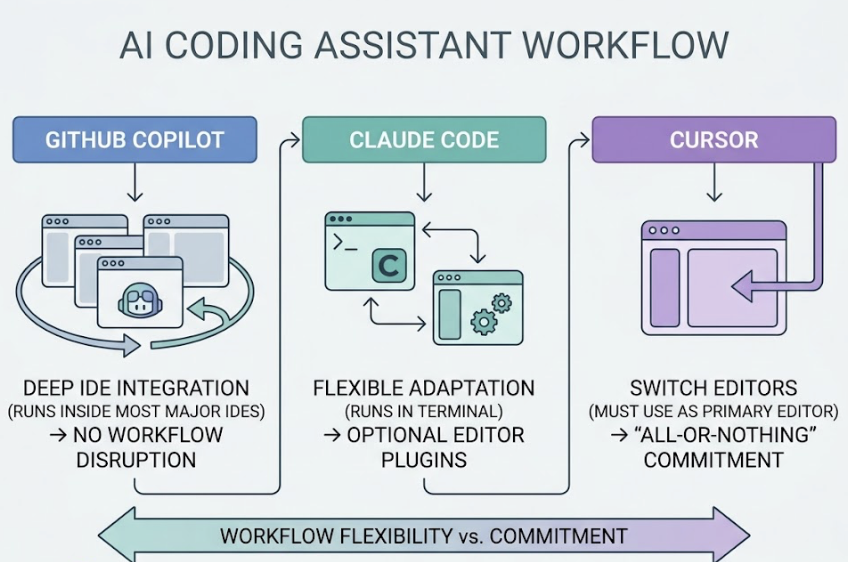
Claude Code bets on the terminal. It’s a CLI-native agent built for delegation: write code, run tests, execute shell commands, and manage Git operations without leaving the command line. The core thesis is that complex, multi-file refactors need an agent that can interact with the entire OS environment, not just the text editor.
GitHub Copilot bets on ubiquity. Rather than asking developers to change anything, it layers a high-fidelity AI experience over whichever IDE you’re already using. VS Code, JetBrains, Xcode, Visual Studio, it doesn’t matter. By 2026, Copilot has evolved into a multi-model gateway, letting teams toggle between GPT-5, Claude 4.6, and Gemini 3 Pro inside a single familiar interface.
Cursor bets on ownership. By forking VS Code entirely, Anysphere gained control over the editor’s internal state, something an extension API can never provide. That control powers Composer 2, which lets the AI manipulate the file tree, terminal, and code editor simultaneously with a coordination level that plugins simply can’t match.
Same goal: help you ship faster. Completely different approaches.
The 5 Metrics That Actually Determine Daily Value
Code Completion Speed and Accuracy
Latency kills flow. Cursor’s “Supermaven” integration and proprietary Tab models lead the market here, with an acceptance rate as high as 72% and multi-line predictions that often finish a thought before you do. Copilot uses lightweight, speed-optimized models for inline completions that remain highly competitive. Claude Code doesn’t offer traditional ghost-text autocompletion at all. It focuses on larger-scale generation through prompts, not character-by-character assistance.
If your primary need is fast in-editor autocomplete, Cursor or Copilot wins this round. Claude Code isn’t playing the same game.
Multi-File Context and Codebase Awareness
This is where the real divergence shows up.
| Feature | Claude Code | GitHub Copilot | Cursor |
|---|---|---|---|
| Native Context | 1,000,000 tokens (Opus 4.6) | 128K–200K (typical) | 200,000 tokens |
| Indexing Strategy | Sequential / Summary Caching | Workspace / Issue Indexing | Semantic Vector Indexing (RAG) |
| Multi-File Editing | 50+ files (reasoning-based) | Limited (extension API) | High (Composer 2) |
Claude Code leads in raw reasoning across massive codebases. Its 1M token context window with Context Compaction lets it maintain coherence across extended refactor sessions in a way the other two can’t match. Cursor compensates through local semantic indexing, vectorizing your entire codebase so the AI can locate a relevant file in a large monorepo in milliseconds, without needing every file open.
Two different approaches to the same problem. Both are genuinely good. Which one fits depends on whether your codebase is massive-and-sprawling or large-and-well-indexed.
Agent Mode: Can It Actually Execute End-to-End?
Agent mode has moved from buzzword to functional requirement. All three tools have it. Only one has made it the core product.
Claude Code’s agent runs an autonomous edit-test-fix loop until a goal is met. The “Agent Teams” feature fans out sub-tasks to parallel Claude instances, where one agent writes tests while another writes documentation, then merges everything into a single commit. It’s the most ambitious agentic architecture of the three.
Cursor’s Cloud Agents run on remote infrastructure, which solves thermal throttling on local hardware during intensive sessions. Copilot’s Coding Agent is uniquely optimized for the GitHub issue-to-PR pipeline, the most efficient workflow specifically for teams using GitHub as their project management layer.
For raw autonomous execution on complex engineering tasks, Claude Code is the current frontier.
IDE Flexibility vs. Lock-in
Copilot wins here by a wide margin. It runs inside almost every major IDE with no workflow disruption. Claude Code is also flexible, running alongside any editor in the terminal, with official VS Code and JetBrains plugins to smooth the experience. Cursor, however, is an all-or-nothing commitment. You can’t use its deepest features without switching to it as your primary editor.
Pricing for Solo Devs vs. Teams
| Tier | Claude Code | GitHub Copilot | Cursor |
|---|---|---|---|
| Pro (Individual) | $20/month | $10/month | $20/month |
| Power User | $100–$200/month | $39/month (Pro+) | $60–$200/month |
| Business (per seat) | $100/seat | $19/seat | $40/seat |
Copilot is the clear price leader at $10/month for individuals. The Claude Code Max plan at $200/month is notably the most cost-efficient path for heavy API users: the subscription can be up to 93% cheaper than paying raw API costs at equivalent token volumes. For developers running agents 8+ hours a day, that math changes the decision entirely.
Where Claude Code Actually Pulls Ahead
Claude Code has carved out a specific niche: high-complexity reasoning tasks that break other tools.
On the SWE-bench Verified benchmark, the industry standard for real-world software engineering, Claude Code scored 80.8%. That’s the highest recorded for any tool in its class as of 2026. Not a marginal advantage.
The terminal-native workflow removes the UI abstractions that slow down large refactors. The “Spec-first” approach, where Claude generates a markdown plan for the developer to review before a single line changes, reduces the risk of irreversible bulk edits. For architectural migrations or bugs that require reasoning across 50+ files, the Opus 4.6 model’s reasoning capacity is the deciding factor.
The honest weakness is the learning curve. You need to get comfortable with CLI navigation, commands like /compact, /clear, and /rewind, and a text-based workflow. Developers who rely on visual UI builders or drag-and-drop IDE features will find it restrictive.
The Copilot Workflow Nobody Talks About Enough
Despite the momentum behind Cursor and Claude Code, Copilot maintains a genuine moat that’s easy to overlook: the issue-to-PR pipeline.
Assign a GitHub issue to Copilot’s Coding Agent directly from the browser. It clones the repo into a secure GitHub Actions VM, implements the fix, runs the existing test suite, and opens a draft PR with a summary of changes. No IDE required. No specific developer workflow needed. For maintenance work and bug fixes on existing codebases, this hands-off automation is a significant time saver.
There’s also a compliance angle. Microsoft’s Customer Copyright Commitment provides IP indemnity that smaller startups like Anysphere can’t yet match at enterprise scale. For legal teams signing off on procurement, that assurance is often the deciding factor, regardless of feature parity.
What Cursor Gets Right That Others Can’t Copy
Cursor’s differentiation isn’t the underlying model. Users can load the same Claude 4.6 or GPT-4o models in Cursor. The edge is environment control.
Because Cursor owns the fork, it built the Autonomy Slider into Composer 2: a per-session setting that lets developers choose exactly how independently the AI operates. At low autonomy, every suggestion requires approval. At high autonomy, the AI searches the codebase, runs terminal commands, executes tests, and self-corrects until the task is done. That level of UI-level control is only possible because they own the editor.
The local semantic indexing is also a meaningful practical advantage. Cursor builds an intelligent catalog of your project, understanding cross-file dependencies like how a change in a React component affects a CSS-in-JS utility, without needing every file open. Combined with Supermaven’s autocomplete speed, this makes Cursor the tool most likely to keep a developer in flow state during frontend and iterative UI work.
How to Choose Based on Your Actual Workflow
Stop asking which tool is best. Start asking which tool fits the specific work you actually do.
| Scenario | Recommended Tool | Why |
|---|---|---|
| Solo dev, large monorepo | Claude Code | 80.8% SWE-bench; handles 1M token context across 50+ files |
| Enterprise team on GitHub | GitHub Copilot | $19/seat, IP indemnity, issue-to-PR automation |
| Rapid prototyping / frontend | Cursor | Composer 2 + Autonomy Slider, fastest path from idea to working feature |
| Budget under $20/month | Copilot Pro | $10/month, unlimited autocomplete, 300 premium requests |
| Power user, agent-heavy | Claude Code Max | $200/month avoids per-token API costs for 8+ hour daily agent sessions |
No tool dominates every row. The “best” one is whichever one matches your row.
Can You Use All Three? The Honest Answer
Yes, and increasingly, experienced developers do.
The emerging pattern is tool layering, not tool replacing. A practical 2026 hybrid stack looks like this: Copilot for fast single-file autocompletion, Cursor for iterative feature builds and UI work, and Claude Code when you hit a wall that the other two can’t break through. A 50-file bug trace, a race condition in a complex backend, an architectural migration with cascading dependencies — that’s where 80.8% SWE-bench accuracy starts to matter.
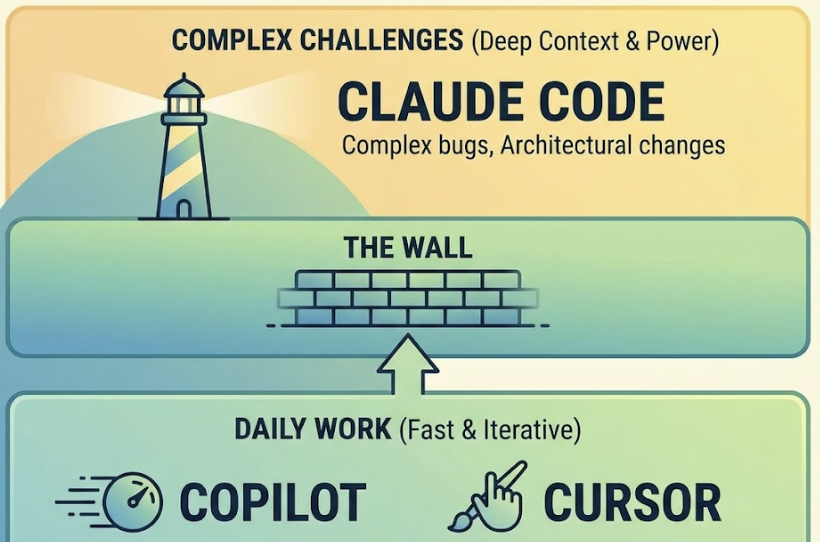
The combined cost runs roughly $40–60/month. Senior engineers consistently frame that as a negligible expense against the 10–20 hours of manual work saved weekly.
Pick your primary tool based on the work you do most. Add the others for the situations where your primary falls short.
One Thing AI Coding Tools Don’t Solve
These tools help you ship faster. But once you’ve shipped, a different challenge begins: making sure what you built actually gets recommended by AI systems like ChatGPT, Perplexity, and Gemini.
That’s a separate problem from development speed. It’s about how AI search engines discover, evaluate, and recommend products. Platforms like Topify track exactly that, monitoring how AI platforms mention your brand and where you rank against competitors in AI-generated answers. It’s the layer that kicks in after the code is deployed.
Conclusion
The three tools in this comparison aren’t competing for the same developer. Claude Code is for the developer who needs to reason through the hardest problems in the codebase. Copilot is for the team that needs to move fast, stay compliant, and not disrupt existing workflows. Cursor is for the developer who wants the most immersive AI-native editing environment available.
You don’t need to pick one and only one. You need to know which one leads.
Start with the scenario table above. The tool that matches your most common work context is your primary. The others become situational. That’s the 2026 approach: not replacing, layering.
FAQ
Q: Is Claude Code free?
A: No. Claude Code requires a Claude Pro ($20/month), Max ($100–$200/month), or pay-as-you-go API subscription. New API users typically receive $5 in trial credits, but there’s no permanent free tier.
Q: Does Claude Code work inside VS Code?
A: Yes. There’s an official VS Code extension that connects to the Claude CLI. It provides visual diffs, file-sharing, and terminal integration without leaving VS Code, though the core interaction remains text-based.
Q: Cursor vs. Copilot: which is cheaper for teams?
A: GitHub Copilot is significantly cheaper at $19 per user per month for the Business plan. Cursor Business runs $40 per seat. For a 10-person team, Copilot saves over $2,500 annually before considering any feature tradeoffs.
Q: Can Claude Code replace Cursor entirely?
A: For CLI-first developers who prioritize reasoning accuracy over in-editor autocomplete, yes. For frontend-heavy work and rapid prototyping, Cursor’s Composer 2, visual diffs, and Supermaven autocomplete provide a more integrated experience that Claude Code doesn’t replicate.