

You write one prompt. Claude plans the backend, scaffolds the frontend, runs the tests, and fixes the errors. You didn’t touch a file.
That’s not a marketing claim. Anthropic’s internal engineering team reports that a majority of their own production code is now written by Claude Code. The shift is real, and it’s accelerating.
This tutorial walks you through building a full-stack task manager from scratch using Claude Code. REST API, React frontend, SQLite database. We’ll cover the exact prompts, the setup that saves you time, and the failure modes you’ll hit if you skip the config.
Let’s get into it.
It’s Not Autocomplete. Here’s What Claude Code Actually Does
Most AI coding tools are reactive. You type, they suggest. You accept, they wait.
Claude Code operates on a different model entirely. When you give it a goal, it enters a Perception-Planning-Execution loop: first reading the codebase with tools like FileRead, Glob, and Grep, then breaking the task into a sequence of subtasks, then executing those steps autonomously, including running your tests and fixing the errors it caused.
The practical difference is significant. A traditional assistant gives you a code snippet. Claude Code reads your entire project structure, decides which files to create, installs the dependencies, runs the server, reads the error log, and patches the bug before you realize there was one.
That’s the gap.
The App We’re Building (and Why This Stack Works as a Test)
We’re building a task manager with three layers:
- Backend: Node.js + Express REST API
- Database: SQLite (via the
better-sqlite3package) - Frontend: React with component-level state management
This isn’t a toy example. It forces Claude Code to coordinate across multiple paradigms simultaneously: server routing, database schema design, and client-side state management. If an AI agent can build this cleanly from one prompt, it can handle most mid-complexity prototypes.
Setup: Claude Code Running in Under 2 Minutes
Install via a single shell command. On macOS or Linux:
bash
curl -fsSL https://claude.ai/install.sh | bashWindows users on PowerShell:
powershell
irm https://claude.ai/install.ps1 | iexNative binary installation is recommended over the older npm method. It includes automatic background updates and runs faster.
Authentication is browser-based for Pro, Max, and Team subscribers. After login, you’re in the terminal. Now do this before you write a single prompt:
bash
cd your-project-folder
claude /init
This generates a CLAUDE.md file: a markdown record of your project structure, preferred conventions, and build commands. It’s the persistent context Claude reads at the start of every session. Without it, the agent has to re-learn your project every time.
One config that saves you later. Open .claude/settings.json and set:
json
{
  "defaultMode": "acceptEdits"
}
This allows Claude to write and modify files automatically without asking for confirmation on every change. It still prompts before running destructive shell commands. Good balance.
Also create a .claudeignore file and add:
node_modules/
dist/
.git/
This keeps Claude from loading thousands of irrelevant tokens into its context window. Skip this and you’ll burn through your quota faster than expected.
Prompt to Backend: Watch Claude Plan Before It Writes a Single Line
Here’s the exact prompt used to generate the backend:
“Build a REST API for a task manager using Node.js, Express, and SQLite. Include routes for creating, reading, updating, and deleting tasks. Add input validation and proper error handling. Initialize the project and install all dependencies.”
Claude doesn’t immediately output code. It enters a planning phase first.
You’ll see it identify the directory structure it’s about to create, list the packages it needs, and note the edge cases in error handling. Then it starts executing.
What it builds in a single pass:
server.jswith Express configuration and middlewaremodels/task.jswith SQLite schema and query functionsroutes/tasks.jswith full CRUD endpoints- Automatic
npm installofexpress,better-sqlite3, andcors
If the server fails to start, Claude reads the error log and patches it. You don’t need to do anything.
Frontend in One Pass: Claude Handles the Wiring
Once the backend is running, give Claude this:
“Build a React frontend for this task manager. Connect it to the REST API. Include a task list, an add-task form, and the ability to mark tasks complete and delete them.”
The key here is that Claude reads its own backend implementation before writing the frontend. It already knows the URL structure, the response shape, and the expected request body format. The fetch calls are correct the first time.
What it generates:
App.jsxwith component-level stateTaskList.jsxandTaskItem.jsxas reusable componentsapi.jsfor all HTTP calls, centralized in one file- Basic CSS scoped to each component
The wiring between components and API happens without you navigating a single file.
One prompt that improves output quality significantly: ask Claude to wrap the main view in an Error Boundary and handle loading and empty states explicitly. Without this prompt, it defaults to the happy path and leaves edge cases bare.
Where Claude Code Slows Down (Honest Assessment)
The 200,000-token context window is large. It’s not infinite.
As a session grows, the window fills with file reads, command outputs, and conversation history. Performance starts to degrade around the two-thirds mark. The agent may forget an earlier instruction or start making contradictory edits. When you notice this happening, run:
bash
/compactThis summarizes the session history and frees up space without losing key decisions. Use it proactively, not as a rescue.
Three other failure modes worth knowing:
Thinking loops. If you give Claude a vague instruction, it may search the codebase repeatedly without taking action. Five minutes of watching it loop is a signal to interrupt with Ctrl+C and provide a more specific file path or constraint.
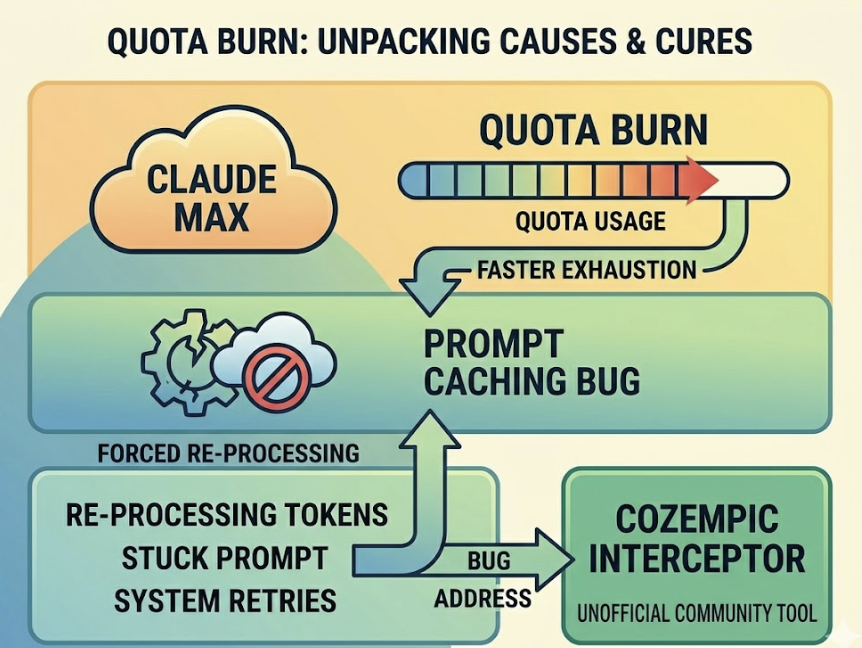
Quota burn. On Claude Max plans, sessions have been reported to exhaust faster than expected. The cause is typically a bug in the prompt caching mechanism that forces the system to re-process tokens it should have cached. Community tools like the Cozempic interceptor exist to address this, though they’re unofficial.
Conflicting edits. If Claude undoes its own previous work, the issue is usually an ambiguous rule in CLAUDE.md. Keep the instructions specific and non-overlapping.
Deploy: Local to Live in 3 Steps
Claude Code can’t click through a cloud dashboard. It can run CLI commands.
With the Railway plugin installed, deployment is a single instruction:
“Deploy this task manager to Railway and verify the staging environment.”
The plugin provides a use-railway agent skill that covers project setup, service linking, environment variable injection, and build log monitoring. A PreToolUse hook automatically approves Railway CLI commands, so Claude executes the full deployment without prompting you at each step.
What Claude handles:
railway init,railway up,railway logs- Setting
DATABASE_URLandPORTas environment variables - Checking that the health endpoint returns 200
What it still can’t do: set up a custom domain through the dashboard. That one’s manual.
Note on Routines. Anthropic introduced scheduled automation in April 2026. Routines let you run agentic tasks on a schedule or triggered by GitHub events, on Anthropic’s infrastructure, with no local terminal required. Nightly database backups, automated PR reviews, periodic health checks. This moves Claude Code from personal tool to CI/CD component.
Is Claude Code Worth Switching To?
Depends on what you’re switching from.
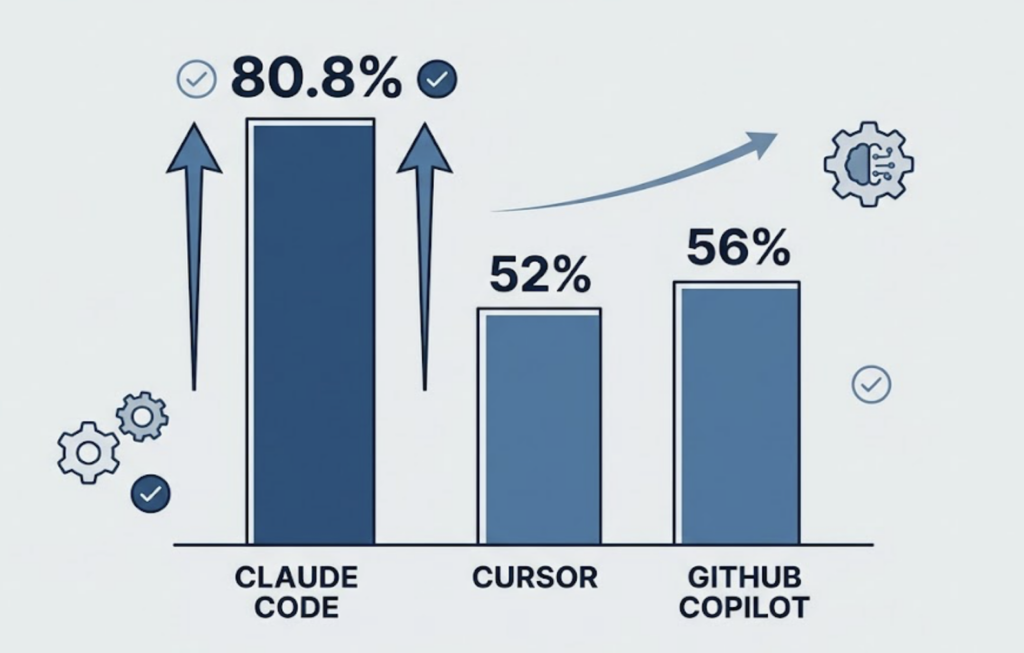
On the SWE-bench Verified benchmark, a standardized test of real-world software engineering problem resolution, Claude Code scores 80.8%. Cursor’s Composer mode sits around 52%, GitHub Copilot around 56%. The gap is large enough to matter for complex, multi-file work.
For inline autocomplete during daily coding, Cursor is still faster and more ergonomic. Its Supermaven integration and visual diff view are hard to match in a terminal interface.
The workflow that most professional developers land on: use Cursor or Copilot for routine editing, switch to Claude Code for anything requiring multi-file coordination, architecture changes, or debugging logic that spans several layers.
| Use Case | Best Tool |
|---|---|
| Inline autocomplete | Cursor |
| Boilerplate generation | GitHub Copilot |
| Multi-file refactoring | Claude Code |
| Large-scale migrations | Claude Code |
| Visual diff review | Cursor |
| Autonomous deployment tasks | Claude Code |
That’s not a competition. It’s a division of labor.
Conclusion
Claude Code isn’t a better autocomplete. It’s a different category of tool.
The full-stack task manager in this tutorial took under 10 minutes to scaffold because the agent planned before it wrote, ran its own tests, and fixed its own mistakes. That loop, repeated across a real project, compresses timelines in ways that add up fast.
The setup steps matter. CLAUDE.md, .claudeignore, and acceptEdits aren’t optional polish. They’re what separates a productive session from one that burns quota and loops.
Start with a bounded project. Watch the planning phase. Then adjust from there.
FAQ
Does Claude Code work offline?
No. It requires an active internet connection for model inference. Community integrations with local models like Qwen 2.5 Coder via Ollama exist, but performance varies depending on local hardware.
Can it handle TypeScript, Python, and other stacks?
Yes. Claude Code is language-agnostic. It’s particularly strong with TypeScript and Python due to training data density, but it has been used for large-scale migrations in Go and Scala as well.
How does it compare to Cursor’s Agent Mode?
Cursor’s Agent Mode is editor-integrated with visual diffs. Claude Code is terminal-native and better suited for tasks requiring shell execution, background processes, and deep codebase reasoning. Claude Code scores higher on engineering benchmarks; Cursor offers a more visual development experience.
Is there a free tier?
No. Claude Code requires a paid subscription: Pro, Max, or Team, or a Console account with pre-paid credits. Unofficial free usage is possible by connecting to local open-source models via Ollama.