
Your GA4 dashboard says referral traffic grew 12% last quarter. Somewhere inside that number, buried under newsletter platforms and random backlinks, visitors from Claude are converting at nearly 3x the rate of Google organic. You just can’t see them.
That’s not a minor reporting gap. Claude referral sessions grew 64x between November 2024 and May 2026, overtaking Perplexity as a referral source in March 2026. And because GA4’s default channel grouping doesn’t separate AI traffic from generic referrals, most analytics teams are flying blind on the fastest-growing segment in their acquisition mix.
Why Claude Traffic Is Growing Faster Than Most Teams Realize
Claude’s referral footprint is small in absolute terms but accelerating at a pace that dwarfs traditional channels. According to SE Ranking data, Claude’s share of total website traffic jumped 386% between January and April 2026 alone, with most of that growth concentrated in a single month.
The broader context matters. AI referral traffic across all platforms grew 796% over two years, and it’s expanding 165x faster than organic search. Within that wave, Claude’s trajectory stands out. In the B2B segment specifically, Claude’s share of AI referrals rose from 1.4% to 18.5% in just eight months, turning what was once a single-platform story into a four-engine market.
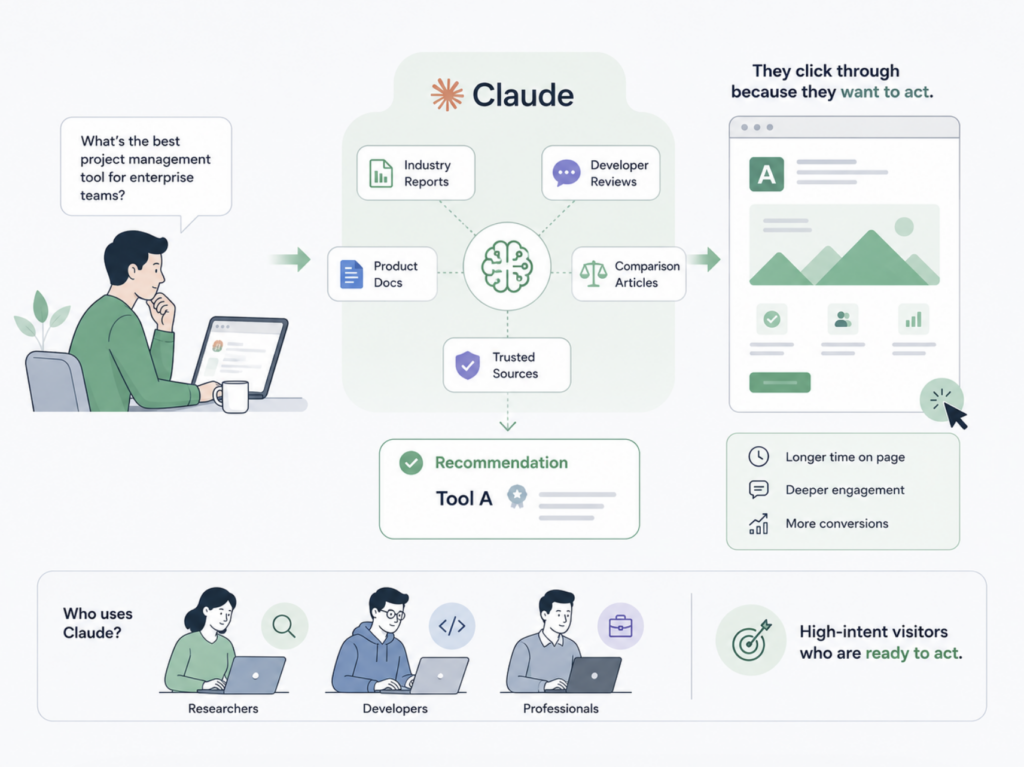
Here’s what makes Claude traffic different from other AI sources. Claude users tend to be researchers, developers, and professionals who arrive with specific intent. They spend longer on page and engage more deeply with B2B and SaaS content. The visitors Claude sends aren’t browsing. They’ve already narrowed their options inside the conversation and clicked through because they want to act.
Where Claude Traffic Actually Shows Up in Your GA4 Reports
Finding Claude traffic in GA4 takes some digging, because the default setup doesn’t make it easy. Here’s what to look for.
Open GA4 and navigate to Reports > Acquisition > Traffic Acquisition. Change the primary dimension to “Session source / medium.” In the search bar, type claude.ai. If Claude is citing your content, you’ll typically see it as claude.ai / referral.
That’s the straightforward case. In practice, Claude traffic can appear in multiple places depending on how the user interacted with the link. Desktop web sessions from claude.ai usually pass a clean referrer header. But sessions from Claude’s mobile app, API integrations, or third-party tools often arrive without any referrer data at all, landing in your “Direct” bucket instead.
This isn’t unique to Claude. Across all AI platforms, roughly 70% of AI-driven traffic lacks standard referrer headers. That means the claude.ai sessions you can see in GA4 are likely a floor, not a ceiling.
One recent development helps. In May 2026, Google added a native “AI Assistant” channel to GA4’s default channel grouping, automatically classifying traffic from ChatGPT, Gemini, and Claude. It’s a step forward, but it only works when a referrer header is present, it isn’t retroactive, and it doesn’t cover every AI platform. You’ll still want a custom setup.
How to Build a Custom Channel Group for Claude Traffic in GA4
The native AI Assistant channel is a good baseline, but a custom channel group gives you historical data, broader platform coverage, and full control over the classification logic. Here’s how to set it up.
Go to Admin > Data display > Channel groups. Duplicate your default channel group so you’re working on a copy, not the original. Click “Add new channel” and name it something clear: “AI Traffic” or “AI Search.”
Set the condition to Source matches regex and use this pattern:
^(chatgpt\.com|chat\.openai\.com|openai\.com|perplexity\.ai|claude\.ai|gemini\.google\.com|copilot\.microsoft\.com|deepseek\.com|grok\.com|meta\.ai|you\.com|phind\.com|mistral\.ai)$
This single anchored pattern captures the major AI referral sources currently passing attribution data to GA4. Avoid loose patterns like .*ai.*, which will match email providers and retail domains that happen to contain those letters.
Now the part most people miss: drag your new AI channel above the Referral channel in the list. GA4 evaluates channel rules top-to-bottom. If your generic Referral rule fires first, it claims Claude sessions before your custom filter ever gets a chance. This ordering step is the single most common setup mistake in AI traffic tracking.
Save, then verify. Open Reports > Realtime, visit your site from a Claude citation link, and confirm the session appears under your new AI channel within a minute. If it shows up under Referral, your channel order is still wrong.
Plan to review your regex quarterly. New AI platforms launch regularly, and existing ones sometimes change their domain structure. Building a quarterly audit into your analytics maintenance keeps the data clean.
UTM Parameters: Tracking the Claude Traffic You Control
Most Claude traffic is passive. Claude cites your content in a conversation, the user clicks, and the referral shows up in GA4 (or doesn’t, if the referrer header is stripped). You can’t attach UTM parameters to those links because you didn’t create them.
But there’s a category of Claude traffic you can control. If your brand publishes content designed to be shared via AI assistants, or if you distribute links through channels where users paste them into Claude conversations, UTM tagging gives you attribution precision that referral tracking alone can’t provide.
A clean naming convention keeps the data usable:
| Parameter | Recommended Value |
|---|---|
| utm_source | claude |
| utm_medium | ai_referral |
| utm_campaign | [your campaign name] |
The practical use case: you publish a product comparison page and promote it in a developer community where Claude is heavily used. Tag the promoted links with UTMs so you can distinguish “someone found this page through Claude’s citations” (passive referral) from “someone clicked our promoted link, then may have also shared it in Claude” (active distribution).
Don’t over-tag. UTMs are for links you place. Passive Claude referral traffic should flow through your custom channel group instead. Mixing the two approaches creates cleaner segmentation than either one alone.
What GA4 Can’t Tell You About Claude Traffic in GA4
Here’s the gap that changes how you think about this entire channel.
GA4 tracks clicks. When someone in a Claude conversation clicks a link to your site, GA4 records a session. But Claude might mention your brand in a hundred conversations and generate exactly zero clicks from most of them. Those mentions still shape how users perceive your brand, your product, and your competitors. GA4 has no way to measure them.
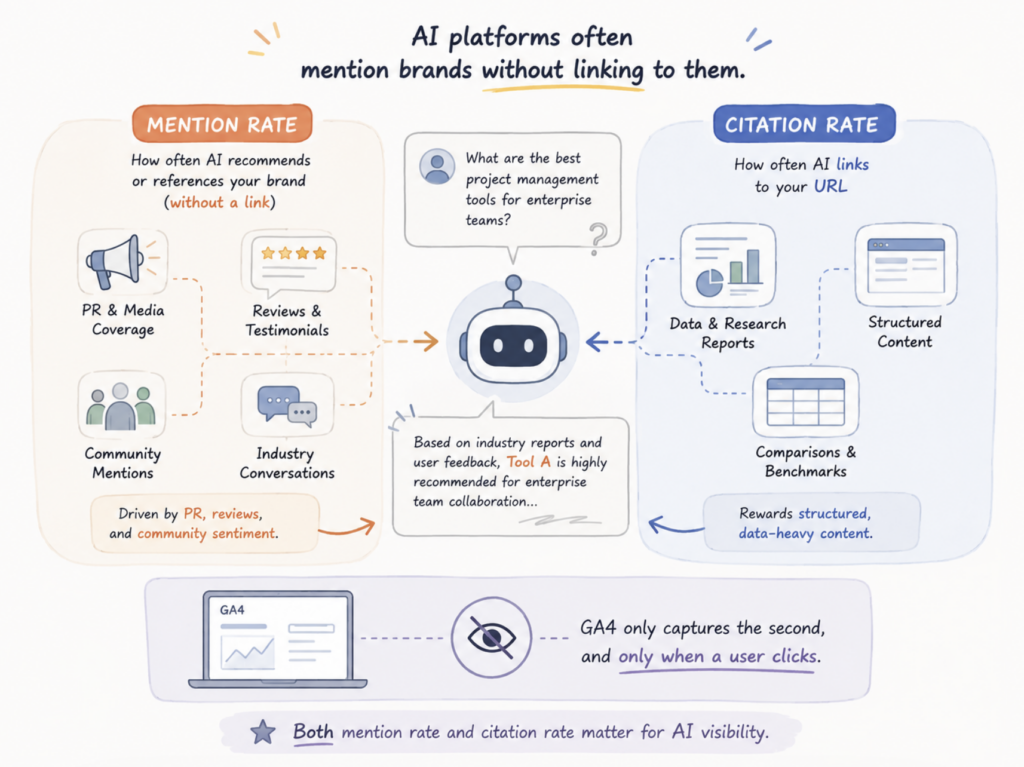
This isn’t a hypothetical. Research shows that AI platforms often mention brands without linking to them. The “mention rate,” which reflects how often an AI recommends or references your brand, operates independently from the “citation rate,” which measures how often it links to your URL. The first is driven by PR, reviews, and community sentiment. The second rewards structured, data-heavy content. Both matter, but GA4 only captures the second, and only when a user clicks.
That visibility gap is where purpose-built AI monitoring tools come in. Topify, for example, tracks brand mentions across ChatGPT, Perplexity, Claude, and other major AI platforms at the prompt level. Instead of waiting for a click to show up in GA4, you can see how often Claude mentions your brand, what sentiment it assigns, which competitors it recommends alongside you, and which source domains the AI is citing.
In practice, that means you can spot a drop in Claude mentions and trace it back to a specific content gap or a competitor that recently earned stronger citations. Topify’s Source Analysis shows exactly which domains AI platforms reference, so you know where to focus your content strategy. GA4 tells you what happened after the click. Topify tells you what happened before it.
The two aren’t competing approaches. They’re complementary layers. GA4 gives you session-level conversion data. Topify gives you the visibility data that explains why those sessions are (or aren’t) growing.
Three Metrics That Tell You If Claude Traffic Is Worth Optimizing
Once tracking is in place, resist the urge to stare at raw session counts. Claude’s referral volume will be smaller than organic search for a while. The question isn’t “how much traffic,” it’s “how good is this traffic.”
Metric 1: Engagement rate of Claude traffic vs. other channels. In GA4, compare your AI channel’s engagement rate against organic search and direct. AI-referred visitors typically show 68% longer session duration and higher pages-per-session than organic. If Claude traffic is outperforming your other channels on engagement, it signals that these visitors arrive with clear intent and find what they’re looking for.
Metric 2: Conversion rate by AI source. Don’t lump all AI traffic together. Break it down by source. Across multiple studies, ChatGPT referrals convert at roughly 15.9%, Perplexity at 10.5%, and Claude at 5%, all significantly above Google organic’s 1.76% benchmark. Your numbers will vary by industry, but the relative pattern, where AI traffic outperforms organic on conversion, holds across approximately 72% of websites measured.
Metric 3: Month-over-month Claude session growth. This is your leading indicator. AI referral traffic overall is growing at roughly 1 percentage point month-over-month, but Claude specifically is growing faster than any other platform on a percentage basis. Track whether your Claude sessions are following that curve, beating it, or falling behind. A stall might mean Claude stopped citing your content, which is a content strategy signal, not a traffic problem.
Conclusion
Claude traffic in GA4 isn’t a curiosity anymore. It’s a measurable, high-intent acquisition channel that most analytics setups still misclassify or miss entirely.
The fix starts with a 15-minute custom channel group configuration that separates AI referrals from generic traffic. That gives you the baseline. From there, the real strategic advantage comes from understanding what GA4 can’t show you: whether Claude is mentioning your brand at all, how it frames you relative to competitors, and which content earns citations. Tools like Topify fill that gap by tracking AI visibility across platforms at the prompt level, turning a blind spot into a growth channel you can actually optimize.
FAQ
Q: How do I find Claude traffic in GA4?
A: Go to Reports > Acquisition > Traffic Acquisition, change the primary dimension to “Session source / medium,” and search for claude.ai. You’ll typically see it as claude.ai / referral. For a permanent solution, create a custom channel group with a regex filter that captures all AI referral sources.
Q: Does Claude pass referrer data to GA4?
A: Claude’s web app (claude.ai) generally passes referrer headers on desktop, so those sessions show up as referral traffic. However, mobile app sessions, API integrations, and some third-party tools often strip the referrer, causing traffic to appear as “Direct” in GA4. Industry data suggests roughly 70% of AI traffic may arrive without proper referrer attribution.
Q: Can I track how often Claude mentions my brand without anyone clicking?
A: GA4 can’t track mentions, only clicks. To monitor whether Claude is recommending your brand in conversations, you need an AI visibility platform like Topify that tracks brand mentions, sentiment, and competitor comparisons across AI search engines at the prompt level.
Q: Should I create a separate GA4 channel for all AI traffic or just Claude?
A: Create one channel that captures all major AI sources (ChatGPT, Claude, Perplexity, Gemini, Copilot, and others) using a single regex pattern. This gives you a unified “AI Traffic” metric for reporting. You can then break down by individual source within that channel using GA4’s secondary dimensions or Explorations when you need platform-level detail.