
Your SEO team spent years fine-tuning robots.txt rules for GPTBot and OAI-SearchBot, and that felt like enough. Then OpenAI shipped GPT-6 Astra on September 3, 2026, a model that scores 72.6% on OSWorld 2.0 by clicking buttons, filling forms, and opening multiple tabs like a person, not indexing pages like a bot. The rules you wrote for a crawler may not mean much to an agent that reads your site the way a hired researcher would.
When Browsing Stops Being Crawling
A classic crawler walks URLs and builds an index. It grabs the HTML, follows links, and moves on. GPTBot still works this way, which is why OpenAI documents it separately from its other agents.
GPT-6 Astra doesn’t fit that model. OpenAI describes it as state of the art in computer use, meaning it operates browsers directly: it clicks, scrolls, compares tables across tabs, and can run for roughly 40 minutes on a single task. That’s a jump from 65.7% to 72.6% on OSWorld 2.0 versus GPT-5.6 Sol, a benchmark built to measure computer-operating skill, not text generation.
Here’s the practical shift. When someone asks ChatGPT to compare two service providers, Astra doesn’t settle for three retrieved snippets. It opens your page, maybe your competitor’s too, checks pricing tables, and scrolls past the fold.
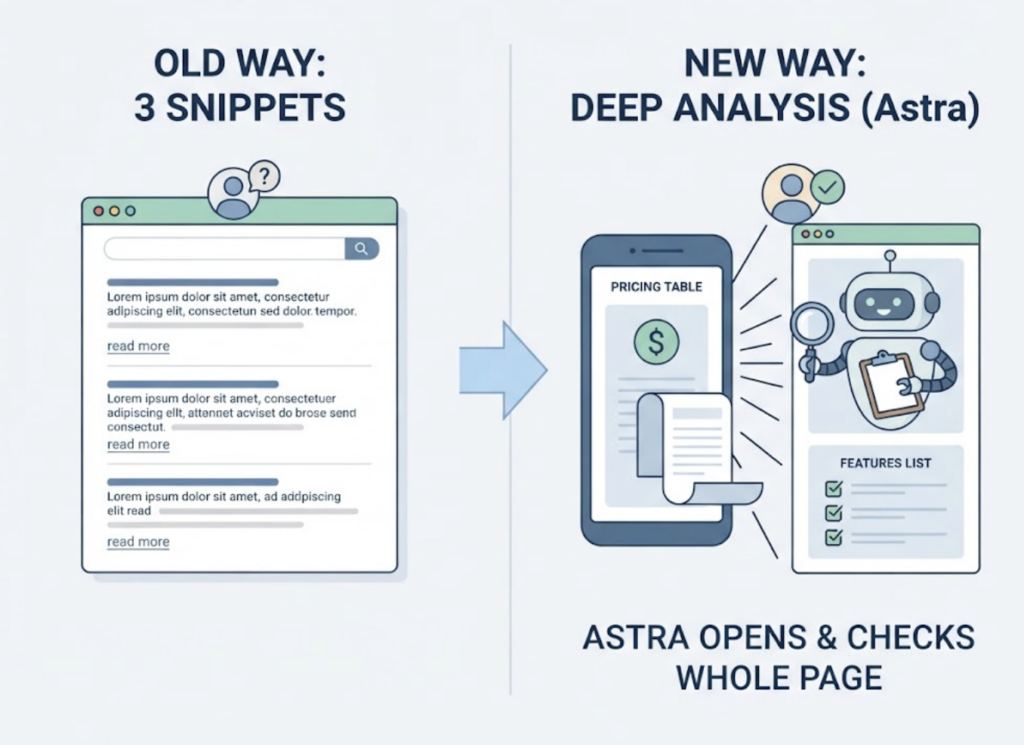
Your content is being read by an agent that behaves like a person, not summarized by an indexer. That changes what robots.txt is actually protecting you from.
What Robots.txt Actually Controls, and What It Doesn’t
Robots.txt is a request, not a lock. It tells well-behaved bots what you’d prefer they do, and compliant bots follow it voluntarily.
OpenAI currently documents three separate user agents: GPTBot for training data collection, OAI-SearchBot for ChatGPT’s search feature, and ChatGPT-User for pages a person asks ChatGPT to visit directly. Each can be allowed or disallowed independently, which is exactly why so many sites get this wrong. A site can block GPTBot to opt out of training while still allowing OAI-SearchBot to appear in search answers, but teams often write one blanket rule and assume it covers everything.
The more common failure is simpler. A robots.txt file with a full browser string like GPTBot/1.3 pasted into the User-agent line, instead of the plain token GPTBot, matches nothing at all, and the site owner has no idea the rule never applied.
Does GPT-6 Astra Follow the Same Robots.txt Rules?
Astra’s browsing behavior sits closer to ChatGPT-User than to GPTBot, since it acts on a person’s request rather than crawling on its own schedule. But identity verification for agentic traffic is moving past user-agent strings entirely.
Cloudflare and Google are behind a proposed IETF standard called Web Bot Auth, which has agents sign every request with a cryptographic key instead of a header that anyone can copy. Cloudflare’s Bot Management update introduced a dedicated Verified AI Agent category, and by mid-2026 it covered 19 agents including ChatGPT Atlas, Claude in Chrome, and Perplexity’s browser.
A user-agent string alone no longer proves who’s visiting.
OpenAI enabled signed requests for GPTBot by default on May 28, 2026, and Cloudflare reported expecting to verify or block roughly 18 billion AI crawler requests a day in the first month of enforcement. If your site still leans on IP allowlists or plain user-agent matching, you’re checking a credential that agents are actively moving away from.
The Blind Spot: Allowed Access Doesn’t Mean Visible Results
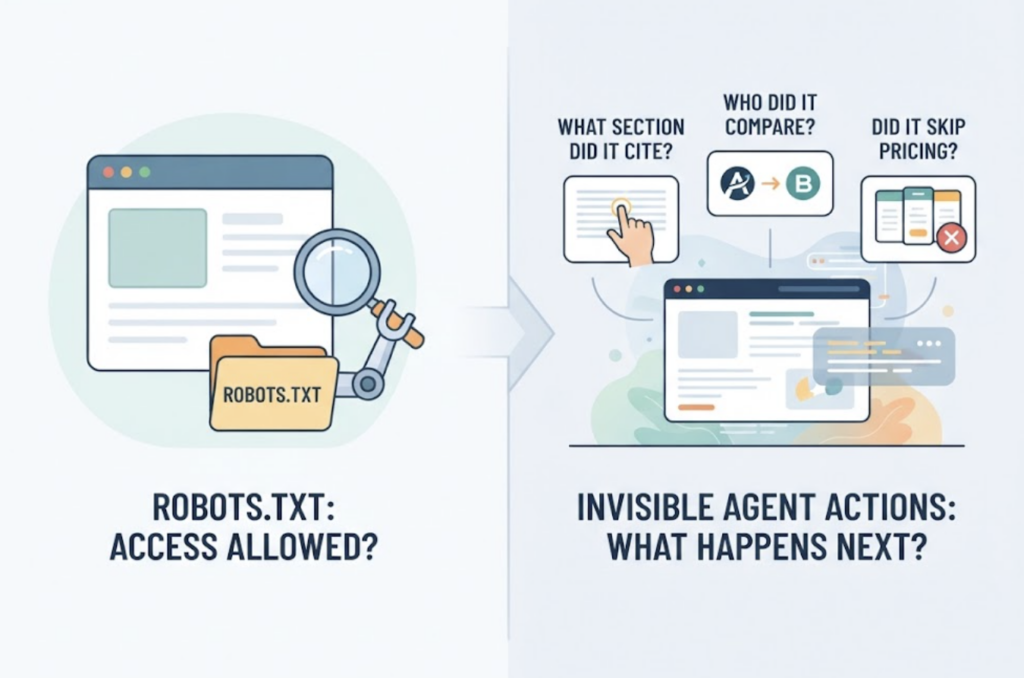
Say you get the robots.txt rules right, the signatures verify, and Astra’s requests come through cleanly. You’ve solved access. You haven’t solved visibility.
Robots.txt tells you whether a request was allowed. It tells you nothing about what the agent actually did with your page once it got there: which section it cited, which competitor it compared you against, or whether it skipped your pricing table entirely. Most teams only find out their brand dropped out of an AI answer when someone happens to ask the same question and notices.
This is the layer Topify‘s Source Analysis tracks: the specific domains and URLs AI platforms actually cite, so you can see whether your access permissions are translating into real citations. Pair that with AI Volume Analytics, which surfaces which prompts and pages draw the most agent traffic in the first place, and you know where a robots.txt audit is worth your time this week, instead of guessing across the whole site.
A Five-Point Robots.txt Check for the GPT-6 Astra Era
Run through this the next time you touch your robots.txt file.
- Check tokens, not full strings. Confirm every User-agent line uses the plain token (
GPTBot,ChatGPT-User) and not a copy-pasted browser string. - Separate training from browsing. Decide independently whether GPTBot should be excluded from training data while ChatGPT-User or Astra’s browsing traffic still gets through.
- Move past UA-only verification. If your CDN or WAF supports Web Bot Auth or signature validation, turn it on rather than trusting the User-agent header alone.
- Structure your highest-value pages for a reader, not a scanner. Astra scrolls, compares tables, and reads context, so pricing pages and comparison content should hold up under that kind of scrutiny.
- Verify the rule actually fired. A robots.txt file that looks correct and blocks nothing is a common failure mode. Check server logs or a linting tool to confirm the rule matched anything.
That fifth point is the one most teams skip, and it’s usually where the real gap sits.
Conclusion
Robots.txt is still the first gate, but it was never built to answer whether an agent like GPT-6 Astra found, trusted, or cited your content once it got through. The access question and the visibility question are separate problems now, and treating them as one is how brands end up invisible in an AI answer without ever noticing the block. Audit the file this week, then check what’s actually being cited on the other side of it with a free source-level scan.
FAQ
Q: Does GPT-6 Astra use a different user agent than GPTBot?
A: OpenAI hasn’t published a separate crawler token specifically for Astra’s browsing behavior. It’s expected to operate closer to the existing ChatGPT-User agent, which handles requests triggered by a person’s ask, though verification is shifting toward signed requests rather than user-agent strings alone.
Q: Should I block AI agents in robots.txt to protect my content?
A: For most sites, no. Blocking agents that power AI citations, like ChatGPT-User or OAI-SearchBot, tends to remove your brand from AI-generated answers entirely. Blocking makes more sense for paywalled or clearly sensitive content, not general marketing pages.
Q: How do I know if my robots.txt rules are actually working?
A: Checking the file for correct syntax isn’t enough. Review server logs for the relevant user agents, or run a linting tool against your rules, since a single misformatted line can silently match nothing.
Q: What’s the difference between robots.txt and Web Bot Auth?
A: Robots.txt is a voluntary, unauthenticated request that any bot can choose to ignore. Web Bot Auth is a cryptographic signature standard that lets a site verify an agent’s identity, closing the gap that user-agent spoofing leaves open.