
A paid-media team submits a ChatGPT ad with a working landing page, yet review fails or stalls. The page opens in every employee's browser, so the team rewrites the ad copy and resubmits. Nothing changes because the problem sits earlier in the pipeline: the automated reviewer cannot reliably reach or evaluate the destination.
OAI-AdsBot is the crawler OpenAI documents for validating landing pages submitted as ChatGPT ads. Making a page crawlable requires more than one robots rule. DNS, redirects, the CDN, WAF, bot mitigation, authentication, geographic logic, JavaScript challenges, rate limits, image hosts, and the application response can all break the path. A layered diagnostic prevents repeated resubmissions from masking the real fault.
OAI-AdsBot validates submitted ad destinations
OpenAI's crawler overview says OAI-AdsBot is used to validate the safety of pages submitted as ads on ChatGPT. OpenAI may also use landing-page content to determine when an ad is relevant. The bot visits pages submitted as ads, and OpenAI says its collected data is not used to train generative AI foundation models.
That scope creates a clear operational objective: the submitted landing page and the resources required to understand it need to be directly reachable by the crawler. A successful human browser visit is not proof because employees may carry cookies, pass challenges, use a supported region, or bypass enterprise controls.
OpenAI publishes an OAI-AdsBot user agent and a JSON file of IP ranges. The company also notes in its advertiser guidance that OAI-AdsBot is officially verified and allowlisted by Cloudflare. Teams should still validate current ranges and edge behavior instead of hard-coding a copied list indefinitely.
OAI-AdsBot is not OAI-SearchBot or GPTBot
OpenAI documents separate crawler roles. OAI-SearchBot supports search discovery. GPTBot relates to content that may be used to improve foundation models. ChatGPT-User can fetch pages for certain user actions. OAI-AdsBot handles ad landing-page validation.
| Agent | Documented purpose | Relevant control question |
|---|---|---|
| OAI-AdsBot | Validate submitted ad pages | Can the campaign destination be reviewed? |
| OAI-SearchBot | Support inclusion in ChatGPT search | Should public content be discoverable in search? |
| GPTBot | Potential model-training use | Does the publisher permit training access? |
| ChatGPT-User | User-initiated page visits | Can a user-requested resource be reached? |
Allowing one agent does not automatically allow another. OpenAI's advertiser crawler guidance says advertisers must allow OAI-AdsBot and recommends allowing OAI-SearchBot as well. That recommendation supports search understanding, but it does not erase an organization's right to maintain different policies for search, training, and ads.
Document every change. A rushed global bot exception can create access beyond the submitted campaign paths.
Test robots.txt and direct HTTP access first
Start with the exact final landing URL after tracking parameters are applied. Check every redirect hop, final status, response body, canonical, and content type. The crawler should reach a successful web page without login, app installation, unsupported deep links, or a region-dependent dead end.
Review robots.txt for OAI-AdsBot and the submitted path. OpenAI's guidance provides an example that explicitly allows OAI-AdsBot. Confirm that a broader wildcard disallow, generated rule, or CDN-managed robots feature does not override the intended policy.
Then request the page through the same public edge that receives crawler traffic. Test without employee cookies, authenticated sessions, or office-network exceptions. A valid response should contain the meaningful page content, not only an empty application shell that requires unsupported interaction.

Save the timestamp, request, response code, redirect chain, relevant headers, and edge event identifier. That record lets security and marketing discuss the same failure.
Inspect WAF, CDN, bot mitigation, and verification layers
A correct robots file cannot override an edge block. WAF rules may reject automated traffic, bot products may assign a low score, and rate controls may treat a burst of ad reviews as abuse. JavaScript or CAPTCHA challenges can also block a crawler that cannot complete a human verification step.
Search edge logs for the exact URL, time, user agent, and published IP information. Look for managed-rule matches, bot categories, custom firewall actions, challenge outcomes, and origin status. If the CDN returns the error, changing application code will not solve it.
Use the narrowest safe exception. Allow the verified crawler to reach only the required public campaign paths and assets when policy permits. Do not disable bot controls for an entire domain simply to clear one review.
At the origin, inspect middleware that requires cookies, executes browser fingerprinting, rejects headless clients, or applies geo and language redirects. The edge may allow the request while the application still serves a block or incomplete variant.
Diagnose 403, 429, redirects, login, and geo failures
A 403 usually points to an explicit deny, bot rule, application authorization check, or regional policy. A 429 indicates rate limiting, which can be triggered by large campaign uploads or repeated validation. OpenAI advises reviewing firewall, CDN, and throttling logs and considering smaller upload batches when bursts create rate-limit failures.
Redirect problems include loops, too many hops, protocol or host oscillation, and destinations that change by geography. Authentication failures often return a branded login page with 200 OK, which can hide the fault from status-only monitoring.
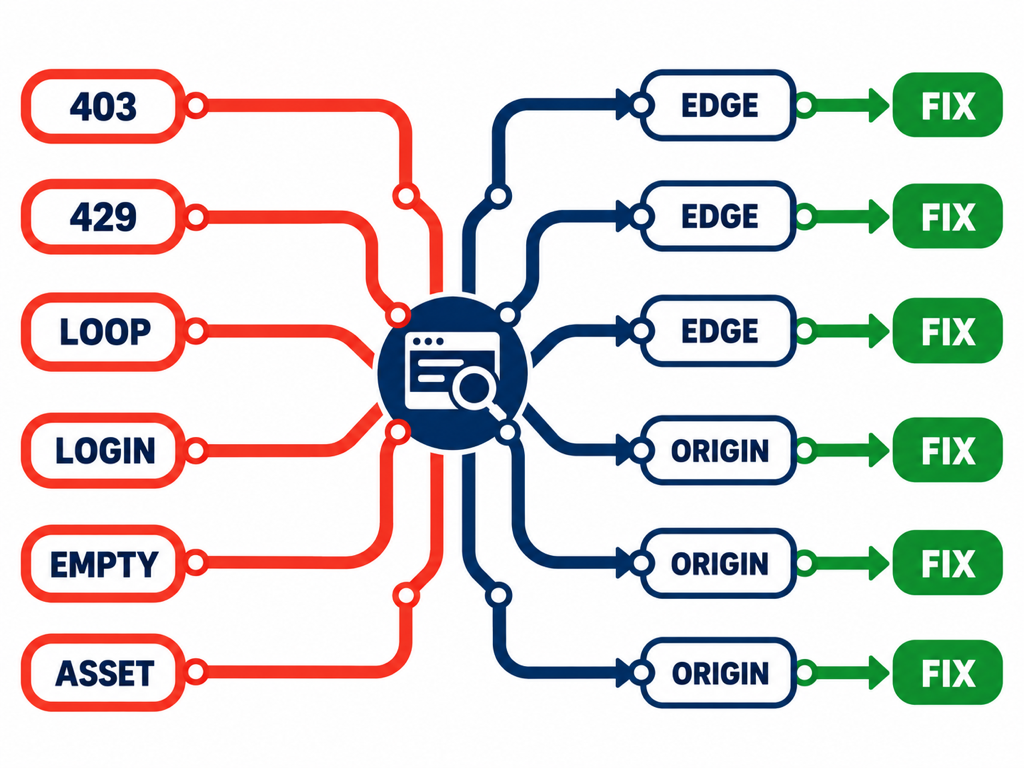
Use the response body as evidence. A successful status with “enable JavaScript,” “access denied,” or an empty root element is not a usable landing page.
Check TLS, DNS, and IPv4 or IPv6 behavior as well. Intermittent failures can occur when only one address family or origin pool is misconfigured.
Validate image hosts, tracking parameters, and resubmission
The ad destination may load its hero image, product data, or essential copy from another hostname. OpenAI's guidance specifically recommends allowing OAI-SearchBot to reach product-image URLs when product feeds are involved, and checking firewall or CDN rules on the image host when a 403 blocks processing.
Test the exact URL with campaign parameters. Analytics middleware sometimes redirects, strips required values, or blocks unfamiliar combinations. Confirm that a crawler request is not charged as an ad click; OpenAI's current ads guidance says review-crawler visits are not billable ad clicks even when third-party analytics classifies them as paid traffic.
After the fix, rerun the layered test before resubmitting. OpenAI says advertisers may need to re-upload or resubmit affected ads if status does not update. Use a small batch first to verify that rate limits and bot controls remain stable.
Maintain a reusable preflight for future campaigns. The best time to discover a crawler block is before media and review timelines depend on the page.
Keep organic AI visibility separate in Topify
Ad validation and organic AI visibility use different systems. Topify can monitor whether the brand appears in organic AI answers, its position and sentiment, and the sources cited for relevant prompts. Establish that baseline before or alongside an ad campaign so paid review traffic and organic answer changes are not blended.
Topify's public overview analytics documentation describes brand metrics, competitor rankings, topic breakdowns, provider filters, and time series. Those outputs help answer whether organic visibility changed during the campaign. They do not reveal ad-review status, replace OAI-AdsBot logs, or attribute a brand mention to ad spend. The article Sponsored vs Cited: When Competitors Buy ChatGPT Ads on Your Queries explains why paid placements and organic citations require separate interpretation.
The operational stack becomes cleaner: infrastructure logs diagnose landing-page access, the ads interface reports review and delivery, and Topify monitors the independent organic-answer layer.
Conclusion
OAI-AdsBot crawlability is a full-path property, not a single robots directive. Test the exact submitted URL through DNS, CDN, WAF, redirects, application rendering, and asset hosts. Inspect response bodies as well as status codes, use narrow verified-bot exceptions, and resolve 403, 429, login, challenge, and geo failures before resubmitting a small campaign batch.
Keep the evidence systems separate. OAI-AdsBot and edge logs explain review access, while ad reporting explains delivery. A Topify organic AI visibility baseline can show mentions and citations without treating paid review traffic as organic performance. That separation shortens diagnosis and produces a defensible campaign report.
FAQ
What is OAI-AdsBot used for?
OpenAI documents OAI-AdsBot as the crawler that validates the safety of web pages submitted as ChatGPT ad destinations and helps assess landing-page relevance.
Is allowing OAI-SearchBot enough for ad review?
No. OpenAI says advertisers must allow OAI-AdsBot. OAI-SearchBot has a different search-discovery role and is recommended separately.
Why does the landing page work for people but fail for the crawler?
Human sessions may carry cookies, pass JavaScript challenges, use an allowed region, or bypass corporate controls. Test the unauthenticated public path through every infrastructure layer.
Should a team resubmit immediately after changing robots.txt?
Verify the final URL, edge behavior, origin response, rendering, and assets first. Then resubmit a small batch if the review status does not recover on its own.