
A publisher can now keep pages eligible for ordinary Bing search while making a different choice about whether those pages inform generated answers. That sounds like a single switch, but Microsoft’s new controls separate model training, AI grounding, crawling, and traditional search. Choosing the wrong layer can remove citation opportunities without resolving the policy concern that triggered the change.
Microsoft AI Grounding therefore needs a content-policy decision before it becomes a technical task. Publishers must decide where an answer may use their material, whether third-party grounding services are acceptable, and which pages carry enough commercial or public-interest value to remain discoverable.
Microsoft AI Grounding controls answer-time use
Microsoft defines AI grounding as using content to help inform a generated response. It is different from training, which changes a model’s learned parameters, and different from indexing a page for traditional Bing results. In its October 30, 2026 announcement, Microsoft introduced three page-level grounding choices.
Allow is the default and keeps the page eligible to inform generated responses. DisallowExtended limits grounding to Microsoft-operated experiences such as Copilot and Microsoft 365 while excluding grounding services Microsoft supplies to third parties. Disallow asks Microsoft not to use the page for grounding.
None of these settings promises a citation, visit, or payment. They set permitted use, not retrieval priority.
| Grounding choice | Microsoft-operated AI | Third-party grounding services | Traditional Bing search |
|---|---|---|---|
| Allow | Eligible | Eligible | Eligible if normal search requirements are met |
| DisallowExtended | Eligible | Excluded | Still eligible |
| Disallow | Excluded | Excluded | Still eligible |
Separate the policy question from crawler access
Grounding preferences do not grant crawler access. A page blocked from Bingbot cannot become available merely because its grounding value is Allow. Conversely, a crawlable page can remain eligible for search while its grounding use is restricted.
This distinction prevents a common configuration mistake. Security or infrastructure teams often treat every AI control as a robots.txt rule that blocks traffic. The grounding control is page-level and may be expressed through a meta tag or an X-Robots-Tag response header. Crawl access, canonicalization, authentication, and index eligibility remain separate layers.
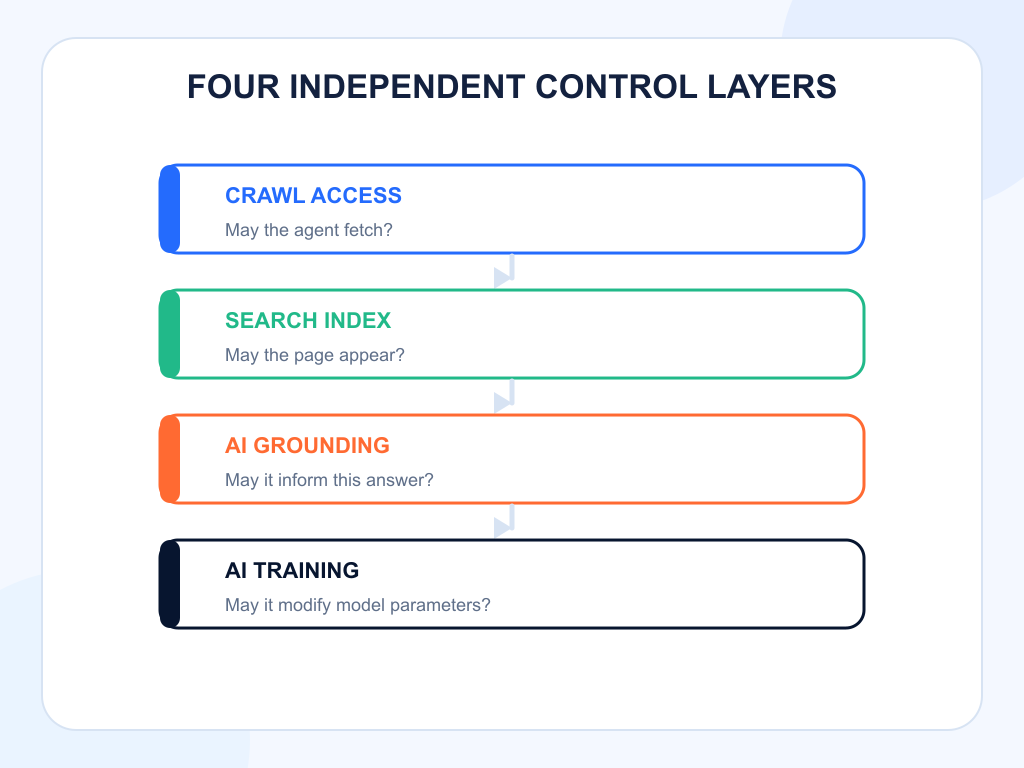
Document those layers in different columns of the policy register. A single “AI blocked” field is too vague to support an audit or explain a visibility change.
Choose by content class, not by domain alone
A site-wide philosophical position rarely matches the economics of every page. A publisher may want public explainers to inform Microsoft-operated answers, licensed reporting to stay out of third-party grounding services, and restricted archives to remain outside grounding entirely.
Use four questions for each content class:
- Does answer-time exposure improve discovery, trust, or public access?
- Does the content contain licensed, personal, subscriber-only, or time-sensitive material?
- Is use inside Microsoft products materially different from use by third parties?
- Can the team measure the visibility or business value at risk?
Marketing pages, public documentation, press resources, and product specifications often benefit from broad discovery. Premium analysis, syndicated material, or pages with contractual restrictions may need narrower treatment. Legal counsel should interpret licenses; the SEO team should quantify the discovery trade-off rather than invent a legal conclusion.
DisallowExtended creates a middle option
The most distinctive new choice is DisallowExtended. It preserves eligibility in Microsoft-operated AI experiences while excluding extended grounding services Microsoft provides to third parties. That can fit a publisher that wants Copilot visibility but does not want the same content available through external grounding APIs.
The trade-off is reach. Microsoft’s announcement warns that either restrictive grounding setting can reduce visibility in AI-generated experiences. A narrower permission may protect a distribution boundary, but it also removes surfaces where the publisher might otherwise earn a citation or brand mention.
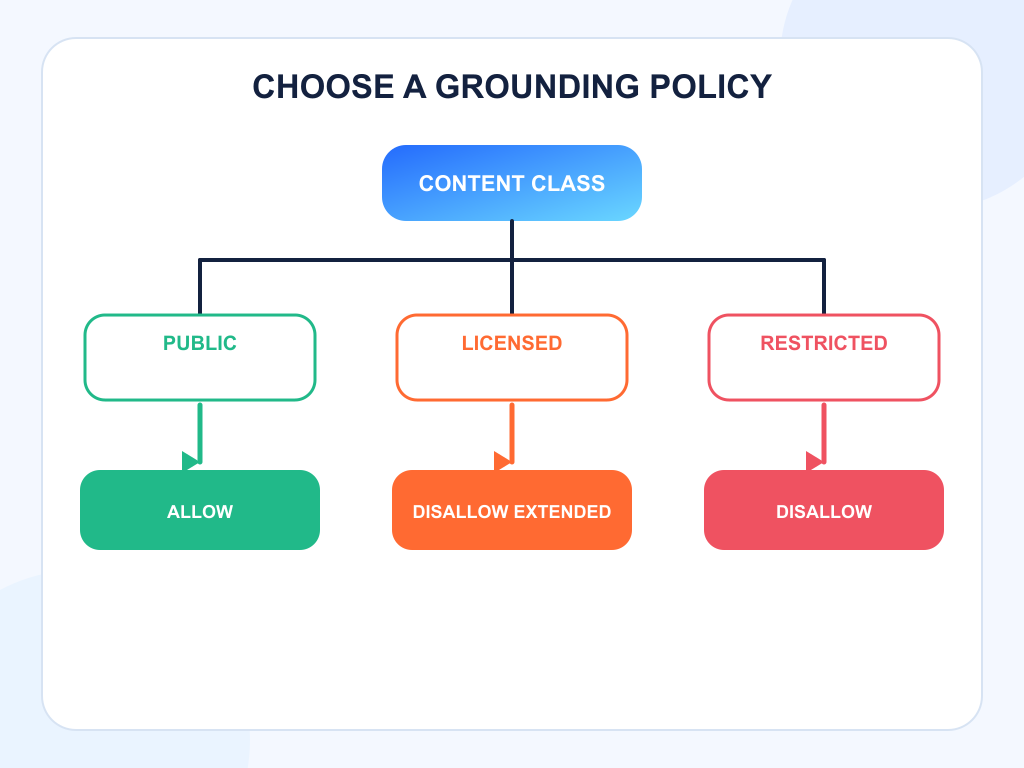
Record the reason, owner, approval date, affected paths, and review date. Without that context, a future engineer may remove the directive as an apparent error or apply it to unrelated pages.
Implementation happens at the page level
Microsoft documents both HTML and HTTP header forms. A page can publish ai-grounding:disallow in a Bingbot meta tag, or return the equivalent value in X-Robots-Tag. The middle choice uses ai-grounding:disallowextended.
Use the response header when templates cannot safely modify page markup, or when the asset is not HTML. Use a meta tag when editorial and engineering teams need the rule visible in the rendered document. Do not set both forms to conflicting values.
Test the final production response, not only a CMS preview. CDNs, reverse proxies, localization layers, and caching rules can remove or duplicate headers. Confirm canonical pages, alternate locales, PDFs, feeds, and error responses independently.
The transition dates change the urgency
Microsoft says the new preferences begin taking effect as pages are crawled from February 1, 2027. Sites relying on NoArchive or NoCache must complete transition steps by March 1, 2027 if they want to maintain grounding restrictions. A temporary Bing Webmaster Tools preference is intended to bridge the period before pages are recrawled, and that temporary state expires on recrawl or September 30, 2027.
That timeline makes inventory work more urgent than code. Teams need to identify current directives, owners, page classes, and intended outcomes before selecting replacement values. A bulk substitution without policy mapping can accidentally broaden use or suppress visibility.
Measure the visibility cost before and after the change
Create a baseline for representative prompts, cited pages, brand mentions, recommendation position, and referral sessions. Keep the prompt set stable across the transition and label pages by grounding policy. Search Console or Bing Webmaster Tools data can show traditional search behavior, while answer-level monitoring shows changes in generated responses.
Topify can provide that answer-observation layer. Build separate prompt groups for public, limited, and restricted content classes, then use AI search analytics to track visibility, positions, cited domains, and response changes over time. The system cannot prove that a meta tag caused a particular model output, so pair the trend with deployment and recrawl evidence. Topify’s related analysis, AI Search Content Controls: What Google’s Generative AI Setting Actually Changes, helps teams keep platform-specific controls from collapsing into one policy.
Use three labels in the report: observed, inferred, and unknown. That language keeps a correlation from becoming an unsupported causal claim.
Set review thresholds before changing the directive
A policy review should define what would justify keeping, narrowing, or reversing the choice. Possible thresholds include a sustained loss of citations from high-value pages, a measurable decline in qualified referrals, a contract change, or evidence that the selected scope does not match the licensed material. Define the observation window and owner before deployment so the team does not react to the first volatile answer.
Also define acceptable uncertainty. Grounding systems do not expose every retrieval decision, and a page can remain uncited even when it is fully allowed. The review should ask whether the intended restriction is active and whether the discovery cost is tolerable, not whether a specific prompt produces a guaranteed result.
For mixed sites, use a staged rollout. Begin with one clearly classified section, verify the production directive, wait for recrawl, and compare it with an unchanged section. Expand only after legal, editorial, and growth teams agree that the technical and commercial outcomes match the approved policy. This approach takes longer than a global toggle, but it creates evidence that can survive a later audit.
Keep the approval record beside the directive inventory. Future teams should be able to see not only what value was deployed, but why the organization accepted the associated discovery cost and scope.
Conclusion
Microsoft AI Grounding is not a binary choice between being searchable and being private. It creates a separate decision about answer-time use, with a middle option for Microsoft-operated experiences and a restrictive option for all grounding. The right value depends on the content class, license, audience value, and tolerance for losing AI discovery.
Start with a page inventory and policy matrix, then test the chosen directive in production and preserve a prompt-level baseline. Topify’s AI visibility monitoring can show whether citations and mentions change after Microsoft recrawls the affected pages, while technical logs confirm whether the policy was actually discovered.
FAQ
What is Microsoft AI Grounding?
It is Microsoft’s term for using web content to help inform generated responses. It is separate from model training and traditional search indexing.
Does DisallowExtended remove a page from Bing search?
No. Microsoft says grounding preferences do not change eligibility for traditional Bing results, subject to normal crawl and indexing requirements.
Where is the grounding preference configured?
It is a page-level value published through a Bingbot meta tag or an X-Robots-Tag response header.
Does Allow guarantee a Copilot citation?
No. Allow makes the page eligible for grounding. It does not guarantee retrieval, citation, traffic, or payment.