

You ran a report last week. Rankings look stable. Average positions haven’t moved much. But organic clicks are down.
That gap between “ranking fine” and “getting traffic” is exactly why learning to read Google Search Console properly matters more now than it did three years ago. GSC is still the most direct, server-side data feed you have for understanding how Google sees your site. But it rewards practitioners who go beyond surface metrics.
This guide covers how to actually use it.
What Google Search Console Measures (and What It Deliberately Skips)
GSC gives you four core metrics in the Search Performance report: Total Clicks, Total Impressions, Average CTR, and Average Position. Each one measures something different, and they interact in ways that trip up a lot of analysts.
An impression is counted when your URL appears in a Google result. A click is counted when a user transitions from the SERP to your page. Average Position is the mean rank of your topmost appearing link across all searches. Here’s the part that trips people up: position is only recorded when an impression occurs, so a page with zero impressions will show no position data at all.
What GSC doesn’t track: direct traffic, social, email, paid ads, or any clicks coming from ChatGPT, Perplexity, or Gemini. If someone finds your brand through an AI answer and types your URL directly, GSC never sees it. That’s not a bug. It’s just a scope boundary you need to plan around.
How to Read the Search Performance Report Without Getting Confused by the Numbers
Open the Search Performance report and you’ll see aggregate numbers across your full property. The data starts to become useful when you filter by dimension: Query, Page, Country, or Device.
The most common misread is treating Average Position as a single, stable number. It’s an average across all searches that triggered an impression, which means a volatile long-tail keyword portfolio can make your “position” look artificially steady even when core rankings are slipping.
The metric interaction that matters most is stable position + declining clicks. That combination typically signals one thing: a zero-click shift. Google’s SERP features answered the query. Your GSC keyword tracking data confirms your ranking; your click data confirms users didn’t need to leave Google to get what they came for.
Zero-click searches now account for approximately 60% of all global searches. On mobile, that number reaches 77.2%. For informational queries where an AI Overview appears, click-through rates can drop by as much as 61%.
How to Find Quick-Win Keywords in Google Search Console
This is the most actionable thing most SEO teams can do in an afternoon.
Filter the Search Performance report for Average Position between 10.9 and 20. Sort the results by Impressions descending. What you’re looking at are keywords where Google already considers your page relevant, but you’re sitting on page two where less than 1% of all organic clicks actually land.
Moving a keyword from position 15 to position 8 can push CTR from roughly 0.78% to around 3%, which is close to a 10x improvement in clicks without acquiring a single new backlink.
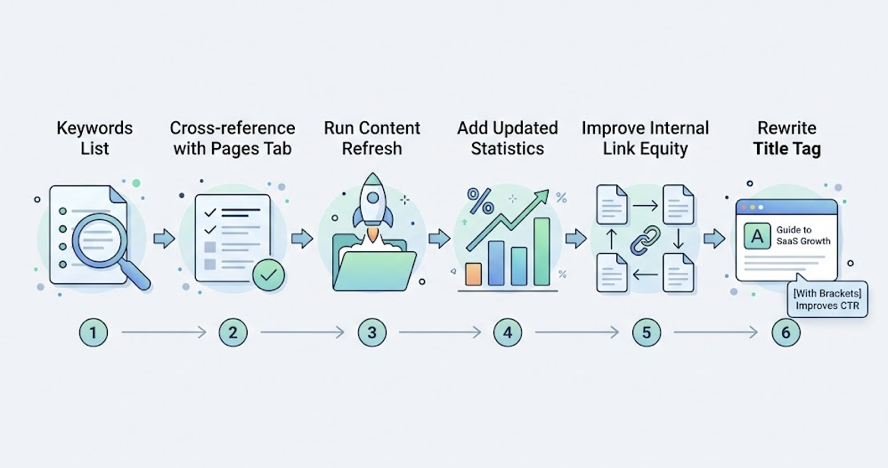
The workflow from there: cross-reference those keywords with the Pages tab to identify which specific URL is ranking. Then run a content refresh. Add updated statistics. Improve the internal link equity pointing to that page. Rewrite the title tag with something more specific. Brackets in titles, for instance, have been shown to improve CTR by nearly 40%.
This is what a functional search performance report is actually for: not just tracking what you have, but surfacing what’s close enough to move.
Google Search Console vs GA4: Two Lenses, Not One
The data mismatch between GSC and GA4 is one of the most frequently asked questions in SEO forums, and it has a straightforward answer: the two tools don’t measure the same thing.
GSC answers “how did Google handle this page in search?” GA4 answers “what did users do after they arrived?” They’re complementary, not redundant.
| Feature | Google Search Console | Google Analytics 4 |
|---|---|---|
| Primary question | How Google sees your site | How users behave on your site |
| Data source | Google’s internal logs (server-side) | Client-side JavaScript |
| Affected by ad blockers | No | Yes |
| Timezone | Fixed to PDT | Configurable |
| Traffic types covered | Google organic only | All channels |
| Real-time capability | 48-72 hour lag (24-hr comparisons as of June 2025) | Near-instant |
How to connect Google Search Console with GA4: Go to GA4 Admin, then Product Links, then Search Console Links. Pair your GSC property with a web data stream. Then publish the Search Console collection in the GA4 Library so it appears in your primary reporting menu. Once linked, you can see which search queries drove specific conversions, something neither tool can show in isolation.
The integrated view is where the real decisions happen.
How to Use Search Console Data to Improve Your Content Strategy
GSC is useful for finding what to create. It’s even more useful for finding what to fix.
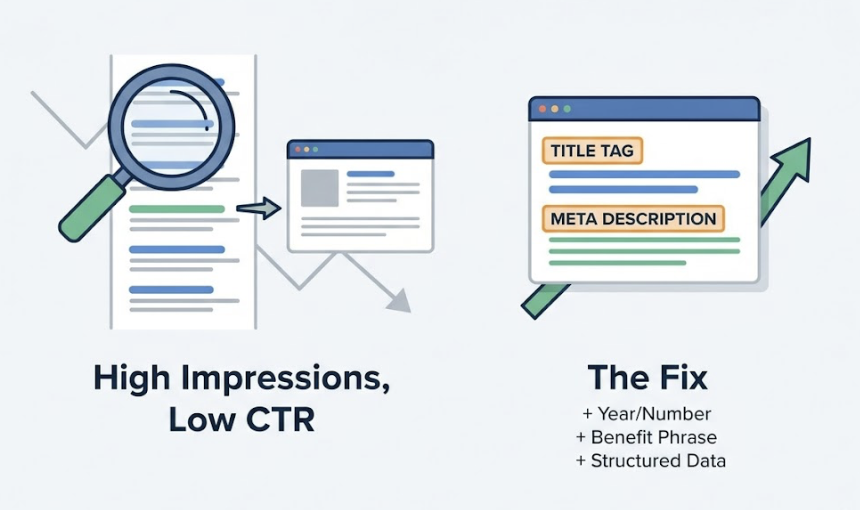
A page with high impressions and low CTR is a clear editorial signal: Google considers you relevant, but your snippet isn’t winning the click. The fix is rarely about the content itself. It’s about the title tag and meta description. Adding a specific year, a number, or a benefit-forward phrase often shifts the click equation meaningfully. Structured data markup for FAQs and reviews can increase clicks by up to 58% in the right categories.
Content decay shows up differently. A page that used to rank well but is now at position 12-18 with steady impressions tells you the content is aging, not irrelevant. That’s a refresh candidate. Bloggers who update old posts are 2.5x more likely to report strong results compared to those who focus only on publishing new content.
Use the Country filter to identify regional performance gaps. If a page drives strong impressions in the UK but weak clicks, the problem might be localization, not rankings.
And don’t skip sitemap submissions. Sites with XML sitemaps get indexed 33% faster, which matters whenever you’re publishing time-sensitive content or launching new product pages.
How to Fix Crawl Errors Found in Google Search Console
The Coverage report is where silent technical problems surface.
“Errors” are unintentional failures: 404s, 5xx server errors, redirect loops. “Excluded” pages are usually intentional (noindex tags, canonical redirects) and don’t need immediate action. The distinction matters because practitioners who treat all excluded URLs as problems end up chasing ghosts.
Persistent 5xx server errors are the most urgent. Google de-prioritizes unreliable sources fast. If your server is timing out on Googlebot requests even occasionally, that’s a ranking risk that no amount of content optimization can offset.
Use the URL Inspection tool for individual page debugging. It renders the page exactly as Googlebot sees it, making it possible to identify JavaScript dependencies that are failing to load or resources Googlebot can’t access.
Pages that meet Core Web Vitals thresholds are 24% less likely to be abandoned by users. A one-second delay in load time correlates with a 7% reduction in conversion rates. CWV isn’t glamorous, but it functions as a tie-breaker when two pages are otherwise equivalent in quality and authority.
The Traffic Google Search Console Can’t See
Here’s the structural problem with relying on GSC as your only source of search truth.
Organic traffic across diverse industries has declined by a median of 10% to 14%, even as total search query volume reaches record highs. That gap isn’t a measurement error. It’s a structural shift: AI search engines and AI Overviews are intercepting a growing share of queries and delivering answers without routing users to external pages.
GSC has no visibility into this. If your brand appears in a ChatGPT or Perplexity answer 500 times today, your GSC dashboard shows nothing. If AI platforms are misrepresenting your product, positioning you incorrectly, or not citing your content at all, GSC can’t alert you.
The metric that’s emerging as a leading indicator here isn’t backlinks. It’s brand mentions. Brand mentions across the web correlate with AI search visibility at a coefficient of 0.664, compared to just 0.218 for traditional backlinks. Perplexity, for instance, draws 46.7% of its top citations from Reddit. ChatGPT skews toward Wikipedia, major publications, and high-authority review platforms.
This is where a tool like Topify closes the gap. Topify tracks how AI platforms, including ChatGPT, Gemini, and Perplexity, are responding to prompts relevant to your brand. Its Source Analysis feature maps exactly which domains and URLs AI engines are citing in your category, so you can identify where your content is missing from the conversation and which third-party sources are worth prioritizing for mentions or contributions.
For teams already fluent in GSC, Topify functions as the adjacent layer: GSC tells you how Google ranks you, Topify tells you what AI says about you. Both are now necessary for a complete picture of search visibility.
If you’re ready to see where your brand stands in AI search, you can get started with Topify alongside your existing GSC setup.
Conclusion
Google Search Console is still the most authoritative free dataset for understanding how Google processes your site. The Search Performance report, the Coverage diagnostic, and the URL Inspection tool give you more actionable insight than most paid platforms offer for the same data category.
But the definition of search performance is changing. Ranking #1 on Google and capturing 27.6% to 39.8% of available clicks is meaningfully different from ranking #1 in 2026, when an AI Overview can cut that same position’s CTR by 32% before anyone scrolls down. GSC shows you what happened on Google. Building a complete view of your brand’s search presence now requires tracking what AI says, too.
Start with the fundamentals: clean up your Coverage report, run the Page 2 keyword workflow, link GSC to GA4, and refresh your highest-impression, lowest-CTR pages. Then extend your measurement framework to cover AI search. That’s the sequence.
FAQ
Q: How do I use Google Search Console to analyze website traffic?
A: Open the Search Performance report and switch between the Query, Page, Country, and Device dimensions. Clicks tell you actual traffic; Impressions tell you exposure. The combination of high impressions with low CTR is your most actionable signal. As of the June 2025 update, you can also run 24-hour comparisons to catch sudden traffic drops faster.
Q: How do I connect Google Search Console with GA4?
A: In your GA4 property, go to Admin, then Product Links, then Search Console Links. Select your GSC property and pair it with your web data stream. Once linked, publish the Search Console collection in the GA4 Library. You’ll then be able to see which search queries are driving specific conversions, something neither platform shows on its own.
Q: How do I find quick-win keywords in Google Search Console?
A: Filter the Search Performance report by Average Position (greater than 10.9), then sort by Impressions descending. Keywords between positions 11 and 20 are your quick wins: Google already considers your page relevant, and a targeted content refresh can move these rankings to page one, where click-through rates jump roughly 10x.
Q: What’s the difference between Google Search Console and Google Analytics?
A: GSC shows how Google processes and displays your site in search results. GA4 shows what users do after they arrive. GSC is server-side and unaffected by ad blockers; GA4 relies on client-side JavaScript and can miss traffic from privacy-conscious users. Use GSC to optimize visibility and rankings, use GA4 to optimize user behavior and conversion paths, and connect both for a complete view.