
You’re probably already getting traffic from ChatGPT and Perplexity. You just can’t see it.
Most of it is landing in your GA4 as “Direct” or “Unassigned.” Not because tracking is broken, but because the default setup was never designed for a world where AI platforms send users to websites. The referrer handshake gets stripped before it arrives. The session gets miscategorized. And the visit disappears into a bucket you’re not watching.
This is the attribution blind spot that’s quietly growing larger every month.
Here’s what’s actually happening, why it matters, and what you can do about it.
AI Referral Traffic Is Already in Your GA4. You’re Just Not Seeing It.
Approximately 70.6% of every AI referral arriving at a website is invisible in Google Analytics 4, classified as “Direct” or “Unassigned.” That number isn’t a rounding error. It’s a structural problem rooted in how modern browsers handle referrer headers.
When a user clicks a link inside ChatGPT or Perplexity, the browser applies a strict-origin-when-cross-origin policy by default, which now governs over 90% of global web traffic. In practice, this strips the path and query string from the referrer header, leaving GA4 with just the base origin at best, or nothing at all.
It gets worse at the premium tier. ChatGPT’s paid accounts frequently use the rel="noreferrer" attribute on outbound links, which explicitly blocks any referral information from passing through. These are your highest-intent visitors, the ones who pay for the product, and they’re the most likely to show up as ghosts in your dashboard.
Native mobile apps compound the problem further. When an AI app opens a link inside a WebView or in-app browser, those environments increasingly strip referrers to comply with cross-app tracking restrictions. As AI discovery shifts toward mobile assistants, the “Direct” bucket will keep growing.
That’s the gap most brands still can’t see.
| Scenario | What GA4 Shows |
|---|---|
| HTTPS AI Site → HTTPS Brand Site | Referral (origin only) |
| HTTPS AI Site → HTTP Brand Site | Direct / (none) |
| Paid ChatGPT account click | Direct / (none) |
| Mobile AI app (WebView) | Direct / (none) |
| User copies and pastes AI recommendation | Direct / (none) |
Why AI Search Traffic Behaves Nothing Like Organic Search
Before setting up tracking, it’s worth understanding what you’re actually measuring, because AI search traffic and traditional organic traffic are fundamentally different products.
When someone clicks from a Google result, they’re still exploring. They’ve seen a title and a meta description. They’re not sure you’re the answer yet.
When someone clicks from a Perplexity or Gemini citation, the AI has already synthesized a recommendation on their behalf. The information-gathering phase happened inside the interface. The website visit is the transaction.
This “pre-qualification effect” shows up directly in the data. Analysis across 101,000 websites and nearly 2 million AI-driven sessions shows that AI referral traffic converts at 1.94% on average, compared to 1.14% for traditional organic search. For sign-up flows, the gap is even wider: AI-referred users convert to sign-ups at 1.66%, versus 0.15% for organic. That’s an 11x difference.
AI-referred visitors do spend less time on-site and visit fewer pages. That’s not a quality problem. They already have what they need from the AI interface. They came to your site to act, not to browse.
| Metric | Traditional Organic Search | AI Referral Traffic |
|---|---|---|
| Avg. Conversion Rate | 1.14% | 1.94% |
| Sign-up Conversion Rate | 0.15% | 1.66% |
| Subscription Conversion | 0.55% | 1.34% |
| Avg. Pages per Session | 2.52 | 1.86 |
| High-Intent Page Penetration | 0.13% | 0.46% |
The volume is still small. AI search traffic accounts for roughly 0.15% to 0.25% of total global internet traffic. But the ROI profile is closer to a paid channel than organic. Treating it as background noise is a missed opportunity.
How AI Search Engines Actually Send Traffic to Your Website
Not all AI-driven traffic works the same way. There are three distinct mechanisms, and each requires a different tracking approach.
Inline citation links are the most direct. Perplexity, Gemini, and increasingly Copilot place numbered or hyperlinked sources directly within the response body. These generate identifiable referral sessions and are the easiest to track.
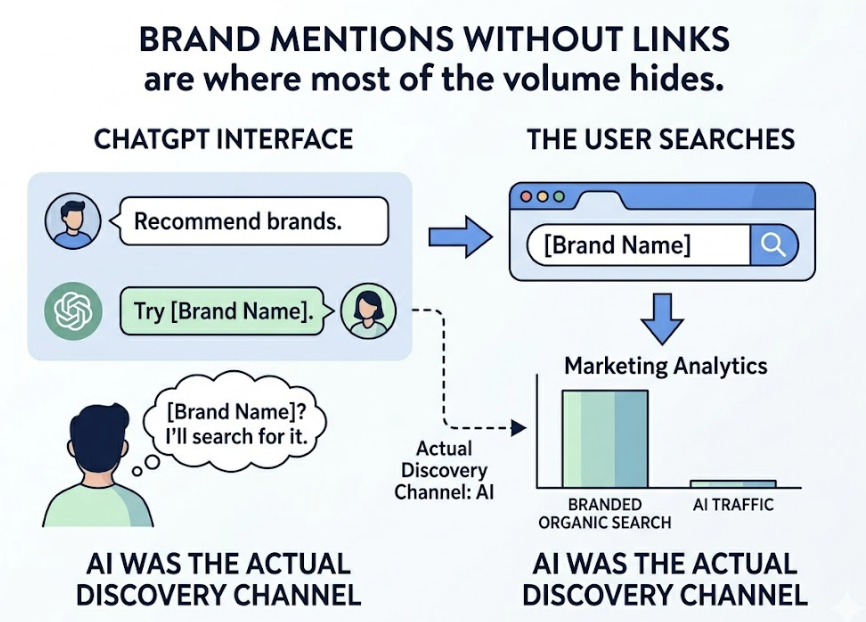
Brand mentions without links are where most of the volume hides. ChatGPT frequently recommends brands by name without attaching a URL. The user reads the recommendation, then opens a new tab and searches for the brand name. This shows up in your analytics as branded organic search, not AI traffic, even though the AI was the actual discovery channel.
Source bibliographies appear at the bottom of AI responses as a “Sources” or “Read More” section. These generate real referral traffic, but the click-through rate is lower than inline citations because the user has to scroll past the answer to find them.
This creates what researchers call the “Mention-Source Divide.” An AI platform might cite your content for accuracy while recommending a competitor by name. Or it might recommend your brand without ever linking to you. Currently, 73% of AI brand presence consists of “Ghost Citations” where a website is used as a source but the brand name is never explicitly recommended in the answer.
Understanding which of these three mechanisms is driving your brand matters for how you optimize.
How to Set Up AI Search Traffic Tracking in GA4
The goal here is to rescue the identifiable AI referral traffic from the generic “Referral” bucket and give it its own channel. Here’s the setup.
Step 1: Create a Custom Channel Grouping
In GA4, go to Admin > Data Display > Channel Groups. Copy the default grouping to preserve your historical data, then create a new channel called “AI Search” or “LLM Traffic.”
Set the condition to “Source matches regex” and use this pattern:
chatgpt\.com|chat\.openai\.com|perplexity\.ai|gemini\.google\.com|claude\.ai|copilot\.microsoft\.com|deepseek\.com|grok\.com|x\.ai|openai\.comOne step that most guides skip: drag the “AI Search” channel to the very top of your channel list. GA4 evaluates rules sequentially. If “Referral” sits above “AI Search,” the AI traffic gets captured by the first matching rule and never reaches your custom category.
Step 2: Track Google AI Overviews Specifically
Google AI Overviews append a fragment like #:~:text= to links they serve. GA4 strips these by default. Create a custom dimension for the full page URL to isolate these AI-specific entry points. Brands cited in Google AI Overviews earn 35% more organic clicks than those not cited, even when both rank in the top 10 organically.
Step 3: Build an AI Referral Segment
In GA4 Explorations, create a dedicated AI Referral segment. This lets you compare session quality between AI-referred users and traditional organic users, specifically bounce rate, session duration, and conversion rate per channel.
Step 4: Track Branded Search as a Proxy Signal
Since GA4 can’t capture the noreferrer traffic, use Google Search Console to monitor branded search volume. When your AI visibility increases, branded search typically follows. A rising correlation between AI mention rate and branded query volume is your indirect attribution signal for unlinked mentions.
| Tracking Layer | Method | What It Captures |
|---|---|---|
| Direct measurement | Custom Channel Grouping | Identifiable AI referrals |
| Proxy signal | Branded search in GSC | Unlinked AI brand mentions |
| Technical hygiene | Server log analysis | Bot vs. real user validation |
| Deep content spikes | Direct traffic segmentation | Noreferrer high-intent sessions |
The AI Search Visibility Landscape in 2026: More Platforms Than You Think
Here’s something worth building into your tracking setup from day one: the AI referral market is no longer a one-platform story.
ChatGPT’s referral share dropped from 86.7% in January 2025 to 64.5% in January 2026. That’s a 22-point decline in 12 months. Meanwhile, Gemini’s referral traffic to external websites grew 115% between November 2025 and January 2026, a pace 12x faster than earlier in the year, enough to overtake Perplexity in global referral volume.
Microsoft Copilot grew from 2.1% to 12.8% of referral share over the same period. DeepSeek captured 4.2% of AI traffic share almost immediately after launch.
| AI Platform | Jan 2025 Referral Share | Jan 2026 Referral Share |
|---|---|---|
| ChatGPT | 86.7% | 64.5% |
| Google Gemini | 5.7% | 21.5% |
| Perplexity AI | 8.6% | 5.5% |
| Microsoft Copilot | 2.1% | 12.8% |
| Claude (Anthropic) | 0.6% | 4.9% |
| DeepSeek | <1% | 4.2% |
A strategy that only optimizes for ChatGPT is now ignoring over 35% of the generative traffic market. Your GA4 regex, your content strategy, and your monitoring setup all need to account for this fragmentation.
Why GEO Visibility Doesn’t Automatically Translate to Traffic (And What CVR Actually Measures)
This is the insight most brands miss.
Being mentioned by an AI platform and receiving website traffic from it are two very different things. An AI can recommend your brand dozens of times per day without generating a single trackable session. This happens in zero-click environments, where the AI provides a complete enough answer that the user has no reason to click through.
The metric that bridges this gap is CVR (Conversion Visibility Rate): the ratio of actual website visits to the number of times a brand was mentioned or cited across a set of prompts. A high visibility score with a low CVR tells you the AI is using your brand to answer questions without sending traffic. A lower visibility score with a strong CVR tells you that when you do get mentioned, your brand positioning drives action.
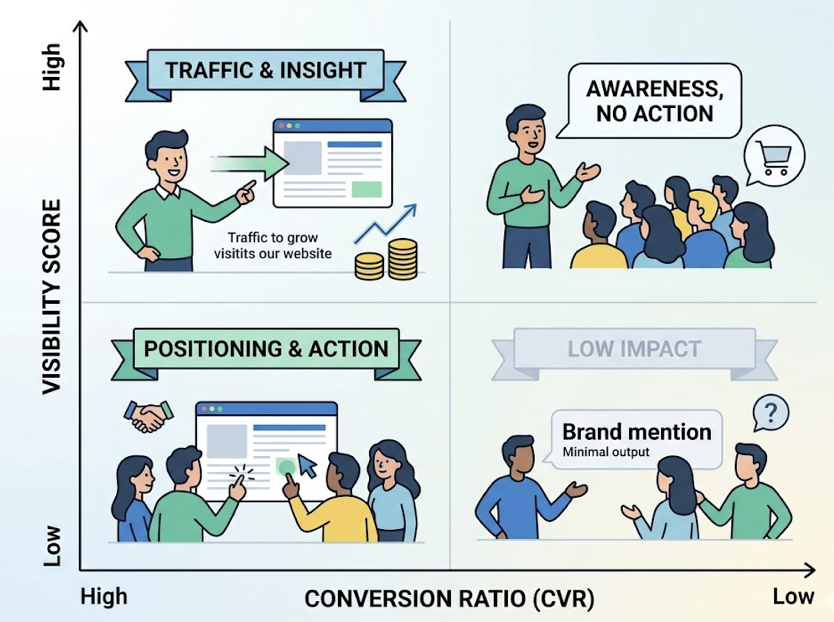
Several factors directly influence CVR. First-position recommendations matter most: AI citations that appear in the first 30% of a response receive the majority of clicks. The sentiment context matters too. If an AI consistently frames your brand as a budget option when your actual positioning is premium, users ignore the recommendation even when they see it.
This is where Topify fills a gap that GA4 can’t. Topify’s CVR metric tracks the efficiency of your AI visibility across ChatGPT, Gemini, Perplexity, DeepSeek, and other major platforms, not just whether you appear, but whether that appearance drives real traffic. Combined with its AI Volume Analytics, which surfaces the high-intent prompts where your brand currently gets no visibility, and Source Analysis, which shows which of your pages AI platforms are actually citing, it gives you a complete picture of why your GEO visibility is or isn’t converting to sessions.
Most analytics tools tell you how much traffic arrived. Topify tells you how much visibility you left on the table.
How to Grow Website Traffic Through AI Platform Visibility
Once tracking is in place, the growth question becomes: what makes AI platforms more likely to cite and recommend your brand with a link?
Content with higher factual density improves AI visibility by 41%. Pages that lead with verifiable statistics, specific numbers, and expert attributions are more likely to be cited because AI systems use them as reliable evidence. Strict hierarchical heading structure (H1/H2/H3) increases citation likelihood by 2.8x because it maps cleanly to how AI models parse and extract content.
One structural pattern stands out: “Answer Capsules,” a concise summary of the key point placed in the first 30% of the text, account for 44% of AI citations. If your content buries the answer below the fold, AI platforms are less likely to use it.
On the technical side, 69% of AI crawlers cannot execute JavaScript. If your content depends on client-side rendering, large portions of it are simply invisible to these systems. Server-side rendering isn’t optional for AI discoverability.
Three levers worth prioritizing:
Expand prompt coverage. Most brands are visible for a narrow set of queries. Using AI Volume Analytics (available in Topify’s Pro plan) surfaces the high-volume prompts in your category where competitors are being recommended and you’re not. That’s where the growth surface is.
Fix the source-mention gap. If Source Analysis shows that AI platforms are citing your pages but not mentioning your brand by name, the content is being used as evidence without you getting credit. Restructuring those pages to make the brand’s role explicit in the answer text fixes this.
Monitor competitor positioning. AI recommendations shift. A competitor that’s currently ranked second in ChatGPT responses can move to first within weeks if they publish the right content. Topify’s Competitor Monitoring tracks position changes across platforms in real time, so you see the shift before it affects your traffic numbers.
Conclusion
AI search traffic is already a real channel. It’s small by volume, but the conversion data is hard to argue with: higher sign-up rates, higher subscription rates, and users who arrive with intent already formed.
The problem isn’t the traffic. It’s the infrastructure. Most brands are running a 2023 analytics setup in a 2026 discovery environment. The fix is straightforward: custom GA4 channel groupings, branded search monitoring as a proxy signal, and a measurement layer that connects GEO visibility to actual sessions.
Getting that infrastructure right is the first step. Growing from there requires knowing which prompts drive traffic, which platforms are sending it, and whether your brand is being cited or just mentioned. Those are questions GA4 alone can’t answer.
FAQ
How do I track traffic coming from ChatGPT and Gemini?
In GA4, create a Custom Channel Grouping using a regex pattern that includes chatgpt\.com, openai\.com, gemini\.google\.com, and other AI platform domains. Drag this rule to the top of your channel list so it captures traffic before the generic “Referral” rule does.
Why are AI platforms becoming a new traffic source?
AI search engines use Retrieval-Augmented Generation (RAG) to find and synthesize web content. When they cite sources, they give users a direct path to verify or act on a recommendation. This turns the AI interface into a pre-qualification layer that filters out low-intent users before they ever reach your website.
How do I measure the conversion rate of AI search traffic?
Once AI traffic is isolated in its own GA4 channel, apply it as a filter in your User Acquisition or Ecommerce reports. Compare “Session Conversion Rate” for the AI channel against your organic search baseline. Expect AI-referred traffic to convert at a higher rate with lower pages-per-session.
What metrics matter most for measuring AI search traffic performance?
The three to prioritize are AI Share of Voice (how often you appear vs. competitors across relevant prompts), Citation Rate (how often your appearance includes a clickable link), and CVR (how efficiently your AI visibility translates into actual website sessions).
How do I attribute revenue to AI search traffic sources?
Combine identifiable referral revenue tracked in GA4 with branded search volume data from Google Search Console. Because AI brand mentions without links often result in a branded search, a rising correlation between AI visibility growth and branded query revenue is your primary attribution signal for unlinked discovery.
How do I track referral traffic from Perplexity and DeepSeek specifically?
Add perplexity\.ai and deepseek\.com to your GA4 regex pattern alongside the other AI platform domains. Monitor them as separate dimensions in your Explorations report to see platform-level volume differences. DeepSeek captured 4.2% of global AI referral share within weeks of its major launch, so it’s worth tracking from the start.