
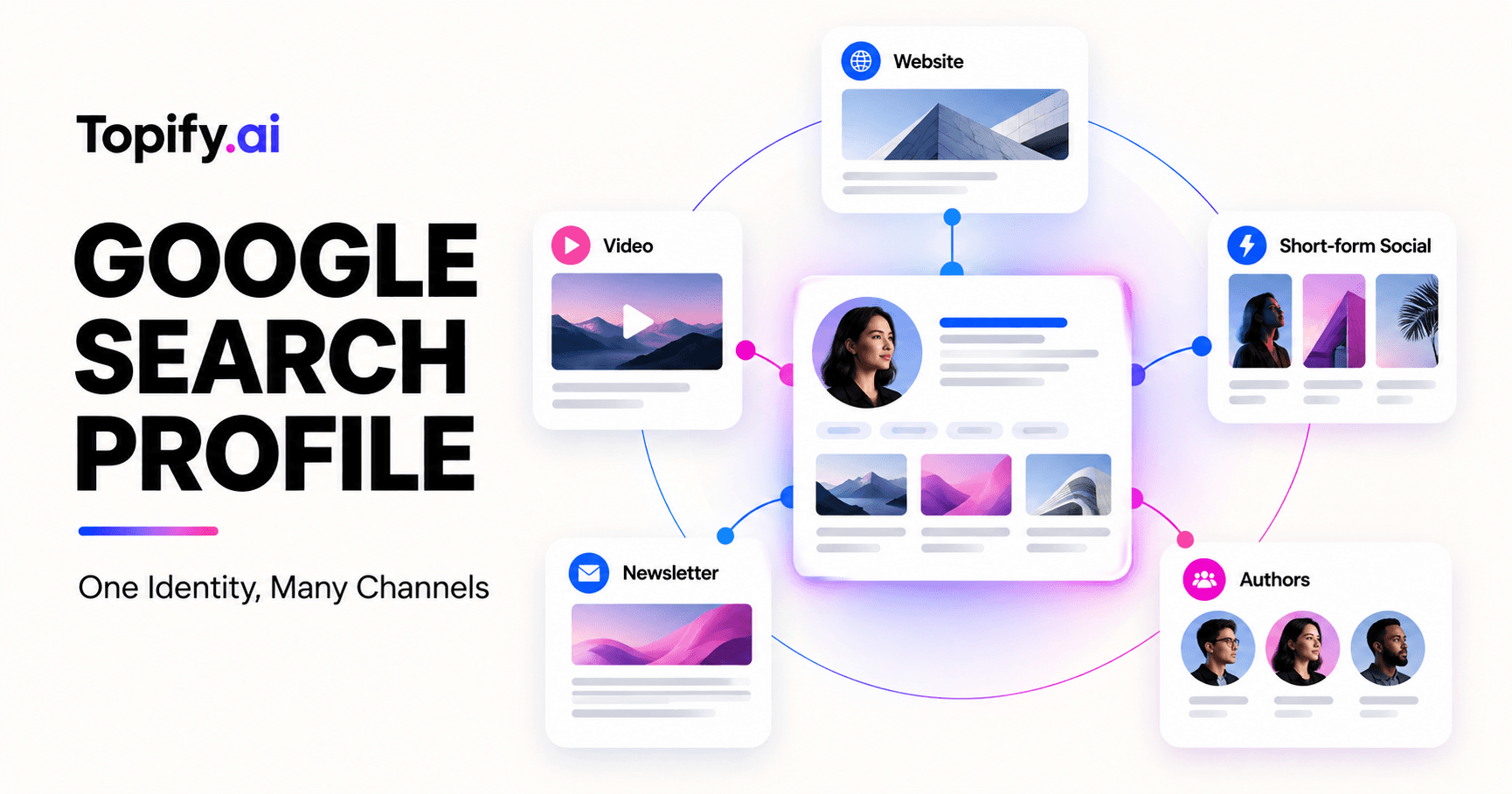
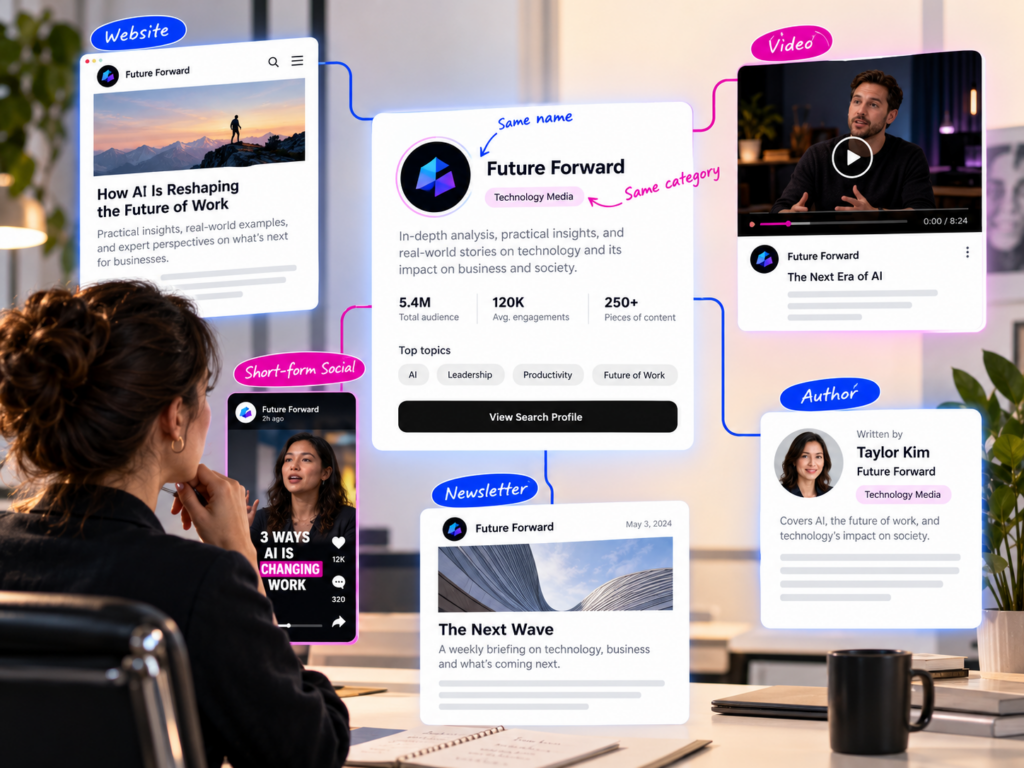
A publisher has a website, newsletter, YouTube channel, TikTok account, and several author profiles. Each channel is active, but names, avatars, and bios have drifted. A reader who finds one account cannot easily verify which other accounts belong to the same publisher.
A Google Search profile offers a single destination that brings linked web and social content together. The opportunity is identity consolidation and audience discovery, not a guaranteed ranking lift. Before adding a badge, publishers should claim the correct profile, align their public identity, choose an accessible placement, and decide how they will measure adoption without confusing correlation with causation.
A Google Search Profile Consolidates Discovery, Not Ownership
Google’s Search profile documentation describes a profile as a destination that brings together content from a website and social platforms. Examples include Instagram, TikTok, YouTube, X, Facebook, and the publisher’s site.
When readers follow a Search profile, Google says content linked on that profile is more likely to appear for those readers in Discover. That is a personalized audience relationship, not a general promise that every linked page will rank higher for everyone.
Set the right objective:
- help readers verify the publisher’s official identity;
- connect content distributed across several public channels;
- give loyal readers a way to follow that identity in Google;
- reduce confusion created by outdated or unofficial profiles.
A Search profile does not transfer control over a social platform account. Each channel still has its own verification, security, publishing, and moderation process.
Document which team owns the profile and which accounts are authorized to appear. Without ownership, the profile can become another stale surface.
Claim the Profile Before You Add the Badge
Google’s implementation sequence begins after the publisher has claimed the Search profile. Do not promote a badge or profile URL until the intended identity is verified and the linked content has been reviewed.
Use this preflight:
- Confirm the exact profile handle and public URL.
- Review linked website and social accounts for ownership.
- Check display name, logo, description, and current destination URLs.
- Remove or correct obsolete channels where the product allows it.
- Record the owner, recovery path, and review cadence.
- Test the profile while signed out where possible.
Google documents the profile URL pattern as https://profile.google.com/@handle. Use the exact claimed handle rather than constructing a guess.
Account security belongs in the launch checklist. A consolidated profile can make impersonation easier to detect, but it also raises the impact of losing access. Use the account provider’s current security controls and maintain an internal recovery owner.
Audit Identity Consistency Across Connected Channels
A profile can connect fragmented channels without resolving their contradictions. Before launch, create a simple identity matrix.
| Identity field | What should align | Acceptable variation | Risk when inconsistent |
|---|---|---|---|
| Name | Recognizable publisher or creator name | Platform length constraints | Readers cannot verify the official account |
| Logo or portrait | Same current visual identity | Crop and aspect ratio | Old branding creates false affiliation cues |
| Description | Core category, audience, and value proposition | Channel-specific emphasis | AI and users receive conflicting positioning |
| Website URL | Current canonical destination | Campaign tracking parameters | Traffic and authority split across old domains |
| Social handles | Official accounts controlled by the publisher | Platform naming limits | Impersonators look equally credible |
| Publication cadence | Active channels and current content | Format-specific frequency | Profile promotes abandoned destinations |
| Location or market | Truthful service or editorial scope | Localized language | Wrong regional expectations |
Do not force every bio to be identical. A video channel can emphasize demonstrations while a newsletter emphasizes analysis. The shared entity facts should remain consistent even when channel descriptions adapt to the audience.
Check whether old domains redirect correctly and whether profile pages use current sameAs relationships where relevant. Google’s ProfilePage structured data guidance supports sameAs links to other external profiles, but markup must still reflect the visible page.
Place the Badge Where Readers Can Act on It
Google provides an official Search profile badge and a text-link alternative. The badge should appear where a reader has enough context to decide whether following the publisher is useful.
Good locations include:
- author or publication profile pages;
- article bylines or end-of-article follow modules;
- newsletter signup and confirmation pages;
- site footer areas dedicated to official channels;
- creator bio pages that already list social destinations.
Avoid placing the badge inside a crowded cluster of unrelated promotional buttons. The action should have a clear label and a reason.
Google’s example uses a normal link to the Search profile URL with an aria-label and an image whose alt text identifies Google Search. A text link such as “Find us on Google Search” is also documented for bylines, newsletters, or bio links.
Measure the click from your site without changing the destination into an unverified redirect chain. Use normal analytics events and respect user privacy.
Meet Accessibility and Brand-Asset Requirements
Google says the clickable target should be at least 48 × 48 dp on Android and 44 × 44 px on iOS and web. It also says not to stretch, rotate, recolor, or otherwise distort the official “Super G” icon and button assets.
Accessibility is broader than target size. Maintain visible focus, keyboard activation, sufficient contrast, meaningful link text, and a logical reading order. Test at high zoom and with a screen reader.
If the Search profile badge appears beside a Preferred Sources badge, Google recommends using the higher-emphasis Search profile button with its label for clarity. It also advises against using the Super G icon alone for the Search profile in that paired context.
Create a design-system component rather than pasting one-off markup across templates. The component can enforce target size, focus style, approved asset, destination format, analytics event, and theme behavior.
Separate Search Profile Effects From Discover Performance
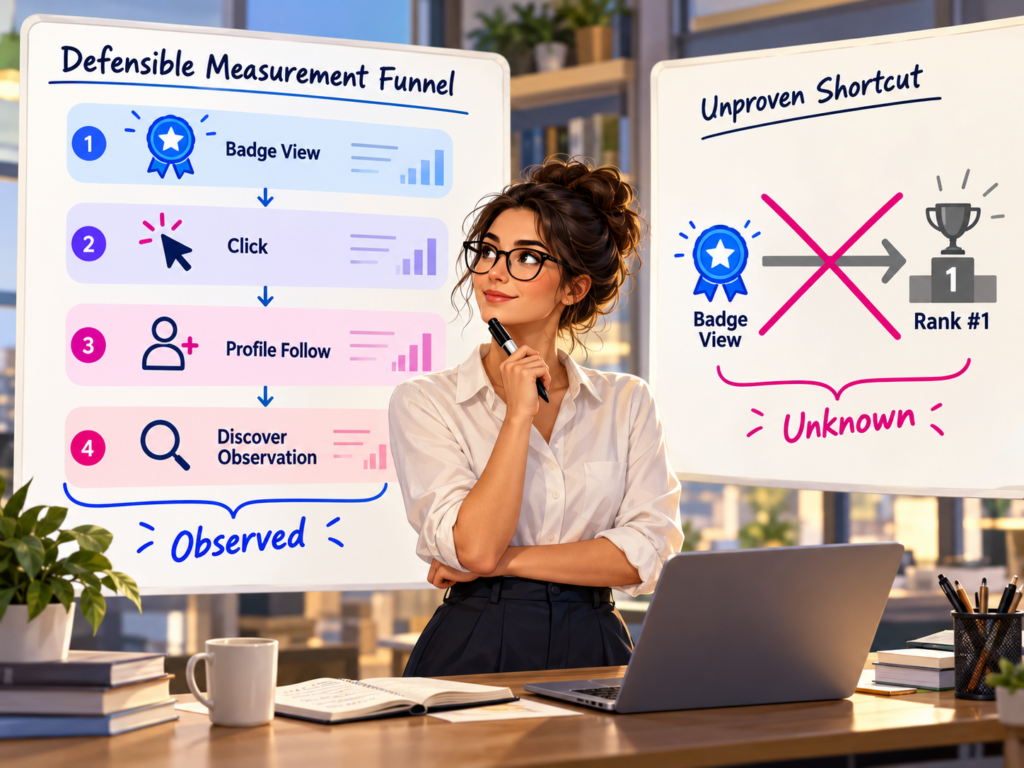
A rise in Discover traffic after the profile launches does not prove that the profile caused it. Content quality, topic demand, publication cadence, imagery, and Google’s systems may change at the same time.
Measure the rollout as a chain of observable steps:
- badge impressions on your site;
- badge or text-link clicks;
- profile views or follows where data is available;
- repeat visits and engagement from relevant surfaces;
- Discover impressions and clicks;
- changes in branded search and direct navigation;
- support questions or impersonation reports.
Use a staged implementation if the site has several templates. Start with profile and byline pages, confirm the component works, then expand to other placements.
Do not promise authors that the badge will increase their rankings. Explain the documented outcome: it helps readers find the Search profile, and following can make linked content more likely to appear for that reader in Discover.
Monitor Cross-Surface Brand Consistency
After launch, review the profile and connected accounts on a schedule. Recheck after rebrands, acquisitions, domain moves, major product launches, and channel closures.
Topify offers a Brand Profile Checker that can show how selected AI platforms describe a brand’s positioning and associated competitors. Use it as one diagnostic input alongside the publisher’s own profile inventory, search data, analytics, and platform records.
Look for mismatches that affect reader decisions: old product names, retired domains, incorrect markets, outdated executive biographies, and unofficial accounts treated as authoritative.
Assign the fix to the source that owns the error. Updating one profile will not automatically correct an outdated third-party article or an AI answer using another source.
The operational goal is a consistent public identity with clear ownership, not identical wording everywhere.
Conclusion
A Google Search profile can give publishers and creators one recognizable destination for web and social content. Its value comes from identity clarity and an audience follow action, not from a guaranteed ranking effect.
Claim the correct profile, audit connected channels, and resolve conflicting names, logos, descriptions, and URLs before promotion. Implement the badge as an accessible, reusable component in places where readers understand the action. Then measure views, clicks, follows, and Discover performance as separate stages. Assign an owner to review linked channels after every rebrand, domain move, or account closure. A profile works best when it becomes part of ongoing identity governance, not a badge installed once and forgotten.
FAQ
What is a Google Search profile?
It is a Google destination that brings together a publisher’s or creator’s linked content from a website and social platforms.
How do I claim a Google Search profile?
Use Google’s current Search profile claiming flow, confirm the intended handle and identity, and review the linked channels before adding the badge to your site.
Does a Search profile improve rankings?
Google does not document a general ranking guarantee. It says that following a Search profile makes linked content more likely to appear for that reader in Discover.
Where should I place the Search profile badge?
Use high-context locations such as bylines, profile pages, end-of-article follow modules, newsletters, and official-channel areas in the footer.