


Here’s what happens after your AI finishes writing:
Format the doc. Upload to CMS. Write the meta title and description.Set the slug. Choose categories and tags. Schedule the publish date.Then someone hits publish. If they remember.
None of these steps require a human. Most teams still do all of them by hand. That’s not an AI problem. It’s a pipeline problem, and it’s where most content teams quietly lose the productivity gains they thought they’d already captured.
The 6 Steps Between “Draft Ready” and “Post Live” That Nobody
The writing part is largely solved. AI can produce a 1,500-word draft
in under 20 minutes. What comes after is where the hours go.
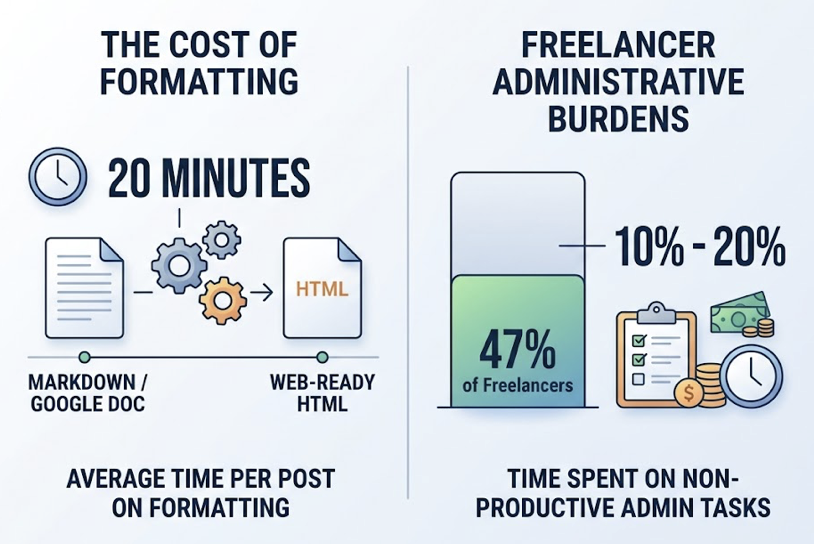
Research into content workflow overhead shows that professionals spend an average of 20 minutes per post on formatting alone, converting from Markdown or Google Docs into web-ready HTML. That’s before anyone touches the CMS. And 47% of freelancers, who form the backbone of most content teams, report spending 10% to 20% of their time on unproductive administrative tasks.
Here’s what the full sequence actually looks like:
1. Document formatting. Markdown doesn’t translate cleanly to CMS rich text. Heading levels break. Tables malform. Image paths go missing. Someone has to fix each one manually.
2. CMS upload and field mapping. WordPress’s Gutenberg editor
expects content in serialized block format. Paste plain text and you
get a single “classic” block, stripping the layout the designer intended. That means rebuilding the post structure by hand inside
the CMS editor.
3. Meta title and description. Meta titles cap at 60 characters, descriptions at 155. Get it wrong and the SERP truncates your brand
before the message lands. Copy-paste errors from previous posts are a documented, recurring failure pattern.
4. Slug configuration. Auto-generated slugs from most CMS
platforms include stop words by default, producing URLs like/how-to-write-a-blog-post-that-ranks-well-in-2025. That requires manual cleanup, or you risk keyword cannibalization across similar posts.
5. Categories, tags, and internal links. Teams without tagging
governance average 15-20 tags per post instead of the strategic
target of 2-5, fragmenting search authority. New content should also be linked from a hub page within 24 hours to ensure rapid crawler discovery. That internal linking step gets skipped more often than not.
6. Scheduling and post-live validation. A post can sit in draft status for days because the responsible editor was unavailable. After it goes live, someone still needs to verify images rendered correctly and no CSS broke in the transition from editor to storefront.
Individually, each step looks manageable. Aggregated across a content calendar, they’re the primary reason content velocity stalls after the AI does its job.
Most “Automated” Blog Publishing Tools Only Remove Step 1
This is the core misunderstanding most teams have about blog
automation.
AI writing tools accelerate Step 1. A complex 2,000-word post that
used to take 6-8 hours of research and drafting now takes under an
hour. That’s real productivity. But Steps 2 through 6 are untouched.
The market currently splits into three levels of actual automation:
Level 1 (Auto-Draft): The tool generates a draft. You handle everything else. Time-to-live: 24-48 hours.
Level 2 (Semi-Automated): The tool can push content to WordPress or Webflow, but meta descriptions, custom slugs, and Gutenberg blocks still require manual correction after the push. Time-to-live: 12-24 hours.
Level 3 (End-to-End): An AI agent handles research, writing, formatting, metadata, slug, categories, and scheduling. No human
touches any publishing node. Time-to-live: under 4 hours.
Most teams think they’re operating at Level 2 or 3.
In practice, they’re at Level 1 with a nicer interface.
The productivity gap is measurable. End-to-end automated blog
publishing pipelines deliver a 45% net gain in AI answer share, compared to an 8% gain for semi-automated tools that still require
manual steps at publishing nodes. That’s not a marginal difference. It’s a structural one.
WordPress, Shopify, and Headless CMS Handle Auto-Publishing
CMS architecture matters more than most teams realize when building a blog automation workflow. The same pipeline behaves differently depending on where it needs to land.
WordPress powers over 40% of the web and has a relatively
mature REST API. The complication is Gutenberg. To auto-publish
correctly into WordPress, a tool needs to generate content in serialized block format, not raw HTML. Without that, posts default
to a single classic block, breaking the intended layout entirely.
Enterprise setups like WordPress VIP use a Block Data API that
retrieves and manages posts as structured JSON, which is cleaner
but requires the automation tool to be specifically calibrated for it.
Shopify is built for commerce, not high-volume publishing. Its
API is rate-limited to 100 GraphQL points per second on standard
plans, which throttles batch publishing for larger stores. There’s
also a significant constraint arriving in April 2026: new metafield
values will be capped at 16KB, making it harder to store complex
SEO configurations or custom layout data directly in the Shopify
environment. For e-commerce teams running an active blog alongside their store, this constraint is worth factoring into any CMS integration for blogs setup now.
Headless CMS platforms like Contentful, Sanity, and Strapi treat
content as structured data from the start, which makes them
well-suited for automation in theory. Sanity works well for teams
needing real-time collaboration. Strapi suits regulated industries
requiring full data sovereignty. Contentful handles multi-market
governance at enterprise scale. The trade-off is integration complexity. Teams without engineering resources often can’t build
the connection layer between an AI writer and a Headless API.
The right CMS integration isn’t about picking the most popular
platform. It’s about matching the automation tool’s output format
to the CMS’s input requirements. Most tools don’t handle this correctly across all three architectures.
How One-Click Blog Publishing Actually Eliminates All 6 Steps
Let’s go back to the six steps and work through what removing them actually requires.
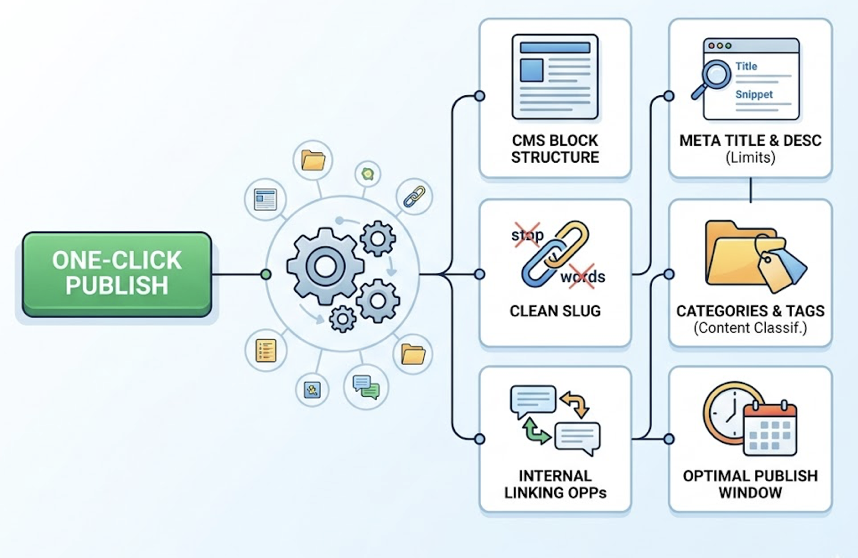
A real one-click blog publishing system doesn’t just write faster.
It needs to standardize output format for the target CMS block
structure, auto-generate meta title and description within character limits, set a clean slug without stop words, assign categories and tags based on content classification, surface internal linking opportunities, and schedule the post for the optimal publish window.
That’s not a writing feature. That’s an agent.
Topify is built around this model. Its One-Click Agent Execution takes a plain-English objective and runs the full sequence autonomously: the agent scans real-time trends, generates the article, formats it for the target CMS, produces SEO metadata optimized to the 60/155-character constraints, sets the slug, assigns categories, and schedules distribution. No human touches any of the six publishing nodes.
On the platform side, Topify’s Basic plan at $99/month includes
50 content generations with automated publishing and SEO optimization built in. The Pro plan at $199/month expands to 100 generations across 8 projects with 10 team seats. For teams that want fully managed content output, Topify’s Standard service
at $3,999/month delivers 60 premium articles per month through
a complete content pipeline, from research to live post.
There’s an additional layer most publishing tools don’t offer.
Traffic from generative AI sources is doubling every two months.
Content that’s technically precise in structure, schema, and
metadata is more likely to be cited by AI engines like ChatGPT
and Perplexity. Topify’s content is built for that from the start, which means the time saved on publishing also compounds into AI search visibility over time.
For Agencies, Those 6 Steps Multiply by the Number of Clients
An agency managing 10 clients, each publishing three posts per week, isn’t dealing with 6 manual steps.
It’s dealing with 180 manual publishing nodes per week. 720 per month.
Research into agency overhead puts manual reporting and
administrative coordination at roughly 100 hours per month for a
mid-sized agency. At $50/hour in labor cost, that’s $5,000 per month absorbed into work that generates no billable output. When applied specifically to the blog content pipeline, the calculation becomes harder to ignore.
For an agency serving 15 clients, the annual comparison looks
like this:
| Scenario | Manual Workflow | Automated (Topify) | Annual Difference |
|---|---|---|---|
| Labor hours/month | 105 hrs | 21 hrs | 1,008 hrs saved |
| Monthly labor cost | $5,250 | $1,050 | |
| Software cost | $0 | $1,000 | |
| Total annual cost | $63,000 | $24,600 | $38,400 saved |
Beyond the labor cost, there’s a second problem: multi-CMS coordination. One client is on WordPress, another on Shopify, a third just migrated to Webflow. Each has different field structures, different block requirements, different API behaviors. Managing that manually across 10+ clients requires either deep technical knowledge spread across the team or constant context-switching that degrades quality at scale.
Topify’s Pro and Enterprise tiers support independent projects per
client, with separate brand voices, CMS integrations, and analytics
dashboards. A single content lead can manage output volume that
would traditionally require a team of five editors.
4 Tools That Cover the Blog Publishing Pipeline, Ranked by How
Not every tool covers the same ground. Here’s where the main
options stop:
| Tool | AI Writing | CMS Push | Meta/Slug Auto-Gen | Multi-CMS | GEO Optimization | Starting Price |
|---|---|---|---|---|---|---|
| Topify | Yes | Yes | Yes | Yes | Yes | $99/mo |
| Surfer SEO | Yes | Partial | No | No | No | $89/mo |
| RightBlogger | Yes | Partial | No | No | No | $29.99/mo |
| Zapier + CMS | No | Yes | No | Yes | No | Variable |
Topify is the only platform in this group that covers all six publishing steps and adds a GEO optimization layer on top. For teams building content velocity in 2025, that combination matters more than it did a year ago.
Surfer SEO and RightBlogger both offer WordPress integrations
but operate at Level 2: they can push text to a CMS, but metadata,
slug, and block structure typically require manual correction after
the push. Useful if you only need help with Steps 1 and 2. Less useful for eliminating all six manual nodes.
Zapier-based pipelines can automate the CMS push but require
significant setup time, have no AI writing capability, and don’t
handle metadata or block formatting natively. Better suited for
engineering-resourced teams building custom workflows from scratch.
The honest framing: if your goal is to reduce some manual steps,
several tools can help. If your goal is to eliminate the manual publishing workflow entirely and build an auto-publish blog posts
pipeline that runs without daily human intervention, the options
narrow quickly.
Conclusion
The six manual steps between “draft ready” and “post live” aren’t
inevitable. They exist because most tools stop at the writing layer
and leave the deployment layer to human hands.
That gap is measurable. End-to-end automated pipelines outperform semi-automated workflows by 45 percentage points in AI answer share. For agencies, moving from manual to automated publishing can recover over $38,000 per year in labor costs. For in-house teams, it means content that goes live in under 4 hours instead of 48.
The question isn’t whether automated blog publishing works. It’s
whether the tool you’re using actually automates publishing, or
just the draft.
Topify covers the full pipeline: from a plain-English goal to a live, CMS-formatted, SEO-optimized post, without manual intervention at any of the six nodes. And because it’s built for AI search visibility, the content it publishes is structured to be cited by the engines increasingly driving discovery.
The draft is ready. It shouldn’t take a human to finish the job.
FAQ
What is end-to-end blog automation and how does it work?
End-to-end blog automation covers the full sequence from content
generation to live publication without human intervention at any
step. This includes AI writing, CMS formatting, meta title and description generation, slug configuration, category assignment,
and scheduling. Level 3 agentic platforms handle all of these steps
autonomously, reducing time-to-live from 24-48 hours to under 4 hours.
How do you auto-publish blog posts to WordPress with AI?
To auto-publish to WordPress correctly, the automation tool needs
to connect via the WordPress REST API and generate content in
Gutenberg block format, not plain HTML. Tools that push raw text
often default to a single “classic” block, breaking the intended
layout. A properly configured pipeline handles block serialization,
meta fields, slug, and taxonomy assignment programmatically without manual cleanup.
How do you integrate AI blog generation with WordPress, Framer, or Webflow?
Each platform requires a different integration approach. WordPress
uses its REST API with Gutenberg-compatible block structure for
layout fidelity. Webflow uses its CMS API with structured collection
fields. Framer’s CMS is more limited and typically requires custom
API work. The integration layer needs to match the output format of
the AI tool to the field structure of each platform. Topify handles CMS synchronization natively as part of its agent execution.
How does automated blog publishing save time for marketing teams?
Manual publishing overhead typically runs 10-20% of total work hours. For a full-time content role, that’s 4-8 hours per week spent on formatting, uploads, metadata, and scheduling, none of which
produces strategic value. End-to-end automation recaptures that
time and redirects it toward ideation and performance analysis.
How do you reduce manual steps in blog content publishing?
Start by auditing which of the six steps your current tools actually
cover: writing, CMS push, meta generation, slug setting, category
assignment, and scheduling. Most teams are manually handling Steps 3-6 even when they think.