
A video page can identify its publisher in the footer and name its presenter in the transcript, yet still leave machines with an ambiguous relationship between the video and its creator. Google updated its VideoObject guidance in September 2026 to support a creator property, giving publishers a more explicit way to connect a video with a Person or Organization. The markup is straightforward, but the editorial decision is not. Teams must choose the correct creator, support the claim visibly, use stable entity URLs, and keep the structured data aligned with the page. This guide explains the full implementation.
What Changed in VideoObject Markup
Google’s Search documentation update log records the September 24, 2026 update to VideoObject creator and interaction properties. The current Video structured data documentation shows creator as a supported property and illustrates an Organization with a name and URL.
The change lets a VideoObject state who created the work. That relationship can be useful when the creator is a recognized publisher, studio, company, or individual expert. It should not be used merely to insert a brand into the markup.
As with other structured data, the value must match what users can verify on the page. Google also requires the page to meet general video eligibility conditions, including a visible video and accessible metadata. Adding creator to a page that fails basic video requirements will not make it eligible.
Decide Whether the Creator Is a Person or Organization
Choose the entity responsible for creating the video, not automatically the person visible on screen or the domain hosting the file.
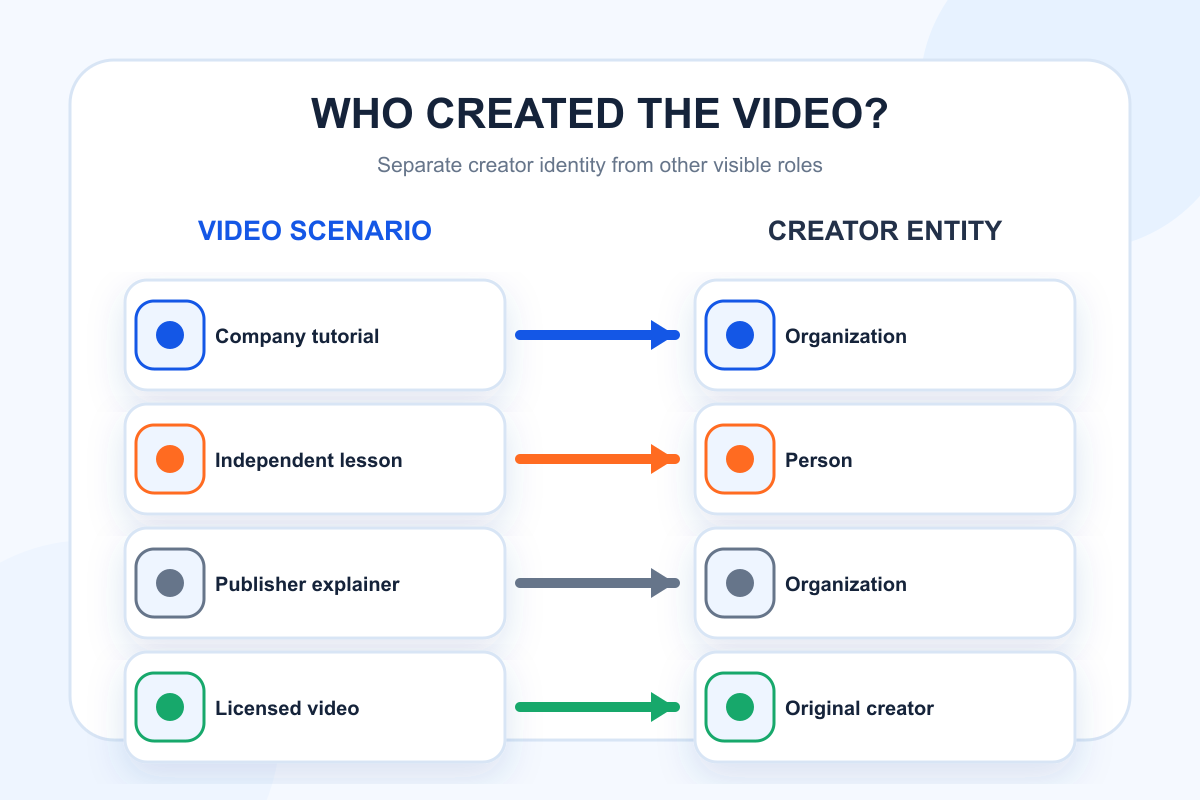
Use a Person when an individual independently created and is publicly credited for the work. Use an Organization when the video is produced under a company’s or publisher’s editorial responsibility. A company webinar hosted by an employee may still have the company as creator, while the employee can be identified elsewhere as presenter, speaker, or author if the page and vocabulary support that relationship.
| Scenario | Likely creator type | Visible evidence to provide |
|---|---|---|
| Company product tutorial | Organization | Publisher name, brand channel, or production credit |
| Independent expert lesson | Person | Creator byline and profile link |
| Newsroom explainer | Organization | Publisher identity and editorial credit |
| Guest interview | Producing Person or Organization | Production credit separate from guest identity |
| Licensed third-party video | Original Person or Organization | Rights and source attribution |
The creator is not necessarily the uploader, host, featured guest, copyright owner, or sponsor. Those roles can overlap, but they should not be collapsed without evidence.
Build a Stable Creator Entity
A creator name is more useful when it points to a stable entity page. For a Person, the URL might be an author or creator profile with biography, expertise, and related work. For an Organization, it may be the canonical corporate or publisher page.
The entity page should use the same name and identity as the video page. Avoid sending every creator URL to a generic homepage when a maintained profile exists. Do not create empty profile pages solely to host structured data. The page should give users meaningful context.
Keep identity consistent across visible bylines, channel names, VideoObject markup, Organization or Person markup, and external profiles. Consistency does not mean every surface must use identical marketing copy. It means the entity should be recognizable without conflicting names, URLs, or affiliations.
Topify’s Brand Profile Checker can help teams review how a brand identity appears across AI-facing contexts. For Google video eligibility and property definitions, rely on Google’s current documentation.
Add Creator to Valid VideoObject JSON-LD
The creator property belongs inside a valid VideoObject. The page still needs the required fields described by Google, including the video name, description, thumbnail URL, upload date, and a valid content or embed location as applicable.
A simplified Organization example looks like this:
{
  "@context": "https://schema.org",
  "@type": "VideoObject",
  "name": "How to Measure AI Citation Share",
  "description": "A practical walkthrough of citation share measurement.",
  "thumbnailUrl": "https://example.com/images/citation-share-video.jpg",
  "uploadDate": "2026-10-17T09:00:00+08:00",
  "embedUrl": "https://example.com/embed/citation-share",
  "creator": {
    "@type": "Organization",
    "name": "Example Analytics",
    "url": "https://example.com/about"
  }
}
Use the production URL and actual page values. Do not copy example dates, images, or names. If the creator is a Person, change the type and use that person’s public profile URL. Keep the markup in sync when a video is republished, rebranded, or moved.
Match Markup to the Visible Page
Structured data should describe what a visitor can see. Display the video prominently and identify the creator near the player, title, or descriptive metadata. If the page credits a different publisher from the JSON-LD creator, resolve the editorial inconsistency before testing the markup.
The title and description in JSON-LD should accurately represent the video rather than stuffing search phrases. The thumbnail should depict the video and remain accessible to Google. The upload date should reflect the video publication, not the date the markup was added.
If several videos appear on one page, determine which video is the primary subject. Google’s guidance generally expects video pages to make the relevant video prominent. A page with an embedded clip buried below unrelated content may not be a strong video result candidate even if the JSON-LD validates.
Validate Syntax, Eligibility, and Identity
Use Google’s Rich Results Test to check supported structured data and syntax. Then inspect the rendered page to confirm the visible creator, title, description, thumbnail, and dates match the markup. Validation success does not guarantee a search appearance, but errors and mismatches can prevent reliable interpretation.
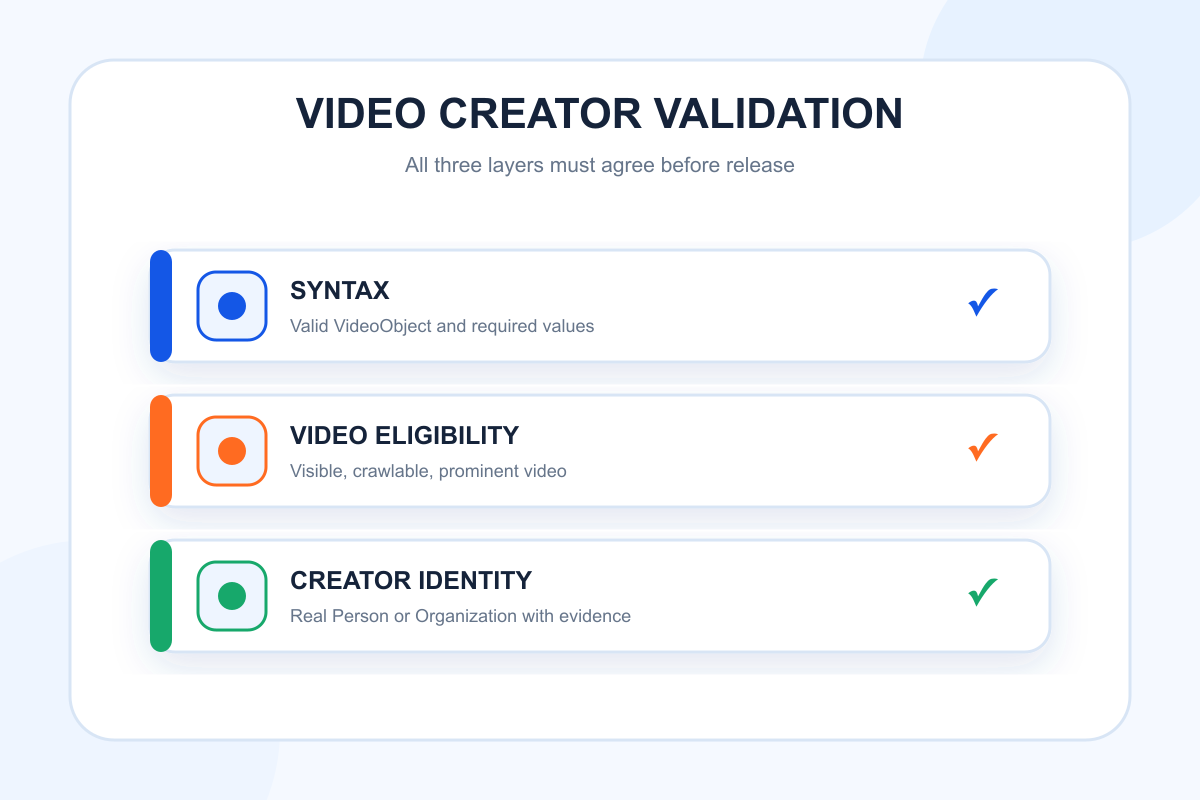
Use this three-part review:
- Syntax: Is the JSON-LD valid and are required values present?
- Eligibility: Is the page crawlable, indexed, and built around a visible video?
- Identity: Is the creator a real, visible, consistently named Person or Organization?
Monitor Search Console enhancement reports where available and inspect affected URLs after template releases. Also check server logs or asset controls to ensure thumbnails and video resources remain accessible.
Avoid Common Creator Markup Errors
Do not mark the on-screen presenter as creator simply because that name is easiest to extract. Do not use the page author if that person only wrote the accompanying article. Do not assign the hosting platform as creator when it did not produce the video. Do not link to a social profile that conflicts with the visible identity or redirects unpredictably.
Avoid adding both Person and Organization creators by default. Multiple creators may be valid for genuine co-creation, but the page should make that relationship clear. More entities do not automatically create stronger signals.
Finally, do not expect creator markup to repair weak video content or poor page design. It describes a relationship. It does not replace accurate titles, useful descriptions, accessible transcripts, strong thumbnails, or a page that serves the viewer.
Measure the Result Responsibly
Record when the markup was deployed and which URL templates changed. Monitor validation errors, video indexing, eligible video impressions, and traffic to the creator profile where those metrics are available. Compare similar pages over a sufficient period rather than attributing a change to one property immediately.
In AI-search monitoring, track whether the video, publisher, or expert is cited for relevant prompts. Topify’s AI Citation Analysis can help examine source and entity visibility beyond traditional result pages. Do not claim that the VideoObject creator property directly caused an AI citation. Treat it as one part of consistent machine-readable identity.
Conclusion
VideoObject creator schema helps publishers state who made a video, but the markup is credible only when the page supports the relationship. Choose Person or Organization based on actual editorial responsibility, link to a stable entity page, keep values consistent with visible content, and validate both syntax and video eligibility. The best implementation makes the creator clearer to users first and machines second.
FAQ
What is the VideoObject creator property?
It is a structured-data property that identifies the Person or Organization responsible for creating a video.
Is the presenter always the video creator?
No. The presenter, guest, uploader, sponsor, publisher, and creator can be different roles. Use the entity with actual creation responsibility.
Does creator schema guarantee a video rich result?
No. Structured data can help Google understand a page, but appearance depends on eligibility, indexing, quality, query relevance, and Google’s systems.
Should the creator have a profile URL?
A stable, meaningful profile or organization URL is useful when available. It should match the visible identity and provide real context to users.