
A page can be perfectly crawlable and still impossible for a browser agent to use. The content loads, the URL is indexed, and the design looks polished to a person. Then the agent fails to open a menu, misreads an unlabeled icon, loses state after a modal appears, or cannot verify whether a form was submitted. That is an operability problem, not an indexing problem. An AI agent-friendly website gives humans and automated assistants the same clear structure, controls, state, and recovery paths. The objective is not to design for a speculative machine audience. It is to remove ambiguity from tasks people already need to complete.
Crawlability Does Not Guarantee Operability
Search crawlers primarily discover and interpret documents. Browser agents complete multi-step tasks. They may navigate, click, type, scroll, inspect page structure, and verify a result. OpenAI’s computer-use documentation describes integrations that operate interfaces through screenshots, browser libraries such as Playwright, or structured mouse and keyboard actions.
That difference matters. A crawler can index a pricing page even when its plan selector is a custom canvas control. An agent may need to identify the selector, understand its current state, choose an option, and confirm the resulting price. If the interface exposes only pixels and fragile event handlers, task reliability drops.
Treat agent friendliness as a layer above technical discovery. The page must first be accessible to the web. Then the interface must make its intended actions legible and testable.
Agents Observe Pages Through More Than One Channel
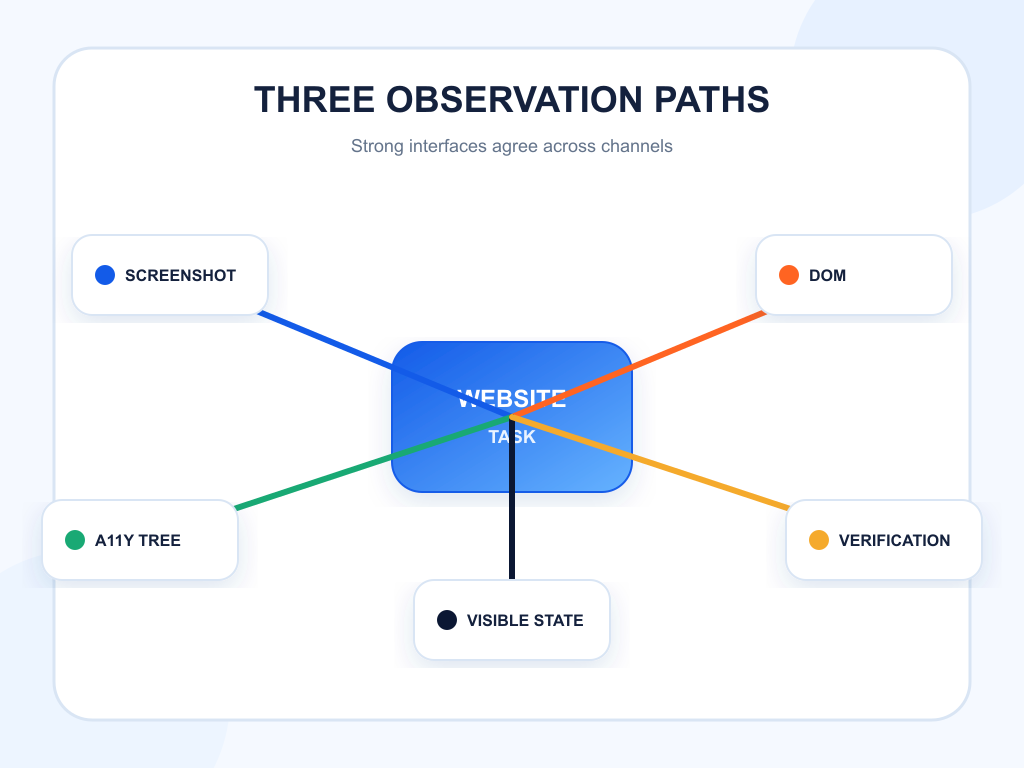
Browser agents do not all work the same way. Some use screenshots and coordinates. Some use DOM locators. Some receive text or accessibility information from a harness. Some combine these observations. No single markup trick guarantees success.
Design for agreement across channels. The visible label should match the accessible name. The control’s DOM role should match what it looks like. State changes should appear both visually and programmatically. A button that says “Start free scan” should not expose the unrelated name “submit-3” or behave like a generic clickable div.
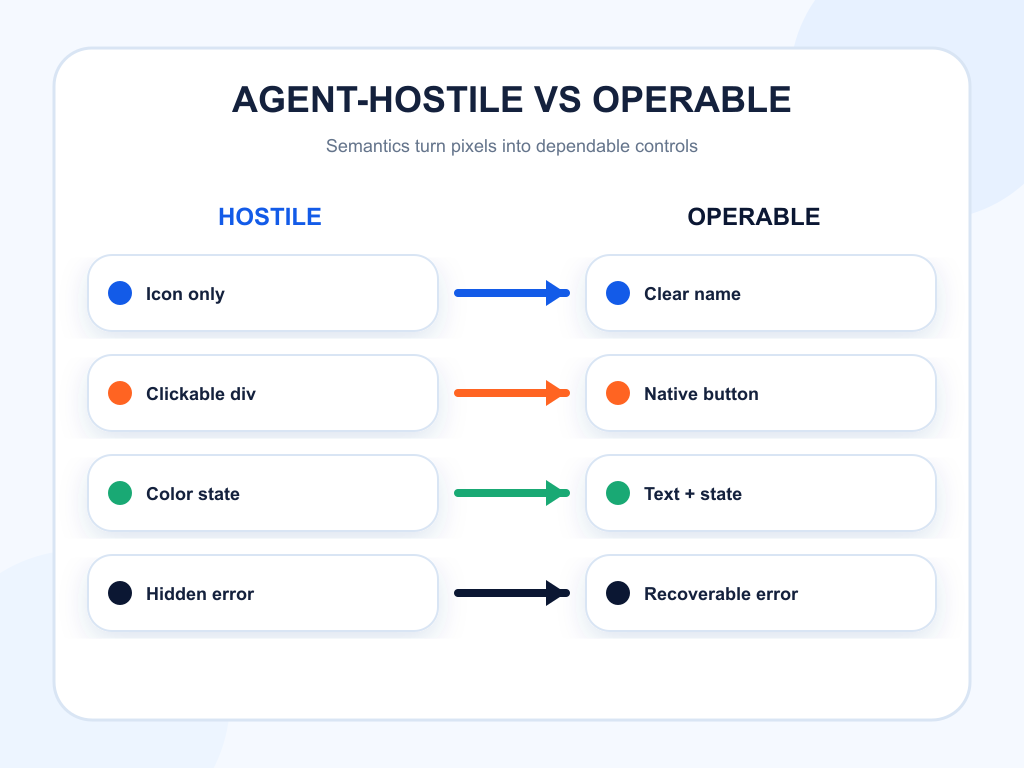
| Interface pattern | Human usability risk | Likely agent failure | Better implementation |
|---|---|---|---|
| Icon-only control without a name | Meaning is unclear | Agent chooses the wrong action | Visible label or accurate accessible name |
Clickable div styled as a button | Keyboard users cannot operate it reliably | DOM or accessibility tools miss the action | Native button element |
| State shown only by color | Status is ambiguous | Agent cannot verify selection | Text plus programmatic state |
| Hidden validation after submit | User does not know what failed | Agent repeats or abandons the task | Inline error tied to the field and summary |
| Dynamic modal without focus management | Keyboard position is lost | Agent acts on background content | Move focus into modal and restore it on close |
Use Native Elements Before Custom Widgets
The W3C’s ARIA in HTML guidance favors native HTML semantics where the language already provides the required element. Native buttons, links, inputs, selects, headings, lists, and dialogs bring expected behavior that custom controls must recreate.
A real button supports focus, keyboard activation, form behavior, and an accessibility role. A styled container with a click listener supports only what the implementation remembers to add. That gap creates failures for people with disabilities and for tools that depend on programmatic structure.
Use ARIA to fill semantic gaps, not to disguise the wrong element. Test custom components against the relevant WAI-ARIA Authoring Practices pattern, including roles, states, focus, and keyboard behavior.
Make Every Action Name and State Explicit
Stable labels help agents plan. “Continue,” “Next,” and “Submit” can be adequate inside a clear flow, but more specific labels reduce ambiguity: “Continue to billing,” “Review order,” or “Send request.” Avoid changing a control’s name during loading unless the change communicates state without erasing the action.
Expose state programmatically. Expanded menus, selected tabs, checked options, disabled buttons, and validation failures should use native properties or correct ARIA states. Show the same state in visible text where it affects the decision.
Keep names consistent across responsive layouts. If desktop says “View pricing” and mobile exposes “Open,” an agent switching context may lose the target. Consistency also helps analytics, testing, and documentation.
Build Predictable Navigation and Page Structure
Logical headings and landmarks let readers and tools understand a page without scanning every pixel. The W3C page-structure tutorial recommends meaningful regions, labeled sections, and properly nested headings.
Use one clear main region. Keep global navigation distinct from page-specific controls. Give repeated navigation regions unique labels. Avoid inserting critical actions only on hover. Preserve an ordinary link destination for navigation instead of relying entirely on script-driven transitions.
Stable URLs and headings also improve recovery. If an agent loses state, it can return to a known step rather than restart from an ambiguous application shell.
Design Errors as Recoverable States
An AI agent-friendly website does not pretend errors will disappear. It makes them local, specific, and recoverable. Tie each error to the affected field, explain the accepted format, preserve valid inputs, and identify the next action.
Avoid generic banners such as “Something went wrong.” State whether the request failed, whether anything was saved, and whether retrying is safe. If a duplicate submission could create a second booking or charge, disable the action and show the resulting record instead of inviting another click.
For timeouts, expired sessions, and access restrictions, provide a clear return path. Browser agents are safer when the interface makes irreversible consequences visible before the action.
Preserve Human Control at Consequential Steps
Agent friendliness is not autonomous permission. OpenAI’s computer-use guidance recommends confirmations for consequential actions, treating page content as untrusted, and verifying the actual outcome. Websites should support that boundary.
Present a clear review step before purchases, account changes, submissions, and data sharing. Show the exact object, amount, recipient, or permission that will change. Use a distinct final action instead of combining review and execution in one surprising control.
After completion, display a durable confirmation with the important details and a reference identifier when appropriate. This helps a person review what happened and helps an agent verify that the task reached the requested state.
Test Real Tasks, Not Isolated Components
Component accessibility is necessary but incomplete. Define representative tasks such as finding a plan, requesting a demo, downloading documentation, updating a profile, or completing checkout. Run them with keyboard-only navigation, screen-reader inspection, DOM locators, and visual browser automation where appropriate.
Track task success, time, number of actions, recovery from unexpected state, and confirmation accuracy. Include negative cases: unavailable options, invalid inputs, network errors, expired sessions, and restricted actions.
Record the first failure, not only the final result. A task that succeeds after five accidental clicks is not reliable. Regression-test the flow whenever navigation, forms, or modal behavior changes.
Connect Operability to AI Visibility Carefully
An operable website can improve the experience after an AI system or agent discovers the brand. It does not guarantee a citation or recommendation. Treat discovery, representation, and task completion as separate layers.
Topify can monitor whether a brand appears in relevant AI answers, how it is positioned, and which sources support the response. Pair that visibility data with browser-task success metrics. A brand may be frequently recommended but lose value when agents cannot complete the next step. On the flip side, a perfect flow has little impact if the brand is absent from the answer.
The joined view helps prioritize work: source and content gaps for discovery, interface fixes for completion, and product analytics for business outcomes.
Include one recovery test in every important journey. Start with an empty required field, an expired session, a changed price, or a failed network request and confirm that the interface explains what happened without discarding valid work. An agent-friendly path is not merely easy when everything succeeds. It exposes enough state for a user or agent to recognize failure, choose a safe next action, and verify that the task did not complete accidentally.
Conclusion
An AI agent-friendly website is a clear, operable website. Start with native HTML, stable labels, explicit state, meaningful page structure, recoverable errors, and visible confirmation. Preserve human control where actions carry consequences, and test complete tasks across visual and programmatic interaction modes. Do not confuse operability with crawlability or visibility. They are connected stages with different evidence. Choose one high-value flow, document its expected states, and run it with keyboard, accessibility, DOM, and visual automation checks. The work improves access for people first and gives browser agents a more dependable interface as a practical side effect.
FAQ
What is an AI agent-friendly website?
It is a site whose content, controls, state, errors, and confirmations are clear enough for people and browser agents to navigate and operate reliably.
Does semantic HTML guarantee that an agent can use a page?
No. It improves programmatic clarity, but agents may also depend on screenshots, DOM locators, network access, permissions, and the quality of their browser harness.
Is agent friendliness the same as SEO?
No. SEO helps discovery and interpretation. Agent friendliness concerns completing tasks after the page is reached.
How should an agent-friendly site be tested?
Test complete user tasks with keyboard navigation, accessibility inspection, DOM-based automation, visual automation, error cases, and final-state verification.