
Your GA4 dashboard says traffic is holding steady. Your leadership team expects a clean monthly report. But conversion rates are quietly slipping, and no one can explain why.
This isn’t a tracking problem. It’s a reporting problem.
The way users discover and evaluate brands has fundamentally shifted over the past 18 months. ChatGPT, Perplexity, Gemini, and Google’s AI Overviews are now intercepting users before they ever reach your site, summarizing information, and in many cases, ending the search journey entirely. Your current website traffic report can’t see any of that.
Here’s what a complete traffic report looks like in 2026, and what you’re likely missing right now.
The GA4 Report Most Teams Are Still Building
The standard monthly traffic report is built on a familiar stack: GA4 for behavioral data, Google Search Console for organic performance, and maybe a Looker Studio dashboard to tie it together.
The core metrics haven’t changed much. Volume metrics like total users and sessions tell you how many people showed up. Quality metrics like engagement rate and average engagement time tell you whether they stayed. Conversion metrics tell you whether any of that activity translated into business outcomes. Channel breakdown helps you figure out which acquisition channels are actually pulling their weight.
This structure works. It’s not wrong.
The problem is what it can’t see. GA4’s entire logic is built on the assumption that a search leads to a click, which leads to a session, which leads to a trackable event. That chain is breaking down. Roughly 60% of searches now produce zero clicks, and GA4 has no mechanism to capture what happened in those moments.
That’s not a rounding error. That’s a structural blind spot.
What KPIs Actually Belong in a Website Traffic Report
Before fixing the structure, it’s worth being precise about which metrics deserve to be in the report at all. Most traffic reports include too many numbers and too few insights.
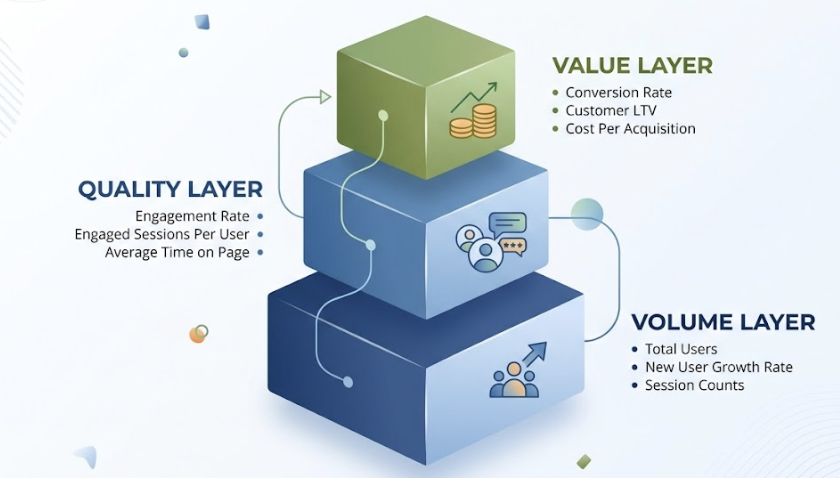
A useful framework organizes KPIs into three layers. The volume layer captures brand reach: total users, new user growth rate, session counts. This is what leadership uses to judge whether the brand is expanding its audience. The quality layer captures audience stickiness: engagement rate, engaged sessions per user, average time on page. These metrics tell you whether your content is actually resolving user intent or just generating empty visits. The value layercaptures business output: conversion rate by channel, customer lifetime value (LTV), and cost per acquisition.
LTV matters more than most teams acknowledge. In an environment where customer acquisition costs have climbed around 40%, optimizing for LTV often delivers a higher ROI than chasing new traffic volume.
For executive traffic reports specifically, the focus should sit almost entirely in the quality and value layers. Leadership doesn’t need to see every metric in your GA4 property. They need to know three things: are we reaching more of the right people, are those people engaging meaningfully, and is the investment translating into revenue.
How to Structure a Monthly Traffic Report Stakeholders Will Read
The most common reason traffic reports get skimmed and shelved is structure. Data-first reports force the reader to draw their own conclusions, which most executives won’t do under time pressure.
The fix is simple: lead with the conclusion.
A well-structured monthly traffic report opens with an executive summary of three to four sentences. This isn’t a preview of what follows. It’s the answer. Here’s what happened, here’s why, here’s what it means for the business.
From there, the report moves into channel performance analysis, comparing traffic contribution and conversion rates across organic search, paid, email, social, and direct. Page-level performance comes next, with a focus on the top 10 landing pages by conversion rather than by volume. Then a trend and anomaly section, which we’ll cover in detail below. The report closes with concrete next steps, not vague “continue optimizing” language but specific actions tied to the data.
On visualization: use line charts for time-series metrics like sessions and active users, comparison tables for month-over-month and year-over-year benchmarks, and funnel views to show where users are dropping off between acquisition and conversion. The visual format should serve the business question, not demonstrate the analyst’s command of chart types.
The Channel Your GA4 Report Can’t See
Here’s the uncomfortable truth behind many traffic reports showing flat or declining organic performance: the brand may actually be growing its presence in search. It’s just happening somewhere GA4 can’t measure.
When AI Overviews are triggered on a query, organic click-through rates drop from an average of 1.76% to 0.61%, a decline of about 65%. For informational queries, which is where most content marketing investment goes, traffic losses typically range between 30% and 40%. B2B tech companies are seeing AI search exposure rates around 70%, with projected traffic impacts in the -35% to -45% range. Healthcare and education are similarly exposed.
That traffic isn’t disappearing. It’s being absorbed by AI interfaces.
GA4 makes this problem worse by miscategorizing AI-referred traffic. Visits originating from ChatGPT, Perplexity, or Gemini frequently get labeled as Referral or Direct in GA4’s default channel grouping. The actual influence of AI platforms on your traffic is almost certainly larger than your reports suggest.
A complete website performance report now needs a third layer alongside the standard GA4 and GSC data: AI search visibility. This means tracking how often your brand appears in AI-generated answers, what sentiment those answers carry, and how you rank relative to competitors in AI recommendation contexts.
This is where tools like Topify come in. Topify monitors brand performance across ChatGPT, Gemini, Perplexity, and other major AI platforms by simulating thousands of industry-specific user prompts and measuring where and how brands appear in the responses. It tracks AI mention frequency, citation patterns, sentiment scoring, and competitive positioning in a single dashboard.
The practical implication for your traffic report: brands that appear in AI citations see organic CTR improvements of around 35%, partially offsetting the traffic losses caused by zero-click searches. That’s not a coincidence. AI citations create a trust signal that carries forward into traditional search behavior.
Adding AI Visibility Data to Your Marketing Traffic Dashboard
Integrating Topify’s data into your existing Looker Studio or Power BI setup gives you a unified decision view. Topify’s AI Volume Analytics quantifies what’s essentially invisible to GA4: the “dark” search traffic where users encounter your brand inside an AI response but never click through.
Useful dimensions to include in the combined dashboard: AI Share of Voice (how your brand’s AI mention frequency compares to direct competitors), citation gap analysis (which core topics are AI platforms citing competitors for instead of you), and sentiment trend over time. These can be displayed alongside your standard GA4 channel metrics so that leadership sees the full picture in one report.
How to Set Traffic Benchmarks That Actually Mean Something
Traffic benchmarks are only useful when they’re calibrated to industry and company stage. Comparing a B2B SaaS company to an e-commerce retailer on session volume is meaningless.
Typical e-commerce sites average around 12.46 million monthly sessions with conversion rates between 1.9% and 2.5%. B2B SaaS companies, by contrast, often operate with median session volumes around 4,100 per month, but with conversion rates between 2.3% and 5.0% and repeat visit rates between 60% and 85%. Financial services firms average around 9.29 million sessions with conversion rates of 1.5% to 3.0%. News and media publishers run between 600K and 900K sessions and are among the sectors most exposed to AI summary traffic interception.
For B2B SaaS, organic traffic year-over-year growth between 35% and 45% is generally considered strong. For e-commerce, 20% to 30% annual growth with stable conversion rates is a healthy benchmark.
One metric that doesn’t get enough attention in traffic reports is net revenue retention (NRR). The SaaS median sits around 106%. In the context of a traffic report, NRR matters because it tests whether the traffic you’re attracting is converting into customers who stay. High traffic growth alongside declining NRR often signals an audience-fit problem, not a volume problem.
How to Explain Traffic Drops Without Losing the Room
When traffic falls, the instinct in a stakeholder report is either to minimize it or to overexplain it. Neither works.
The right approach is a structured diagnostic presented in three parts: what happened, why it happened, and what you’re doing about it.
Start by ruling out tracking failures. A sudden, severe drop that affects all channels simultaneously usually indicates a GA4 tag issue, not an actual traffic loss. Verify your implementation before building any narrative around the data.
From there, check for seasonality. A year-over-year comparison often reveals that the “drop” is a routine annual pattern, which is a far easier conversation with leadership than a structural decline.
If the timing aligns with a Google Core Update, dig into whether E-E-A-T signals may be the cause. HubSpot’s organic traffic dropped from 13.5 million to around 6 million following the 2024 core update, primarily because thin informational content, the kind AI can answer directly, was significantly devalued.
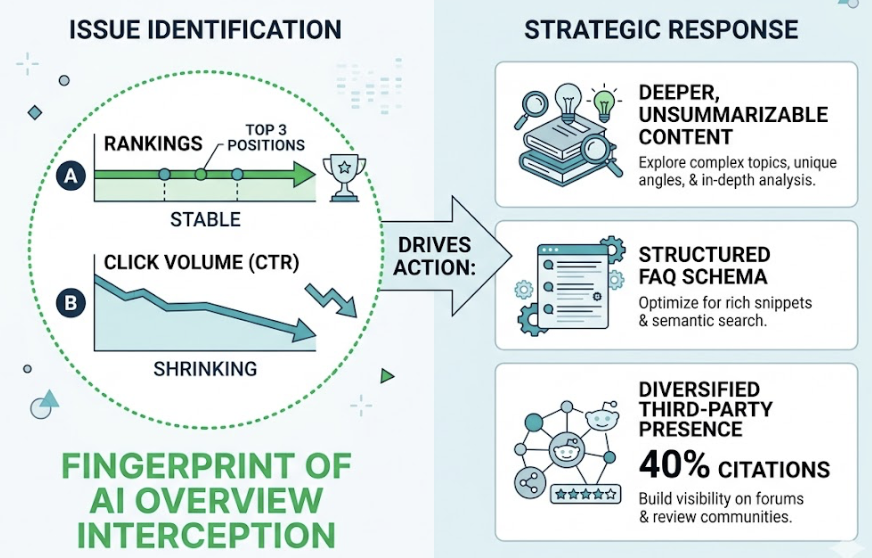
Finally, check whether rankings held but CTR declined. That specific pattern, stable positions but shrinking click volume, is the fingerprint of AI Overview interception. It requires a different response than a ranking drop: specifically, deeper content that AI systems can’t easily summarize, structured FAQ schema to compete for citation, and diversified presence on third-party platforms, given that roughly 40% of LLM citations originate from Reddit and professional review communities.
Automating Your Traffic Report: GA4, GSC, and AI Visibility in One Dashboard
Manual reporting is slow, inconsistent, and often the reason reports arrive two weeks after the data they describe. A modern traffic reporting setup should run itself.
The foundation is connecting GA4 to Looker Studio via the native connector. For teams dealing with large data volumes or hitting API quota limits, enabling BigQuery export gives you direct access to raw GA4 event data, which you can query with far more flexibility than the standard reporting interface allows.
Layer GSC data on top using the Search Console connector in Looker Studio. This lets you map keyword-level impressions, clicks, and average position alongside your GA4 behavioral data, which is essential for identifying AI-related CTR degradation.
For AI visibility, pulling Topify’s AI search data as an additional data source creates a complete picture: traditional traffic performance, organic search health, and AI search visibility in a single dashboard. The approximate value of AI-influenced traffic can be modeled as: (AI-referred sessions × conversion rate) + (branded search uplift × average order value). This gives leadership a dollar-value frame for AI visibility investment, which is considerably more persuasive than abstract mention-frequency metrics.
Set daily automatic refresh schedules and use data blending to merge the three sources into a unified view. The goal is a report that’s ready before anyone has to ask for it.
Conclusion
A website traffic report that only looks at GA4 data is working from an incomplete picture of how your brand is actually performing in search. Traditional metrics still matter. Sessions, engagement rate, CVR, and channel breakdown are still the right foundation. But they can’t tell you what’s happening inside AI interfaces, where an increasing share of research, discovery, and brand evaluation is now taking place.
The teams getting ahead of this are treating AI search visibility as a distinct reporting layer, not a future add-on. Tools like Topify make it possible to track brand presence across ChatGPT, Gemini, Perplexity, and other AI platforms with the same rigor you’d apply to GA4 data. That data, combined with traditional traffic KPIs and the right reporting structure, gives stakeholders a complete view of where your brand stands and where it’s headed.
Traffic is moving. The question is whether your report is moving with it.
FAQ
How do you report on AI search traffic alongside organic traffic in GA4?
GA4 typically misclassifies AI-originated traffic as Referral or Direct. A practical fix is to create a custom channel group in GA4 under Admin > Data display > Channel groups, using regex patterns like .*chatgpt.*|.*perplexity.*|.*gemini.* to isolate AI referrals as a named channel. For the brand-level AI visibility data that GA4 can’t capture at all, pairing GA4 with a dedicated AI monitoring platform like Topify is the most reliable approach.
What KPIs should be in an executive website traffic report?
Executives care about business outcomes, not raw traffic numbers. The core KPIs for an executive report are: engagement rate (traffic quality indicator), conversion rate by channel (channel efficiency), customer lifetime value (long-term acquisition value), and AI Share of Voice (forward-looking market position in AI search). Keep the executive summary to three to four sentences, and let the detail live in the body of the report.
How do you automate website traffic reporting with GA4?
Enable BigQuery export in GA4 to move raw event data into a cloud warehouse, then connect BigQuery to Looker Studio for visualization. This bypasses the standard API’s quota constraints and allows more complex queries. Set daily sync schedules and use Looker Studio’s data blending feature to merge GA4, GSC, and AI visibility data sources into a single dashboard.
How do you explain a traffic drop in a stakeholder report?
Present it as a structured diagnostic: first rule out tracking failures, then check for seasonality using year-over-year comparisons, then evaluate whether timing aligns with a known algorithm update, and finally check whether rankings held while CTR declined (the AI Overview interception pattern). Frame every negative data point with a cause and a specific action plan. The goal isn’t to minimize the drop. It’s to demonstrate that you know what drove it and what you’re doing next.
What’s a healthy website traffic growth rate by industry?
For B2B SaaS, year-over-year organic traffic growth between 35% and 45% is considered strong. For e-commerce, 20% to 30% annual growth with stable conversion rates is healthy. Growth rate alone isn’t the right measure. Net revenue retention (NRR) is the more meaningful indicator of whether traffic quality supports long-term business health. For SaaS companies, maintaining NRR above 100% while growing traffic is the benchmark that actually matters to leadership.