
You ask Claude Code to fix a bug. It gives you a clean, logical solution. You paste it in. The build breaks.
The code wasn’t wrong. The problem is that Claude had no idea it was stepping into a codebase where that pattern was explicitly banned three quarters ago after a production incident.
That’s the gap most developers never close. And it’s not a model problem. It’s a prompting infrastructure problem.
The Context Gap Claude Code Can’t Close on Its Own
Claude Code doesn’t start a session with a mental map of your project. It can’t. It doesn’t know your dependency preferences, your naming conventions, or the architectural decisions your team made six months ago. It knows what you tell it.
Researchers who’ve studied agentic coding workflows call this “architectural blindness.” The agent builds a localized picture of your codebase through file reads and grep searches, but unless it’s given explicit context about the project’s “unwritten rules,” it defaults to generic industry patterns. Those generic patterns often clash with your specific setup.
The result isn’t a hallucination. It’s a reasonable answer to the wrong question.
The fix isn’t prompting harder. It’s prompting smarter, starting before you write your first query.
CLAUDE.md Is the File Your Project Has Been Missing
Every Claude Code session loads one file automatically: CLAUDE.md, stored at your project root. It’s the only document that’s injected into context every single time. Most developers either skip it entirely or fill it with so much information that Claude stops paying attention.
The research is clear on what actually works: a three-tier structure.
Project Identity (WHY): A short description of what the project does and its tech stack. This helps Claude prioritize decisions. A high-frequency trading module has different constraints than a marketing dashboard.
Codebase Mapping (WHAT): Where things live. Especially critical in monorepos. Don’t assume Claude can navigate your directory structure intuitively.
Operational Protocols (HOW): The non-obvious stuff. Custom build commands, naming conventions, and explicitly forbidden practices. This is where you document the decisions that would take a new engineer two weeks of pain to discover.
| Include This | Why It Matters |
|---|---|
| Custom build/test commands | Prevents Claude from guessing npm test when you use make test-suite |
| Non-standard naming conventions | PascalCase filenames, custom suffixes, module identifiers |
| Architectural invariants | “Never expose DB types in the service layer” |
| Dependency preferences | Use the internal Result type, not a new library |
One critical constraint: keep it under 200 lines. Every line in CLAUDE.md consumes tokens. Past 300 lines, the signal-to-noise ratio drops and Claude starts deprioritizing specific instructions in favor of more recent session context.
For complex projects, use the @imports syntax. Your root CLAUDE.md can reference @docs/api-conventions.md only when Claude is working on the API layer. That modularity keeps the agent focused instead of overwhelmed.
Stop Prompting Functions, Start Prompting Architecture
The most common mistake isn’t the CLAUDE.md. It’s how developers frame individual prompts.
“Fix the bug in auth.ts” is a function-level prompt. Claude will fix the bug. It may also introduce a pattern that violates your error-handling conventions, or add a dependency you already have an internal replacement for.
The better version: “This function is part of the OAuth2 provider. It handles token expiration. It must use the existing Result type for error handling. Don’t introduce new dependencies. Run the integration tests in tests/auth/ after your changes.”
That’s architectural prompting. You’re giving Claude the constraints it needs to make decisions that fit your system, not just the problem.
| Fragmented Prompting | Architectural Prompting |
|---|---|
| “Fix the bug in auth.ts” | “This function is part of the OAuth2 provider, handling token expiration per docs/auth-flow.md“ |
| No constraints stated | “Use the existing Result type, no new dependencies” |
| “Does it work?” | “Run tests/auth/ and verify log output matches our structured format” |
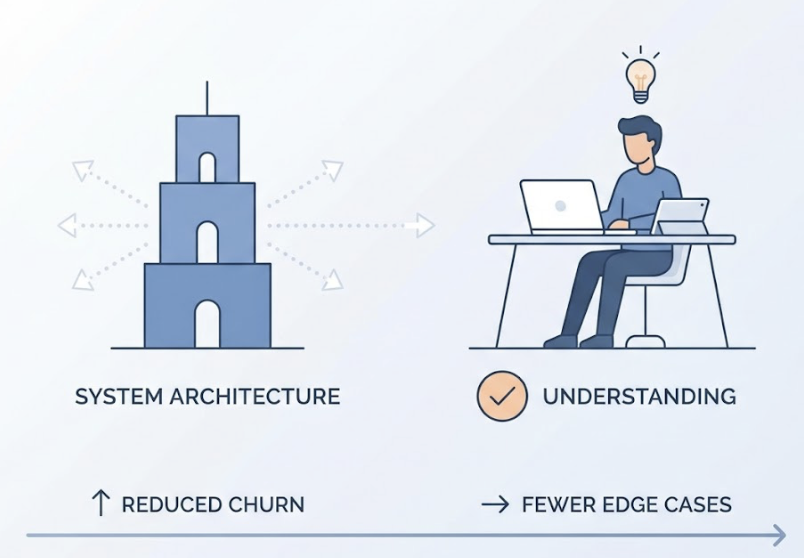
The practical benefit here is less churn. When Claude understands architectural boundaries, it stops proposing changes that violate systemic invariants. It also catches more edge cases on the first pass because it knows what “correct” means in your context, not just in the abstract.
For long-term consistency, some teams use a “Business Brain Pattern”: a /brain/ directory that centralizes shared business logic, technical standards, and architectural decisions. Individual tasks reference these files. When a standard changes, you update one file and every future Claude session automatically inherits it.
Role Prompting That Survives a Long Session
In extended sessions, Claude gradually drifts. As the context window fills with code diffs and error logs, the persona you set at the start gets diluted. A session that began with “strict security reviewer” mode often ends up in “helpful assistant that prioritizes shipping.”
That’s “identity drift,” and it’s fixable.
Set the identity anchor explicitly at the start of each session:
- Persona definition: “You are a senior systems architect focused on high-performance backend systems.”
- Valuation model: “You prioritize correctness and memory safety over syntactic shortcuts.”
- Actionable mandate: “Every code change must include a complexity note and a verification step.”
This isn’t just about tone. When you codify the valuation model, you give Claude a decision-making framework it can apply consistently, even 40 messages into a session.
For teams running multiple Claude Code sessions in parallel, role prompting becomes a scoping mechanism. One agent handles security audits. Another handles performance optimization. You prevent “context pollution” where an agent over-engineers a solution because it knows too much about adjacent concerns.
This scales even further with specialized SKILL.md files. Package a role definition, a set of allowed tools, and a verification checklist into a single slash command. /audit becomes a repeatable, consistent behavior instead of a prompt you rewrite every time.
Prompt Chaining: Don’t Ask Claude to Do Everything at Once
“Build a complete authentication system” is what researchers call a “mega-prompt.” It sounds efficient. In practice, it leads to instruction fatigue: Claude misses subtle constraints, skips edge cases, and occasionally produces a build that technically compiles but violates three project conventions.
The four-phase orchestration model fixes this:
Phase 1: Explore. “Search the codebase and identify all files related to the auth feature. Report what you find. Don’t make any changes.” Claude maps the territory without touching it.
Phase 2: Plan. “Based on what you found, propose a step-by-step implementation plan. Do not write code yet.” Review the plan. Catch architectural misalignments before they’re baked into files.
Phase 3: Implement. Break the plan into atomic sub-tasks. “Implement the data model” is one prompt. “Implement the API endpoint” is the next. Each has its own verification step.
Phase 4: Verify. “Run the full test suite and audit the changes for security issues.” A dedicated review prompt, not an afterthought.
| Phase | Developer Goal | Agent Output |
|---|---|---|
| Explore | Minimize search space | Relevant files and modules |
| Plan | Prevent architectural drift | Step-by-step markdown plan |
| Implement | High-quality code output | File edits (diffs) |
| Verify | Zero regressions | Test reports, lint results |
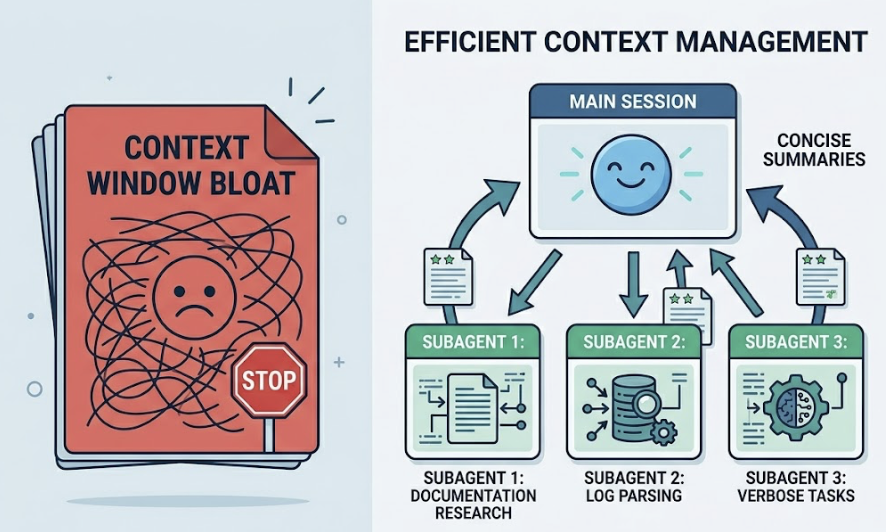
For verbose sub-tasks, like researching documentation or parsing large log files, delegate to subagents. They run in separate context windows, process thousands of tokens, and return only a concise summary to your main session. That prevents the context bloat that kills long sessions.
When Claude Gets It Wrong: The Recovery Prompt Stack
Agentic “doom loops” are real. Claude fixes a bug, creates a new one, then tries to fix that with increasingly erratic changes. The instinct is to re-ask the same question more firmly. That rarely works.
There are three structured recovery templates that do.
Template 1: The Rationale Reset (for logical errors)
“You attempted to fix [X] but introduced [Y]. Stop. Explain: 1) What was the root cause of X? 2) Why did your fix fail? 3) Propose a new approach that specifically avoids Y.”
This forces chain-of-thought reasoning before any more files get touched. It consistently outperforms direct re-prompting on complex debugging tasks.
Template 2: The Constraint Anchor (for convention violations)
“Your solution violates the naming conventions in CLAUDE.md. Re-read the Naming section and refactor your changes to comply. Do not change the logic.”
You’re using the persistent context file as a source of truth to override session drift.
Template 3: The Evidence-First Protocol (for build failures)
“The build is failing with: [paste log]. Do not guess the fix. First, read [config file path]. Second, tell me your interpretation of the error. Third, wait for my confirmation before editing any files.”
That last line is the most important. Inserting a human-in-the-loop step stops the agent from making multiple expensive, incorrect guesses that pollute the context window with bad assumptions.
Claude Code’s native /rewind command pairs well with all three templates. It reverts both the conversation and the file system to a previous checkpoint, completely clearing the “wrong” context from the agent’s memory. Manually undoing edits doesn’t achieve the same thing; the failed reasoning is still in context influencing subsequent decisions.
From Tool to Pair Programmer: Prompting as Dialogue
The biggest shift in advanced Claude Code usage isn’t technical. It’s conceptual.
Traditional completion tools are reactive. You type, they respond. Agentic systems are collaborative. The most effective developers treat Claude like a peer engineer, not an autocomplete on steroids.
One habit drives a statistically significant improvement in code quality: require Claude to explain its understanding before it executes.
Append this to any non-trivial prompt: “Explain your understanding of this task and your proposed plan before you modify any files.”
Two things happen. You catch misunderstandings before a multi-file refactor bakes them in. And Claude, by articulating the plan, reinforces the relevant constraints in its immediate context, making it more likely to adhere to them during implementation.
The second habit is meta-prompting. When a session requires excessive corrections, feed the session history to a separate Claude instance and ask: “Identify the missing context in my prompts that led to these errors. Suggest a new rule for my CLAUDE.md.”
That feedback loop compounds. Your CLAUDE.md improves with every difficult session. Future sessions require less intervention. The instructional infrastructure becomes an asset that scales with the project.
Conclusion
The output quality of Claude Code is a direct function of the instructional infrastructure you build around it.
Closing the context gap through a structured CLAUDE.md, shifting from function-level to architectural prompting, and running every complex task through a Plan-Implement-Verify chain: these aren’t advanced tricks. They’re the baseline for getting consistent results from an agentic system.
The highest-leverage work for a developer using Claude Code isn’t writing code. It’s managing context, defining architectural invariants, and structuring recovery when the agent drifts. Teams at companies like Stripe and Rakuten that have internalized these patterns report meaningful reductions in both development cycle time and incident response.
The model is capable. Whether you get that capability or a slightly smarter autocomplete depends entirely on how you build the environment around it.
FAQ
How does Claude Code handle large, legacy codebases with thousands of files?
It doesn’t read the entire codebase into context. It uses semantic search, ripgrep, and directory analysis to build a localized picture on demand. For very large systems, use subagents for broad investigations and keep the main session focused on specific modules. A well-structured CLAUDE.md with a directory map is essential to guide the agent toward the right sub-folders.
What’s the difference between a Skill and a Hook in Claude Code?
Skills are LLM-driven playbooks in markdown, used for complex tasks that require reasoning, like “conduct a security review.” Hooks are deterministic scripts that run on specific events, like PreFileEdit or PostToolUse, ideal for linting or formatting. Using hooks for mechanical tasks saves tokens and reduces latency.
How do I prevent Claude Code from accessing sensitive files?
Configure .claude/settings.json to explicitly deny access to sensitive paths like .env or credential directories. The agent requires explicit permission before modifying files or running commands, and enterprise users have additional data retention controls.
Does enabling Extended Thinking increase session cost?
Yes. Thinking tokens are billed as output tokens. Use Extended Thinking for planning and complex debugging. For routine tasks like writing unit tests or documentation, reduce the effort level or disable thinking entirely.