
Launching a plugin does not guarantee that anyone will find it. A team can pass review, publish a polished listing, and still see weak usage because the plugin does not match the language people use when they ask for help. The real problem is not merely directory ranking. Discovery happens across several moments: browsing a category, searching the directory, asking ChatGPT for a capability, and working in Codex with a task that could invoke a tool. Effective ChatGPT plugin directory optimization therefore connects positioning, metadata, prompt testing, and post-launch measurement. This guide explains how to build that system without treating the listing as a one-time app-store page.
The Plugin Directory Is Only One Discovery Surface
OpenAI opened app submissions and its app directory in December 2025. In July 2026, the company moved app discovery into the broader Plugin Directory and described plugins as a primary discovery mechanism across ChatGPT and Codex. That change matters because a plugin can now be encountered in more than one context.
A person may browse by category and judge the listing visually. A model may consider tool metadata while interpreting a conversational request. A developer may look for a useful capability inside Codex. These surfaces share an identity, but they do not share the same decision process.
Treat discovery as a funnel with four questions:
- Can the right user recognize the plugin’s job?
- Can the model map a request to the correct tool?
- Does the first successful action prove value quickly?
- Can the team see where discovery or activation breaks?
OpenAI’s Plugin Directory guidance makes the surface change explicit. Its developer guidance also emphasizes that a strong app is a focused capability, not a miniature copy of an entire product.
Define One Clear Job Before Writing Metadata
The fastest way to create vague metadata is to start with a feature inventory. A long list of everything the product can do forces users and models to infer the central job. Start instead with a single sentence:
For [specific user], this plugin helps [complete a specific job] by [performing a concrete action].
For example, “For content teams, this plugin identifies how a brand appears in AI answers and turns citation gaps into an action list” is more useful than “AI visibility and optimization platform.” The first statement names a user, outcome, and action. The second names a category but leaves the job unresolved.
Use that sentence to decide which capabilities belong in the first release. If a tool cannot be explained as part of the core job, it may deserve a separate action, skill, template, or future plugin. OpenAI’s guidance on great ChatGPT appsrecommends a “know, do, show” framing: decide what the app understands, what it can change, and what it should display.
| Discovery signal | What it controls | How to test it |
|---|---|---|
| Plugin name | Human recognition and branded lookup | Ask five target users what they expect it to do |
| Short description | Directory scan and category fit | Compare comprehension after a five-second view |
| Long description | Value, scope, and trust | Check whether a new user can predict the first action |
| Tool description | Model-to-tool matching | Run direct, indirect, and negative prompts |
| Capability list | Codex and directory expectations | Confirm each capability maps to a real supported action |
| Default prompts | First-use activation | Measure completion and error rate for each prompt |

Treat Metadata as a Retrieval Interface
Directory copy serves humans, but tool metadata also helps the model decide whether a tool fits a request. OpenAI’s metadata optimization guide says metadata shapes tool selection in ChatGPT and Codex. That means discoverability depends on precision as well as recall.
Recall asks whether the plugin is considered when it should be. Precision asks whether it stays out of requests it cannot serve. Optimizing only for recall creates noisy activations and disappointed users. Optimizing only for precision makes the plugin invisible.
Write names and descriptions with concrete verbs, objects, and limits. “Analyze a brand’s citations across supported AI answer engines” gives the model more routing information than “Improve AI presence.” Parameters should also explain accepted values, required context, and what the action returns. Avoid stuffing synonyms into every field. Natural, explicit language is more testable than a wall of adjacent keywords.
Directory-facing copy should then translate the same capability for a buyer. State the problem, the action, and the output. Make limitations visible before installation. Trust grows when the listing says what the plugin does not do as clearly as what it does.
Build a Golden Prompt Set Before Launch
A golden prompt set is a small, repeatable collection of requests used to evaluate tool selection. OpenAI recommends three useful groups:
- Direct prompts explicitly asking for the plugin or its core action.
- Indirect prompts expressing the need without naming the tool.
- Negative prompts that sound adjacent but should not invoke the plugin.
Suppose a plugin analyzes AI citations. A direct prompt might be “Use Topify to check our brand citations.” An indirect prompt could be “Which sources are AI assistants using when they answer questions about our category?” A negative prompt might be “Write a citation in APA format.” The negative example protects precision because the word “citation” has several meanings.
Create 15 to 30 prompts for the first launch, weighted toward real customer language. Record whether the correct tool was selected, whether the right parameters were gathered, and whether the output solved the request. Add every surprising failure to the set so it becomes a regression suite rather than a static checklist.
Separate Listing Conversion From Tool Invocation
Directory optimization and conversational invocation are related, but they are not the same metric. A listing can attract views and installs while the model rarely selects the tool. A tool can have strong invocation quality among existing users while the listing attracts little attention.
Track the funnel in stages:
- Directory impressions or listing views, when available.
- Visits to the product or support site.
- Installs, connections, or activations.
- First successful action.
- Repeat use within a meaningful time window.
- Correct invocation rate across the golden prompt set.
- Incorrect invocation rate on negative prompts.
Do not collapse these into one “plugin traffic” number. Each stage suggests a different intervention. Weak listing conversion may call for clearer positioning or stronger proof. Low first-action success may indicate authentication or onboarding friction. Low recall may require metadata changes. Low precision may require narrower wording or tool boundaries.
Connect Prompt Demand to Plugin Positioning
Product teams often write plugin copy from internal terminology. Users ask questions in their own language. A useful discovery program continuously compares the two.
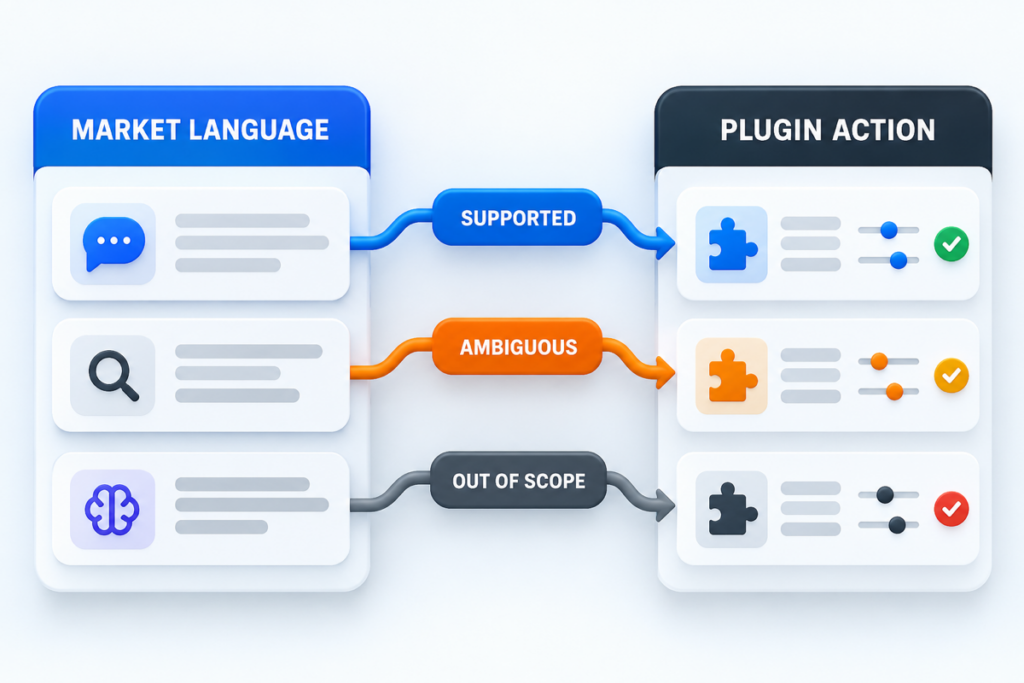
Collect phrases from customer interviews, support tickets, on-site search, sales calls, and public category discussions. Group them by job rather than by isolated word. Then map each group to a supported plugin action. If a high-value request does not map cleanly, decide whether to add a capability, improve the explanation, or explicitly exclude it.
Topify can support the external-discovery side of this work by helping teams monitor how a brand and its competitors appear across AI answer environments. Its Prompt Discovery and AI Citation Analysis pages describe workflows for finding relevant prompts and understanding cited sources. Plugin analytics should remain the source of truth for invocation. The useful connection is between market language outside the plugin and observed behavior inside it.
Run a Controlled 30-Day Optimization Loop
Avoid changing several metadata fields at once. OpenAI recommends iterative testing because a coordinated rewrite makes it difficult to identify which change improved or harmed selection.
In week one, establish baseline results for the golden prompts and confirm that tracking works. In week two, change one high-impact field, such as a tool description, then rerun the same prompts. In week three, evaluate real usage and add newly observed false positives or missed requests. In week four, revise directory copy or default prompts based on the largest verified drop-off.
Keep a change log with the field, previous text, new text, reason, expected effect, and result. This prevents circular edits and gives reviewers evidence that the plugin’s claims match its behavior. It also makes regressions easier to reverse.
Conclusion
ChatGPT plugin directory optimization is not a contest to place the most keywords in a listing. It is the discipline of making one valuable job easy for people to recognize and easy for models to route. Define a focused capability, write explicit metadata, test direct and negative prompts, measure each stage of discovery, and improve one variable at a time. The result is a plugin that is easier to find without appearing in conversations where it does not belong.
FAQ
What is ChatGPT plugin directory optimization?
It is the process of improving a plugin’s positioning, listing, metadata, prompt coverage, onboarding, and measurement so the right users and models can discover and use it.
Do directory keywords guarantee that ChatGPT will use a plugin?
No. Tool selection depends on the request, metadata, available capabilities, permissions, and product behavior. Keywords alone cannot guarantee invocation.
How many prompts should a plugin team test?
Start with 15 to 30 prompts across direct, indirect, and negative cases. Expand the set whenever real usage exposes a new failure pattern.
Should a plugin try to support every related request?
No. A focused plugin usually produces clearer discovery and more reliable actions. Adjacent requests should be added only when the capability can be supported and tested well.