
You spent two weeks writing a detailed guide. You published it, shared it, and waited. Three months later: 12 visits, mostly from yourself. No rankings, no traffic, no idea why.
The article wasn’t bad. The problem was that nobody was searching for it, at least not in the way you wrote it. That’s the core failure of intuition-driven content, and it’s more common than most people admit. Keyword research fixes this by replacing guesswork with data on exactly what your audience is typing, asking, and expecting to find.
Here’s the step-by-step process, including what traditional guides won’t tell you about AI search.
Step 1: Understand What Keyword Research Actually Does
Keyword research is not about finding popular words to stuff into a page. It’s about understanding the exact language your audience uses to describe a problem you can solve.
The most important concept here is search intent, which is the underlying reason behind a query. Search engines now prioritize intent alignment above almost every other ranking signal. There are four types: informational (learning something), navigational (reaching a specific site), commercial (comparing options), and transactional (ready to buy or act). Informational queries account for 52.65% of all searches, while transactional queries sit at just 0.69%.
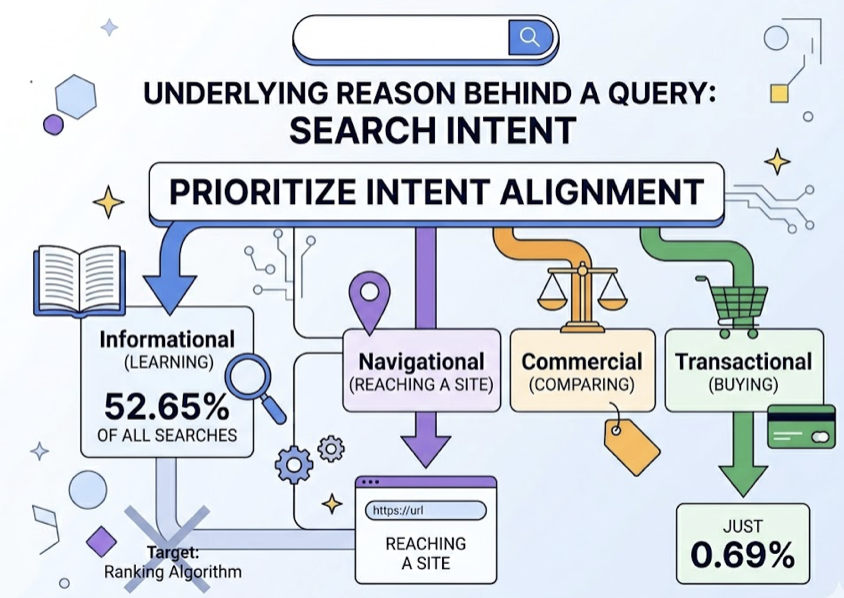
Why does this matter? Because a page that mismatches intent, regardless of how good the content is, will struggle to rank. Pages that mismatch intent see bounce rates exceeding 70%, while intent-aligned content keeps users engaged three to four times longer. Getting this wrong at the research stage means no amount of writing effort will fix it later.
Step 2: Start with Seed Keywords, Then Go Long-Tail
A seed keyword is the core term that describes your product, service, or topic. “Project management,” “vegan recipes,” “SaaS pricing” are all seed keywords. They’re your starting point, not your destination.
From each seed, your job is to expand into long-tail keywords: phrases of three or more words that are more specific and closer to real purchase or action intent. The data on this is compelling. Long-tail keywords account for 70% to 92% of all search traffic, and they convert at a significantly higher rate. A one-word keyword converts at roughly 0.17%. A four-word keyword converts at 1.61%, nearly 10 times higher.
The fourth word in a query is often the “intent modifier”: “best,” “for beginners,” “near me,” “free trial.” That single word transforms a generic browse into a qualified search. New sites especially should focus here. Long-tail terms also move up in rankings an average of 11 positions faster than head keywords.
To expand your seed keywords, use these four methods: competitor gap analysis (what are they ranking for that you’re not?), customer language from reviews and support tickets, Google’s “People Also Ask” boxes, and autocomplete suggestions. These reflect real queries from real users, not assumptions.
The Keyword Research Tools Worth Using
The right tool depends on where you are in your SEO journey. Here’s a practical breakdown:
| Tool | Entry Price | Best For |
|---|---|---|
| Google Keyword Planner | Free | Beginners, PPC validation, Google-native data |
| Ahrefs | $29 (Starter) / $129 (Lite) | Backlink analysis, precise KD scoring |
| Semrush | $139.95/mo | All-in-one marketing teams, AI visibility |
| Ubersuggest | $29/mo | Freelancers, small budgets |
| Topify | $99/mo (Basic) | GEO/AEO: AI prompt discovery, multi-platform AI monitoring |
For most beginners, starting with Google Keyword Planner and one mid-tier tool is enough. What matters more than the tool is how you filter the output.
The KD Filter: Don’t Punch Above Your Weight
Keyword Difficulty (KD) tells you how hard it will be to rank for a given term based on the authority of existing results. For new sites, a practical rule: target KD under 30.
| KD Score | Classification | What to Do |
|---|---|---|
| 0-14 | Very Easy | Prioritize immediately |
| 15-29 | Easy | Primary target for growing sites |
| 30-49 | Possible | Requires quality content and some links |
| 50-69 | Difficult | Needs established domain authority |
| 70+ | Hard/Very Hard | Skip until you’ve built real authority |
Start low, build topical authority, then ladder up. Sites that organize content into topic clusters (one pillar page supported by multiple interconnected cluster pages) have seen traffic growth of up to 1,200% within 12 months. Cluster strategy signals to search engines that you own a topic, not just a page.
Keyword Research in 2026 Goes Beyond Google: Enter GEO
Here’s the thing most beginner guides skip entirely.
Approximately 40% of users now use AI assistants like ChatGPT, Perplexity, and Gemini for discovery queries. That’s a substantial portion of your potential audience that traditional keyword tools can’t see, because AI search doesn’t work on keyword matching. It works on semantic understanding and source authority.
This is the domain of GEO, or Generative Engine Optimization: the practice of optimizing content to be cited and recommended by AI-generated responses.
In traditional SEO, you rank for a keyword. In GEO, you need to become a cited source in a probabilistic synthesis. AI engines use Retrieval-Augmented Generation (RAG) to pull small chunks of content that are mathematically relevant to a query. If your content isn’t structured for chunk-level retrieval, it won’t get pulled, regardless of your backlink count.
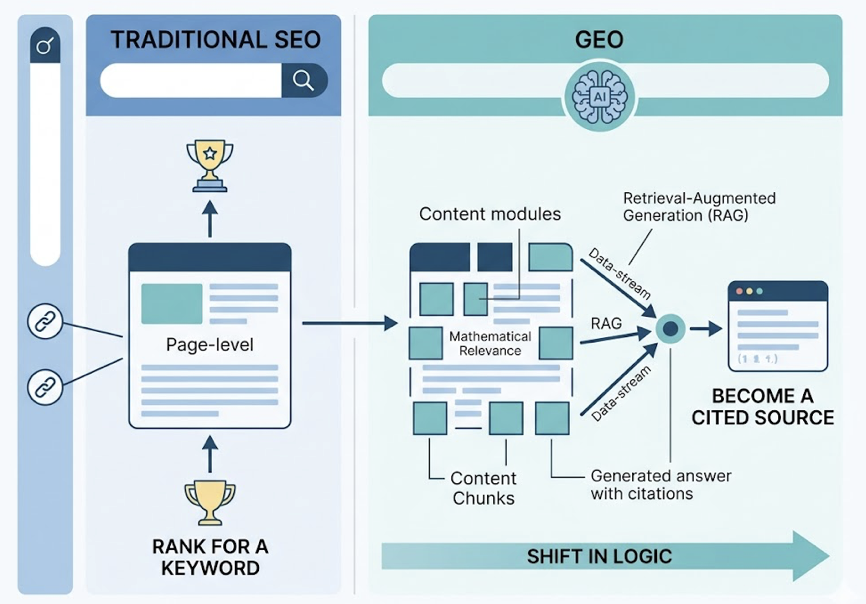
The research on GEO citation signals is specific. For ChatGPT, appearing on authoritative “Best of” lists carries 41% weight in whether a brand gets cited. For Perplexity, that number rises to 64%. This is why “Consensus” (being on the top five lists for your category in Google) has become the new PageRank for AI visibility.
Traditional keyword volume is also being replaced by prompt volume. Users ask ChatGPT full questions that average 23 words, queries that don’t exist in any Google dataset. Topify’s AI Volume Analytics and High-Value Prompt Discovery surfaces exactly these prompts, showing you which conversational queries in your category are driving the most AI responses and where your brand is visible or absent. For marketers trying to extend keyword research into the AI-first era, this is the data gap traditional tools can’t fill.
How to Do AEO: The Layer Most Beginners Miss
AEO, or Answer Engine Optimization, is the practice of optimizing content to appear in zero-click search features: Google’s AI Overviews, Featured Snippets, and voice assistants. It’s distinct from both traditional SEO and GEO, though all three share structural overlap.
The numbers make AEO non-negotiable. Over 60% of US searches in 2024 ended without a click to any website. That’s the majority of queries answered before anyone reaches your page. If you’re not in the answer, you’re invisible.
That said, the quality of traffic from AI answers is notably higher. AI-referred traffic converts at 14.2% compared to 2.8% for traditional search, because the AI has already pre-qualified the user before they click. And being cited in a Google AI Overview results in a 35% higher organic CTR compared to brands on the same page that aren’t cited.
How to Optimize for AEO
Start at the keyword research stage. The keywords best suited for AEO are question-shaped: “What is the best tool for X?”, “How do I do Y?”, “What’s the difference between A and B?” These map directly to how AI Overviews and voice assistants source their answers.
Structural requirements:
- Use H2/H3 headings that mirror actual user questions, not clever internal labels
- Add a direct 40-60 word answer immediately after each question-shaped heading
- Include an FAQ section with real questions your audience asks
- Implement FAQPage and HowTo schema markup so machines can parse your content accurately
Voice search alone is powered by conversational long-tail queries for 82% of queries, and there are now 153.5 million Americans using voice assistants. The language of AEO and the language of long-tail keyword research are, in practice, the same language.
For AEO tools: Semrush’s AI Overview tracker and Ahrefs’ Featured Snippet reports cover the Google side. For tracking which sources AI engines like ChatGPT and Perplexity are actually citing in your category, Topify’s Source Analysis reveals the exact domains AI platforms are pulling from, which is the reverse-engineering step most AEO guides ignore entirely.
5 Keyword Research Mistakes That Kill Your Traffic Before You Start
1. The Volume Trap. Targeting “marketing” because it has 500,000 monthly searches will not help a new site. The intent is too broad, the competition is too high, and the conversion rate is near zero. Specificity is the multiplier.
2. The Prompt Blind Spot. Brands that only do Google keyword research are building visibility for 60% of the search landscape while ignoring the 40% migrating to AI assistants. “AI Share of Voice” is now a measurable metric, and the brands ignoring it are ceding ground quietly.
3. Content Cannibalization. When two pages on your site target the same keyword, they compete against each other. Both rankings suffer. Keyword research needs to account for your existing content map, not just the opportunity in front of you.
4. Over-Optimization. Keyword stuffing still exists, and it still gets penalized. Google’s Helpful Content systems now prioritize demonstrable value over algorithmic manipulation. The goal is to answer the question better than anyone else, not to repeat the keyword more times.
5. Set-and-Forget. AI models update their citation sources. Seasonal trends shift. New competitors enter. Keyword research is a 90-day cycle, not a one-time task. Strategies built on a single research pass tend to plateau within six months.
Conclusion
The gap between “writing content” and “writing content that ranks and gets cited” comes down to one thing: starting with data instead of assumptions.
Keyword research gives you that data for Google. GEO prompt discovery extends it to ChatGPT, Gemini, and Perplexity. AEO optimization ensures you’re capturing zero-click visibility even when users don’t reach your page. These three disciplines now operate as a single system, not separate tracks.
Start with your seed keywords. Validate them against KD and intent. Build topic clusters, not isolated articles. Then extend your research into AI search with tools that show you where your brand exists, or doesn’t, in the answers people are actually getting. Get started with Topify to see where your brand stands across AI platforms today.
FAQ
Q: What’s the difference between SEO, GEO, and AEO?
A: SEO (Search Engine Optimization) targets ranking in Google’s traditional blue-link results. GEO (Generative Engine Optimization) focuses on being cited by AI assistants like ChatGPT and Perplexity in their generated responses. AEO (Answer Engine Optimization) targets zero-click features like Google’s AI Overviews and Featured Snippets. In practice, all three require overlapping content structures, but they each have distinct optimization signals.
Q: How many keywords should a beginner target?
A: Start with three to five long-tail keywords per piece of content. Targeting more than that per page leads to unfocused content that struggles to rank for anything. Build a keyword map across your full site, assigning one primary keyword per page, and expand from there as you build topical authority.
Q: What are the best free keyword research tools?
A: Google Keyword Planner is the most reliable free option, offering direct data from Google’s ad system. Google Search Console (for sites with existing traffic) also shows you what queries are already driving impressions. Ubersuggest has a limited free tier suitable for initial ideation. For AI prompt data, there’s no meaningful free option currently.
Q: How do I find keywords for AI search engines like ChatGPT?
A: Traditional keyword tools don’t cover AI search. The most direct method is to manually test your category’s common questions in ChatGPT and Perplexity and note which brands get cited. For a scalable approach, Topify’s High-Value Prompt Discovery automates this by surfacing the highest-volume AI prompts in your category and showing you where your brand appears or is missing.