

Most developers treat Claude Code like a smarter terminal autocomplete. Type a question, get an answer, copy the code, move on. That works — until you realize you’re still the one jumping between GitHub tabs, Notion docs, and your database client to gather the context Claude actually needs.
That’s the gap MCP closes.
Model Context Protocol (MCP) turns Claude Code from a code generator into something closer to a context-aware agent — one that can pull a PR diff, cross-reference your design spec in Notion, and check live schema before it writes a single line. This guide covers what that actually looks like in practice: the configs that work, the failure modes that don’t, and the workflows worth building.
What MCP Actually Does in Claude Code (Not the Marketing Version)
MCP is an open standard that defines how AI agents communicate with external tools and data sources. The short version: instead of writing API calls itself, Claude sends structured JSON-RPC messages to an MCP server, which handles the actual integration.
Inside Claude Code, the call chain looks like this. You type “check my open PRs.” Claude identifies the relevant tool (list_pull_requests) from the loaded server description, generates a valid JSON parameter set, forwards it to the GitHub MCP server running as a local subprocess, and receives structured data back into its context window. The model then reasons over that data and responds — or kicks off the next tool call.
That architecture solves two real problems: Claude stops being frozen in its training data, and it can access private systems it would otherwise have no visibility into.
When does MCP actually make sense? Here’s the honest version:
| Scenario | Use MCP | Skip MCP |
|---|---|---|
| Frequent cross-tool data reads | ✓ | |
| Complex OAuth-gated cloud services | ✓ | |
One-off simple tasks (git commit) | ✓ | |
| Tools Claude handles well via Bash | ✓ | |
| High-risk write operations without read-only mode | ✓ |
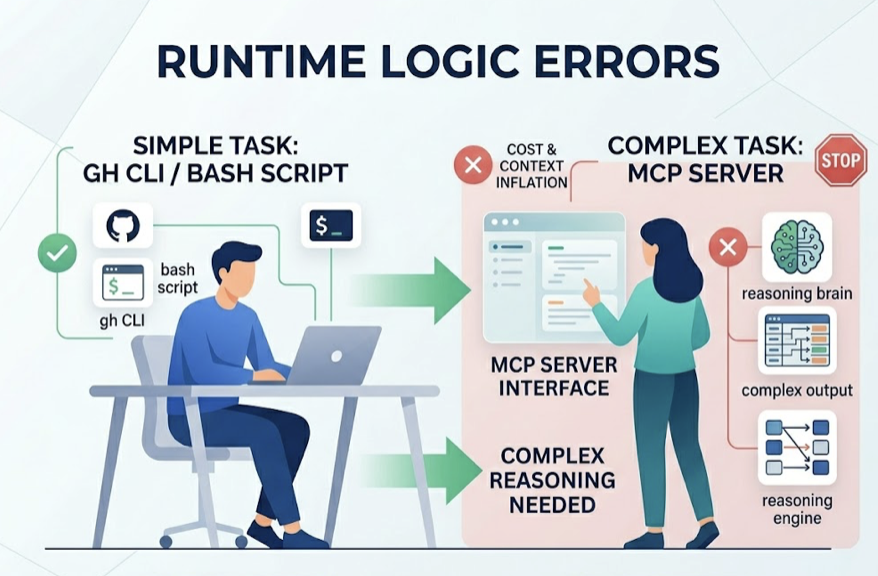
If Claude Code can already handle a task through gh CLI or a quick Bash script, adding a full MCP server just inflates context and costs more tokens. Start with MCP where the tool’s output is complex enough that Claude needs to reason over it, not just pipe it somewhere.
Before You Start: 3 Things Most Setups Get Wrong
90% of MCP configuration failures trace back to the same three issues. Getting these right upfront saves hours of debugging.
1. Version mismatches are silent killers. MCP protocol moves fast. Claude Code versions after 2.1.1 require the add-jsonformat for adding servers — the legacy command syntax fails without a clear error. Node.js versions are another common trap: most MCP servers (Notion included) require Node.js v18 or higher. If your project environment is pinned to v16, you’ll get a “Connection Closed” error that looks like a network issue but isn’t.
Always check node --version and claude --version before touching server configs.
2. Authentication has a strict order. For OAuth-dependent servers like Notion or hosted GitHub integrations, the sequence matters. The common mistake: launching Claude Code first, then trying to fix auth inside the session. That almost never works.
The correct flow: run the server’s auth setup in an external terminal, confirm the access token is stored in your system keyring or config file, then start Claude Code fresh. Re-authentication mid-session typically requires a full restart anyway.
3. Local Stdio vs. remote HTTP is a deliberate choice, not a default.
| Local Stdio | Remote HTTP | |
|---|---|---|
| Performance | No network latency | Network-dependent |
| Security | Stays on your machine | Cloud-routed, OAuth-gated |
| Setup | Requires local runtime (Node/Python) | URL only |
| Best for | Databases, file systems | GitHub, Notion, SaaS tools |
For anything touching sensitive data — database credentials, internal files — local Stdio keeps traffic off the public internet. For cloud-native tools where you’re already authenticated via OAuth, remote HTTP is simpler to maintain.
Integration 1: GitHub — From “Open a PR” to Actually Opening One
The GitHub MCP server (@modelcontextprotocol/server-github) is the most mature integration available. It turns Claude Code into a teammate that can triage issues, review diffs, and surface PR context without you switching tabs.
Which Server to Use
Anthropic deprecated the old npm package format in April 2025. The current recommended approach uses either Docker or the streaming HTTP implementation. For most teams, the project-level .mcp.json config is the cleanest way to share setup across contributors:
{
  "mcpServers": {
    "github": {
      "command": "npx",
      "args": ["-y", "@modelcontextprotocol/server-github"],
      "env": {
        "GITHUB_PERSONAL_ACCESS_TOKEN": "YOUR_TOKEN_HERE"
      }
    }
  }
}
Scope your PAT carefully. Read-only scopes (repo:read, pull_requests:read) are enough for most workflows. Write scopes only when you’ve validated the read-only path works end-to-end.
Prompts That Actually Work
Vague prompts get vague results. These patterns produce reliable output:
PR review with context: “List all PRs merged to main in the last 24 hours that touch the auth module. Check each against the security practices defined in CLAUDE.md and flag anything that doesn’t match.”
Issue triage with code mapping: “Find all open issues tagged bug that mention performance. Read the comments on the top 3, then locate the specific functions in the current codebase most likely responsible.”
What Claude Code Still Can’t Do with GitHub MCP
Image and video attachments in issues and PRs are invisible to the model. It can’t process UI screenshots or design mockups attached to tickets.
It also can’t operate as a GitHub App or Bot identity — all actions run as the user associated with the PAT. And on large monorepos, get_repository_structure will hit context limits fast. Pair it with a purpose-built code indexing tool if you’re working in a repo with tens of thousands of files.
Integration 2: Notion — Turning Your Docs Into a Queryable Knowledge Base
The typical developer workflow has a painful gap: your PRD lives in Notion, your code lives in the editor, and you’re constantly translating between them. Notion MCP closes that gap by letting Claude query your docs in context.
Setting Up the Notion MCP Server
Notion’s official hosted server (https://mcp.notion.com/mcp) is the current recommended path. It supports standard OAuth 2.0, which means setup is a guided browser flow rather than manual token management:
claude mcp add --transport http notion https://mcp.notion.com/mcp
This triggers a web authorization prompt. One common failure: “Audience mismatch” errors. They usually mean the OAuth callback URL in your Notion developer console doesn’t match what the server expects. Fix it in the Notion developer settings before retrying.
Internal Token vs. OAuth: Which to Use
| Internal Integration Token | Hosted OAuth | |
|---|---|---|
| Best for | Solo devs, automation scripts | Teams, enterprise |
| Setup | Manual (add connection per page) | One-time browser flow |
| Maintenance | Requires page-level permission grants | Auto-scoped to workspace |
| Reliability | Depends on community server upkeep | Notion-maintained |
For individuals running local automation, the internal token approach is faster to set up. For teams where multiple developers need the same Notion context, hosted OAuth is worth the extra setup time.
Workflows That Pay Off
Syncing action items to GitHub: “Read today’s 3pm meeting notes in Notion. Pull every action item related to database-migration and create a separate GitHub issue for each.”
In-context doc search during refactors: Instead of opening a browser, ask Claude to search your internal Wiki for specific API authentication logic. It pulls the relevant section, reads it, and applies it directly to the code you’re working on — no copy-paste needed.
The Latency Problem
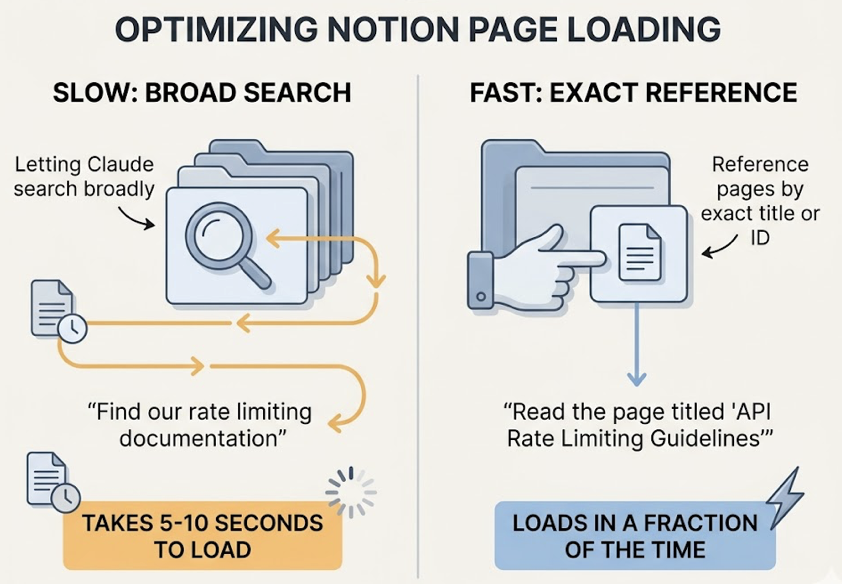
Notion’s API rate limits and nested document structure mean large pages can take 5 to 10 seconds to load. The fix is simple: reference pages by exact title or ID rather than letting Claude search broadly. “Read the page titled ‘API Rate Limiting Guidelines'” loads in a fraction of the time “find our rate limiting documentation” takes.
Integration 3: Databases — Reading Live Schema Without the Guesswork
Database MCP servers give Claude a real-time view of your system state. Instead of inferring schema from context or making assumptions about table structure, it can query directly.
Picking the Right Server
| Server | Strengths | Coverage | Safety |
|---|---|---|---|
mcp-postgres-readonly | Maximum safety, zero write risk | PostgreSQL | Forces READ ONLY transaction on every query |
| Supabase MCP | Full-stack access (Auth, Storage, Edge Functions) | Supabase | Configurable; supports OAuth |
| DBeaver MCP | Reuses existing connection configs | Postgres, SQLite, MySQL, SQL Server | Centralized, includes EXPLAIN support |
| Neon MCP | Branch management for testing migrations | Neon Serverless Postgres | Can isolate writes to temp branches |
Default to Read-Only. Always.
The risk isn’t theoretical. A model working with write permissions can generate and execute a DROP or TRUNCATEstatement from an ambiguous prompt — “reset the test environment” is the classic example. Even experienced developers have triggered this.
Two-layer protection is the right approach. At the database level, create a dedicated mcp_reader role with SELECT-only grants. At the protocol level, use a server like mcp-postgres-readonly that wraps every query block in BEGIN TRANSACTION READ ONLY. Belt and suspenders.
Schema Hallucination and How to Stop It
Even with MCP access, the model can hallucinate column names on complex joins or nested JSONB fields. The fix is sequencing: before running any query, ask Claude to call list_tables and get_table_schema explicitly. It takes one extra round-trip, but it eliminates the guessing.
For production databases, use a dedicated read replica rather than pointing MCP at your primary. Latency from analytical queries adds up.
Chaining Integrations: One Prompt, Three Tools
MCP’s real leverage shows up when you connect multiple servers in a single reasoning chain. Here’s a workflow that actually runs:
“Read the transcript from YouTube video ID xyz. Rewrite it as a technical blog post following the style guide in our Notion workspace. Save the draft to the ‘Ready to Publish’ Notion database, then create a new Git branch and upload the image assets to /public/assets.”
Claude Code executes this in sequence: reads the transcript (external tool), searches and retrieves the Notion style guide (Notion MCP), saves the draft (Notion MCP write), then handles the branch and file operations via local Bash.
When Chaining Breaks
Context window saturation. Each tool’s output eats tokens. On long chains, you’ll hit limits before the task completes. Use /compact mid-task if it’s available, or start a fresh session with only the relevant state carried forward.
Error propagation. If the database query in step one returns bad data, every downstream action — the Notion write, the GitHub issue — runs on a flawed premise. Build checkpoint prompts into complex chains: “Before writing to Notion, confirm the data from the database query looks correct.”
Debugging tool state. The /tools command shows every currently loaded MCP tool and its status. When a server goes silent, that’s your first check. For deeper inspection, /debug opens real-time logs that show exactly where a parameter generation went wrong.
Conclusion
MCP doesn’t make Claude Code magic. What it does is measurable: it eliminates the context-switching tax that slows down every cross-tool workflow.
The practical path forward is incremental. Start with read-only GitHub queries — it’s low-risk and high-payoff. Add Notion search for document-heavy workflows. Connect your database in read-only mode once you’ve seen how the model reasons over live schema. Document the tool preferences and constraints in your CLAUDE.md file so Claude knows which servers to reach for and which parameters you care about.
Write permissions come last, after you trust the model’s behavior in your specific stack.
That’s the real upgrade: not a smarter chatbot, but an agent that knows your codebase, your docs, and your data well enough to act on them.
FAQ
Does Claude Code MCP work with the Claude.ai web interface?
No. Claude.ai has its own “Connectors” feature, but it’s separate from Claude Code’s MCP. Claude Code’s MCP is designed for CLI environments and supports deeper integrations — direct file system access, local database connections — that the web interface doesn’t expose.
Can I build a custom MCP server for internal tools?
Yes. Anthropic provides TypeScript and Python SDKs for building MCP servers. If your internal tool exposes an API, wrapping it as an MCP server is typically a few hundred lines of code. Make sure your server handles either stdio or HTTP transport depending on how Claude Code will connect.
Is MCP integration available on all Claude Code plans?
The MCP protocol itself is open. But heavy tool usage — frequent multi-step chains with large context outputs — consumes tokens faster than standard coding sessions. Pro or Max plans are typically needed for production-scale integration workflows.
How do I debug a broken MCP connection?
Run claude mcp list to check server status. Check logs at ~/Library/Logs/Claude/on macOS or %APPDATA%\Claude\logs\ on Windows. Use /tools inside a session to confirm the server’s tools are visible to the model. If the server shows as connected but tools aren’t appearing, a full Claude Code restart usually resolves it.